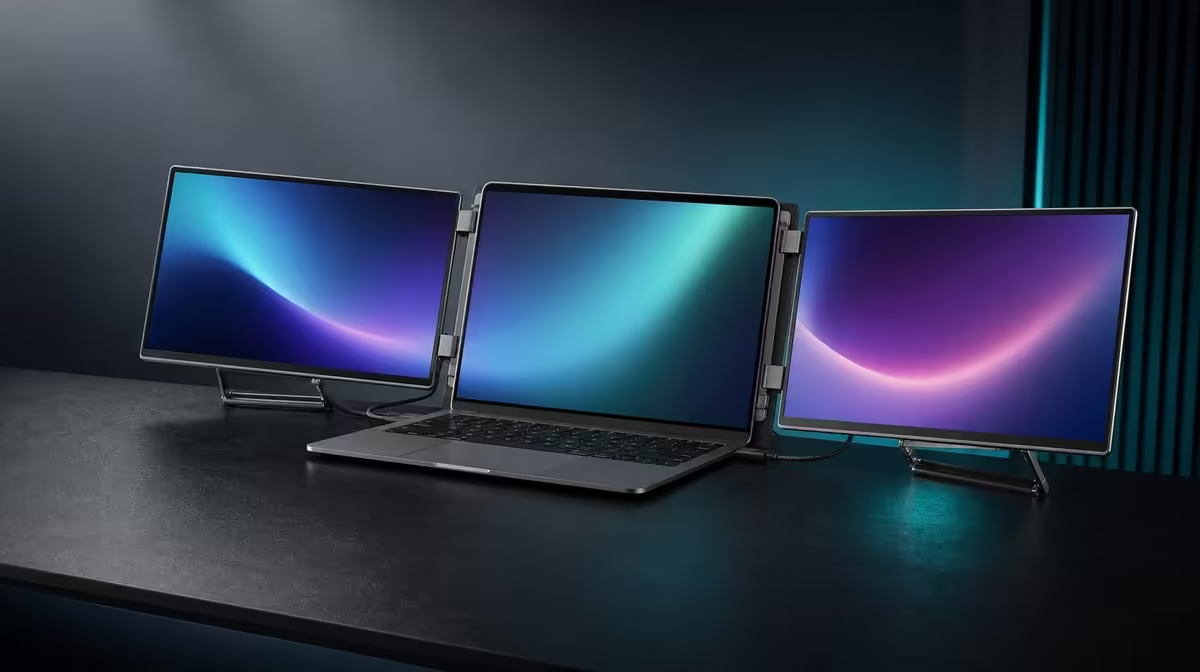
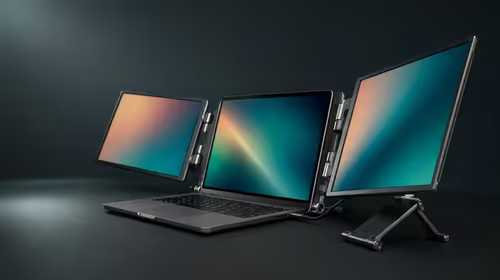
Cost is only one part of a dual-monitor decision; the complete test asks what work becomes easier, whether the laptop can drive the setup and how often the folding system travels. To decide whether a dual 15.6-inch Full HD monitor is worth the cost, use the R4,299 UPERFECT Delta as a measurable workstation rather than an abstract list of features.
Quick Answer
The R4,299 Delta is worth its cost when both independent 15.6-inch 1920 x 1080 IPS panels have regular jobs, the laptop supports the intended connection and the built-in stand and fold reduce travel friction. It is a weaker fit when the second screen remains unused, the host path is unsuitable or the primary workload demands speed-focused motion beyond its 25ms response.
🧮 Define "worth" as a repeated outcome
Write down the task that motivates the purchase. A broad statement such as "more productivity" is hard to test. A specific result such as keeping a report beside its source, a timeline beside files or a model beside properties can be observed.
Assign those views to the two Delta screens. The panels are independent, so extension lets them show different windows. Mirroring repeats the same image and has value for presentation, but it does not produce the same multitasking benefit.
Keep the laptop display in the diagram. It may carry communication or another supporting tool, and its hardware still renders the complete desktop. Two external screens expand visible area; they do not upgrade the notebook's processor, graphics or memory.
Measure a representative session. Count window switches, interruptions and the time needed to find supporting information. Repeat with the earlier laptop-only method if the gain remains unclear.
After defining the outcome, compare complete mobile packages through Evetech's portable display range.
🖥️ Test the Full HD work areas
Each panel has a native resolution of 1920 x 1080. Set both to that baseline, start with matching operating-system scale and read the actual documents or interfaces at the normal distance.
Do not judge value by the number of tiny windows that can be forced onto the desktop. Text, controls and tables must remain comfortable. Adjust application zoom selectively after the common scale is stable.
Arrange the screen rectangles to match the physical Delta panels and laptop. Move a simple window across every boundary, then open the normal workload.
Observe source performance. A laptop driving more visible content can become busy, particularly with several moving applications. Close unrelated tasks and separate notebook load from display response.
The Delta's 25ms characteristic points it toward documents, business, CAD support, editing tools and general multitasking rather than speed-sensitive competitive play. If rapid motion is the main reason for buying, a different priority may be worth more.
🔌 Make compatibility pass before cost
The neat one-cable arrangement depends on a compatible host. The selected USB-C laptop port must operate both external screens and supply the power route they need. Connector shape does not establish that function.
Check the exact computer model and exact port. Once approved, open the Delta on its integrated stand, connect and detect both panels. Test extension, sleep, wake and a full reconnection.
If one screen appears, do not assume settings will create the missing route. Return to the known port, remove optional peripherals and change one variable at a time.
The independent displays can also accept two compatible source devices, one per panel. This can add value when simultaneous systems matter, but it brings separate leads and input-control needs. Score it only when the workflow uses it.
A cable should stay relaxed and clear of the 360-degree hinge. A convenient electronic path loses value when its physical routing destabilises the monitor.
🎒 Count stand and folding value honestly
The built-in stand removes a separate basic support accessory from the setup. Place it on the main desk and a smaller travel surface, then check that the laptop remains comfortable to use.
Use the hinge positions that keep both panels readable and stable. The 360-degree range allows folding and flexible orientation, but not every point has to suit the workstation.
Before packing, close work and disconnect all cables. Test the unit with the laptop, charger and leads in the intended backpack.
Protect both display faces from hard plugs and ensure the compartment closes normally. Carry the complete load, unpack and rebuild on another table.
Time the second cycle. Folding value is the ability to preserve a useful two-screen routine across locations without carrying separate stands or building a fixed desk at each one.
For a workstation that stays open permanently, compare the Evetech PC monitor category. A fixed setup can be the more relevant cost comparison.
Make the R4,299 verdict
Create five checks: task benefit, readable space, host compatibility, surface stability and travel use. Mark critical failures before calculating overall value.
Weight the passes by frequency. Independent work areas used every day matter more than occasional dual-device operation. Folding used for four weekly journeys matters more than a feature that remains unused on a permanent desk.
Keep trade-offs visible. The 25ms response can be acceptable for productivity while remaining unsuitable for a speed-first buyer. The bag can fit while the laptop port fails. A useful decision does not allow one attractive feature to hide another critical mismatch.
Compare a dearer model by the exact requirement it improves. Compare a cheaper alternative as a complete usable system, including support and the number of work areas. Do not award points for imagined prices or capabilities.
If the Delta passes the five checks, R4,299 buys a cohesive dual-screen workstation. If it fails a critical one, not buying it is the better value choice.
Check current availability with Evetech and consult the monitor best-seller page for wider context after reaching the verdict.
Add a final stress test using the busiest normal hour rather than an empty desktop. Keep the required reference visible, move between the primary applications and observe whether the laptop remains responsive. Then disconnect, pack and rebuild without consulting a long troubleshooting sequence. If the two panels deliver useful space under that ordinary pressure, the cost case is stronger than any short demonstration.
Revisit the verdict after several journeys. Note whether the built-in stand replaced separate equipment, whether the bag remained comfortable and whether screen roles restored quickly. These repeated outcomes turn the R4,299 comparison into evidence rather than enthusiasm for a new device.
Frequently Asked Questions
What makes the two panels valuable?
They can keep separate applications or references visible during a repeated task.
Which resolution should be tested?
Use the native 1920 x 1080 resolution on both 15.6-inch screens.
Why is laptop compatibility critical?
One-cable operation needs the exact USB-C host to output both pictures and fulfil the monitor's power requirement.
Does the monitor include a stand?
Yes. Support is integrated into the folding body.
Can the screens show separate devices?
Yes. Each independent panel can receive a compatible source.
Does 25ms fit competitive gaming?
It is not a speed-focused response; the stronger case is productivity and creative support.
How should travel value be tested?
Pack the complete workstation in the intended bag and rebuild it on another realistic surface.
What is the complete cost?
The UPERFECT Delta is priced at R4,299.
Ready to decide whether two Full HD screens earn their place in the budget?
Explore Evetech monitors and give the Delta a pass or fail on work, host fit, support and real travel.