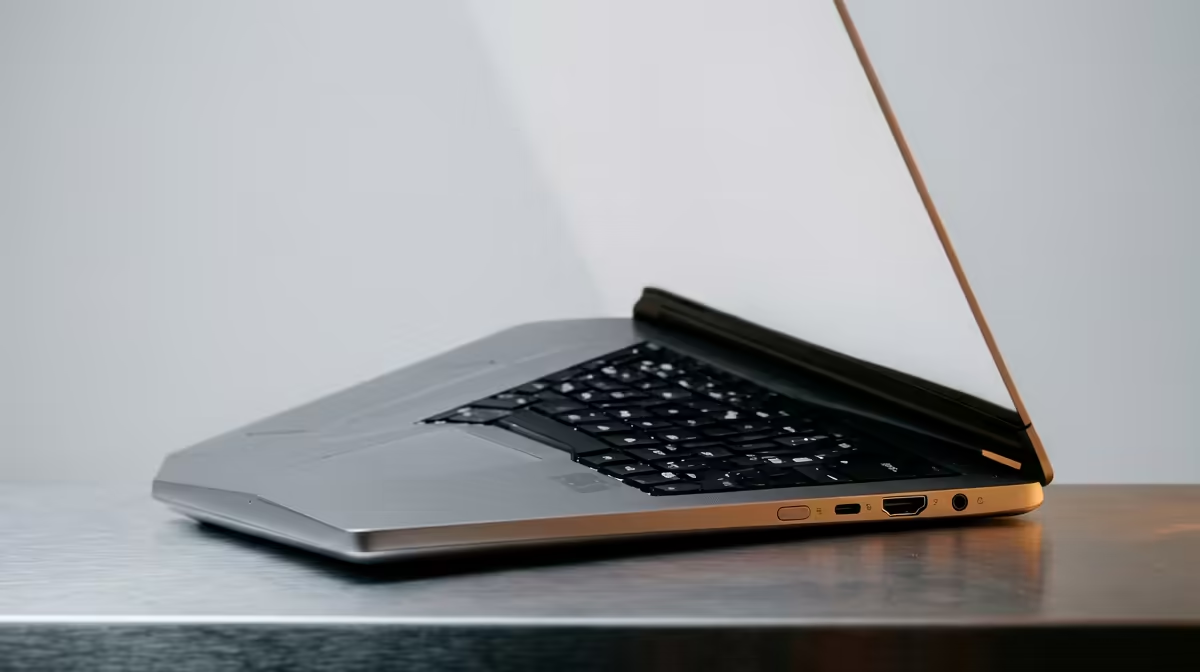
Ever walked into a Cape Town boardroom, ready to present, only to find your laptop has the wrong port for the projector? We’ve all been there… the frantic search for a dongle, the awkward delay. In today's fast-paced professional world, the connections on your device are just as crucial as its processor. This guide demystifies the world of corporate laptop ports, helping you choose a machine that works for you, not against you. 🚀
Understanding the Key Corporate Laptop Ports
Choosing a new work laptop can be overwhelming. You're comparing RAM, storage, and screen size, but what about the physical connections? A good selection of corporate laptop ports can be the difference between a seamless workflow and a bag full of adapters. Let's break down the essentials you'll find on modern business machines.
USB-C and Thunderbolt™: The All-in-One Powerhouse
This is the modern king of connectivity. The small, reversible USB-C port can handle data transfer, video output, and even charge your laptop… all through a single cable. But not all USB-C ports are created equal.
- USB-C: A standard port that offers fast data speeds (from 5Gbps to 20Gbps).
- Thunderbolt™ (3 or 4): A supercharged version of USB-C developed by Intel. It offers blazing-fast speeds (40Gbps), can drive multiple 4K displays, and connects to high-performance accessories like external GPUs. This is the gold standard for power users, and you'll find it on many powerful Intel laptops.
USB-A: The Old Faithful
Don't discount this classic rectangular port. It’s still the most common connector for your mouse, keyboard, external hard drives, and USB sticks. While newer devices are phasing it out, having at least one USB-A port saves you from needing an adapter for your existing peripherals. It's a must-have for practical, everyday use.
HDMI: The Boardroom Standard
When it comes to connecting to TVs, monitors, and projectors, HDMI is the universal language. A full-size HDMI port means you can plug directly into almost any display without a fuss. For professionals who present regularly, this is a non-negotiable feature in their choice of business laptop ports.
Ethernet (RJ45): For Rock-Solid Stability 🔧
Wi-Fi is great, but for critical updates, large file transfers, or just an unstable connection at the office, nothing beats a wired Ethernet port. It provides a faster, more secure, and more reliable internet connection. Many slim ultrabooks omit this port, but it's a vital feature for office-based professionals and anyone who values stability over convenience.
Matching Laptop Ports to Your Workflow
The ideal set of corporate laptop ports depends entirely on how you work. There’s no single "best" configuration. Instead of just looking for the laptop with the most ports, think about which ones you'll actually use day-to-day.
The Mobile Professional & Hot-Desker
If you're constantly moving between home, the office, and client meetings, your priority is portability. A laptop with one or two Thunderbolt™ 4 ports is your best friend. It allows you to connect to a single-cable docking station at your desk that handles power, multiple monitors, and all your peripherals. When it's time to go, you just unplug one cable.
The Creative & Content Creator
Video editors, photographers, and designers need speed and versatility. A mix of ports is crucial. Look for multiple high-speed USB-C/Thunderbolt ports for fast external SSDs, a full-size SD card reader for pulling footage from a camera, and an HDMI 2.1 port for connecting to a high-resolution, colour-accurate monitor. These demanding workflows often benefit from the multi-core muscle found in modern laptops powered by AMD.
Docking Station Pro Tip ⚡
A good Thunderbolt or USB-C docking station can transform your portable laptop into a full desktop powerhouse. Look for one with Power Delivery (PD) of at least 65W to charge your laptop, multiple display outputs (HDMI DisplayPort), and a healthy selection of USB-A ports for your legacy devices. It's a one-time purchase that declutters your desk for years.
Taming the Dongle: Docks vs. Hubs
As laptops get thinner and lighter, they often sacrifice ports. This has led to the "dongle life"—carrying a pouch of adapters for every possible situation. While sometimes unavoidable, you can manage the chaos by choosing the right accessory. This trend isn't just for ultrabooks; you'll see streamlined port selections on everything from budget workhorses to machines found in the best gaming laptop deals.
- Hubs: These are small, portable adapters that typically plug into a USB-C port and offer a few extra connections, like USB-A, HDMI, and an SD card reader. They are great for travel.
- Docks: These are larger, stationary units that offer a much wider array of ports and often have their own power supply. A dock is designed to stay on your desk, allowing you to connect everything with a single cable to your laptop.
Choosing between them depends on your needs. For a permanent desk setup, invest in a dock. For on-the-go connectivity, a compact hub is perfect.
Understanding the landscape of corporate laptop ports is no longer just for the IT department. It's a core part of making an informed purchase that will boost your productivity and reduce daily friction. By matching your laptop's connectivity to your specific workflow, you can ensure your tech setup is a powerful asset, not a frustrating bottleneck. ✨
Ready to Plug and Play?
Don't let dongles dictate your day. Understanding corporate laptop ports is the first step to a seamless workflow. The next is finding a machine with the right connections for your needs. Explore our massive range of laptop specials and find the perfect device to power your productivity.