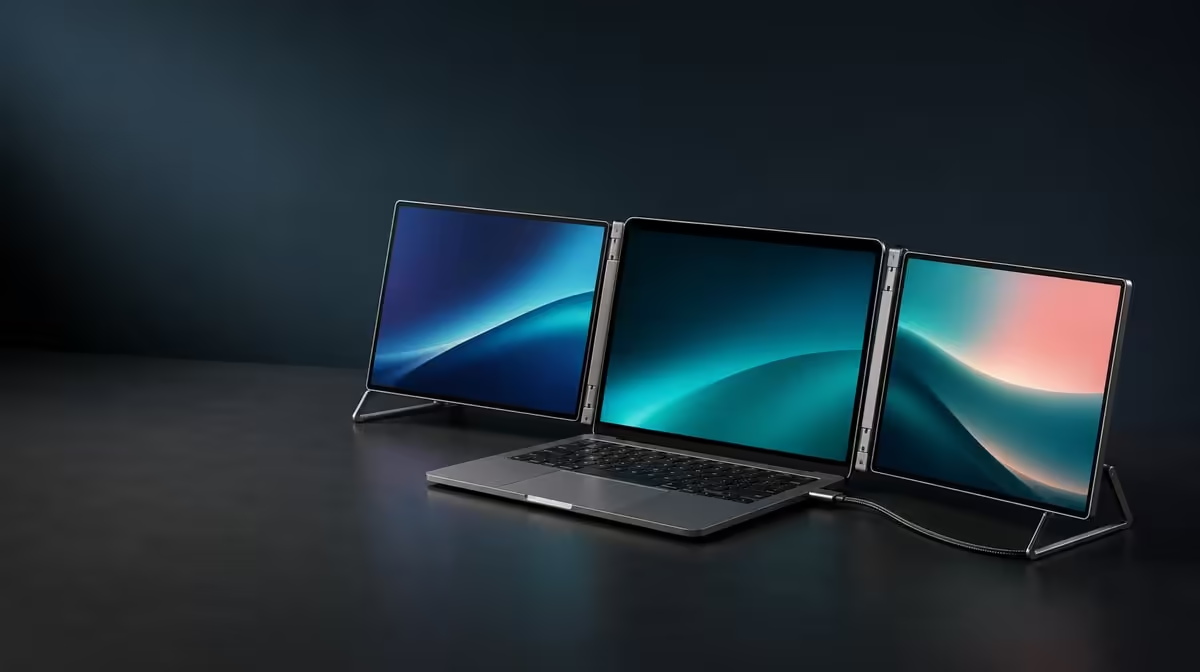
Spending on a portable monitor should begin with the work it enables and the host path that makes the advertised convenience usable. To decide how much to spend on a dual portable monitor in South Africa, price the complete screen system, then test independent workspace, laptop compatibility, support and travel frequency. The UPERFECT Delta provides a R4,299 reference with two Full HD panels.
Quick Answer
Use R4,299 as the Delta's complete decision price: it includes two independent 15.6-inch IPS screens, integrated support and a chassis that folds through 360 degrees. Spend that amount when the laptop can support the intended path and the second work area improves repeated tasks. Spend more only for a confirmed requirement the Delta does not meet, not for an undefined idea of premium.
💵 Start with a complete price, not imagined parts
The Delta is one folding product. Its R4,299 price includes the paired panels and integrated support; there is no reason to invent a separate cost for the second screen, hinge or stand when evaluating this package.
Write the price at the top of a decision sheet and place the required outcome beneath it. Examples include keeping source material visible while writing, separating an edit timeline from files, viewing CAD tools beside a model or preserving a familiar layout on travel days.
Count the laptop companion as part of the workstation. It can remain a third visible area, but it also supplies the processing and connection capability. A monitor budget cannot solve an unsuitable host port or a notebook that struggles with the intended workload.
Avoid setting a higher spending ceiling before the job is defined. A larger amount should buy a specific improvement in compatibility, display behaviour, physical fit or another confirmed need. Price alone is not evidence that the result will be better.
Use Evetech's portable monitor category to compare current options once the complete need is clear.
🖥️ Put a Rand value on independent screen area
Each Delta panel is a 15.6-inch IPS display with native 1920 x 1080 resolution. In extended mode, separate applications or windows can remain visible on each. Mirroring repeats an image and represents a different use.
Measure a representative task. Complete part of a report, project, model or edit with the planned two-panel layout. Note window switching, interruptions and whether the visible reference prevents mistakes or delays. Repeat with the laptop-only routine if the benefit is uncertain.
Readability matters. Start both external panels with matching scale at native Full HD and test text at the normal distance. More visible windows do not deliver more value when labels and controls become uncomfortable to read.
The second screen does not have to be permanently busy. It can hold a stable reference, communication or tool panel that becomes useful at specific points in the workflow. Value can come from availability, provided it reduces a real interruption.
The stated 25ms response is a trade-off. It makes the Delta a productivity-led choice rather than a speed-focused gaming display. A buyer whose budget is driven mainly by competitive motion should compare products around that priority.
🔌 Remove incompatible convenience from the budget
One-cable operation can shorten setup and reduce wiring, but only when the exact USB-C host can drive the screen pair while meeting its power needs. A matching connector shape does not approve the laptop.
Confirm the model and port before assigning value to this feature. Open the Delta on its stand, connect to the known socket and test both displays at native resolution. Include sleep, wake and a full reconnection.
If the path is unsuitable, do not pretend the one-cable benefit remains part of the same calculation. Compare another compatible route or monitor choice with the actual equipment required.
The independent panels can also show two separate compatible devices, one per screen. This capability can be valuable for mixed-source work, but only if that workflow occurs. Another device also adds its own power, input and travel requirements.
Keep the cable arrangement physically sensible. Leads should remain relaxed and outside the folding hinge so connection flexibility does not undermine stand stability.
🎒 Price portability by the number of journeys
Integrated support keeps a loose stand out of the kit, while the 360-degree body closes for transport. These features deliver the most value when the user regularly moves between home, office, client or study locations.
Test the monitor on typical surfaces. Check that the stand remains planted, the laptop keyboard stays accessible and the viewing angle is readable. A spacious main desk is not enough if travel usually ends at a narrow table.
Put the closed Delta, laptop, chargers and cables in the intended bag. Protect the panel faces from hard plugs and ensure the compartment closes without force.
Time the pack and rebuild cycle. Multiply the usefulness by realistic travel frequency, not by the number of possible locations. A person moving daily may place more Rand value on the folding system than someone who leaves it open for months.
For a fixed workstation, compare the Evetech PC monitor range. Portability should not dominate a budget when it remains unused.
Create a spending rule
Build five rows: task benefit, host compatibility, readable display area, physical setup and travel use. Give each a pass or fail, then note how often the benefit occurs.
The R4,299 Delta is a sensible spend only when critical rows pass. Strong screen value cannot rescue a failed host path, and perfect bag fit cannot rescue a display response that conflicts with the primary workload.
When comparing a dearer model, make it identify the row it improves. Write the exact requirement and verify that the alternative meets it. If the higher price simply repeats jobs the Delta already completes, the extra spend lacks a reason.
There is also no need to use the entire budget. Money can remain unspent when the R4,299 system passes the required workflow. Conversely, the lower price should not force a purchase when compatibility or use remains weak.
Once the spending rule is complete, confirm the current Evetech listing and visit its best-selling monitor selection for wider context.
Frequently Asked Questions
What is the Delta's complete price?
The dual portable monitor costs R4,299.
What is included in that decision?
It includes two Full HD IPS panels, independent operation, the folding body and built-in stand.
How should screen value be measured?
Run a representative task and track reduced switching, preserved references and the usefulness of separate work areas.
When does one-cable use count?
Only after the selected laptop USB-C port is confirmed to deliver both pictures and the necessary power route.
Can separate-source support add value?
Yes, when simultaneous compatible devices solve a real workflow; otherwise it may remain unused.
How should travel value be calculated?
Test the complete bag and rebuild cycle, then weight it by the number of journeys that actually occur.
When is spending more justified?
When another monitor solves a specific confirmed requirement that the Delta cannot meet.
Is the Delta designed for speed-first gaming?
No. Its 25ms response makes productivity the stronger budget case.
Ready to make R4,299 answer to measurable work instead of a vague spending ceiling?
Compare Evetech monitors and score the Delta on tasks, host fit, setup and real travel frequency.