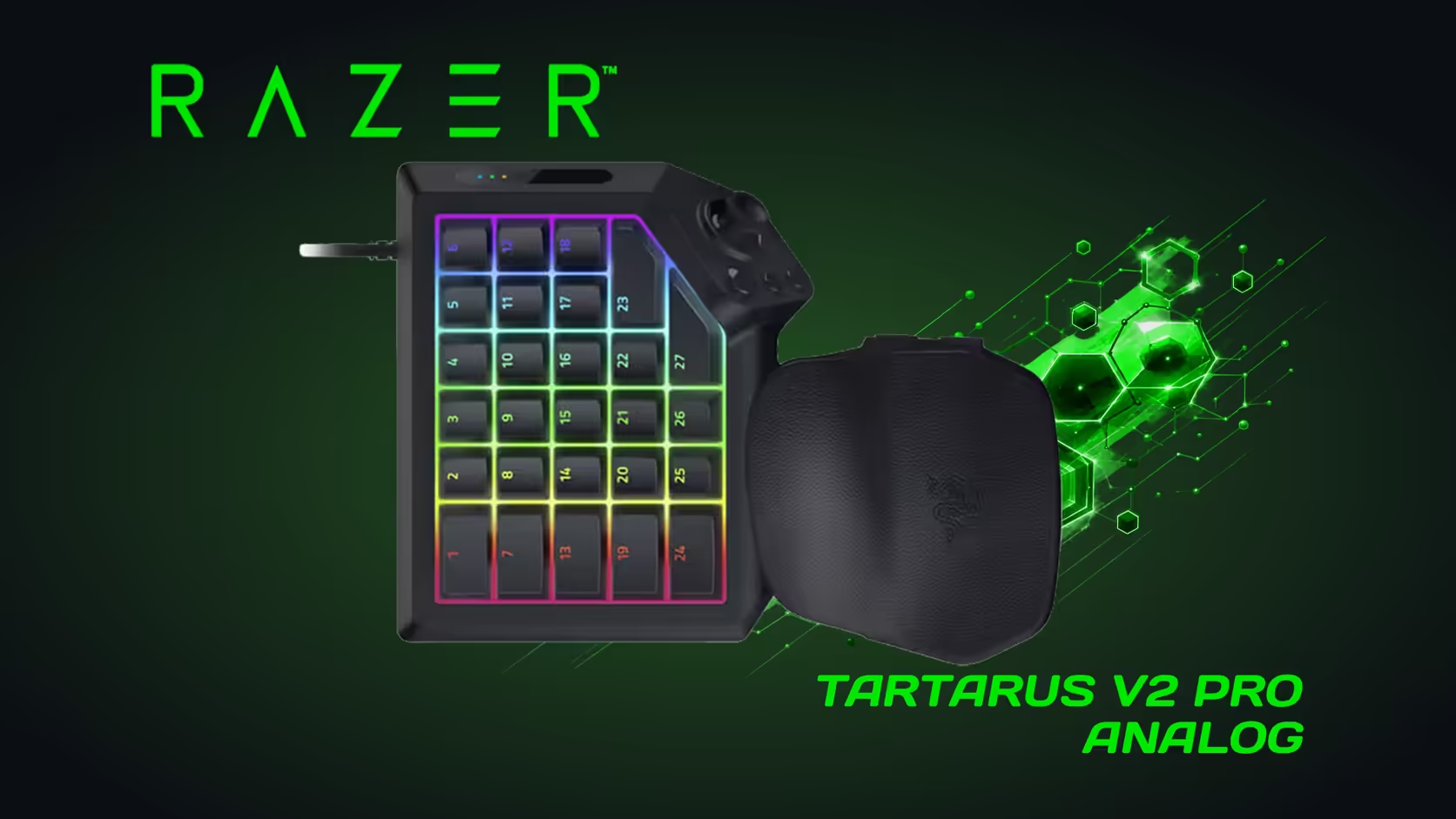
The Tartarus V2 Pro brings three features that change how a keypad plays: analog optical switches, Rapid Trigger and a TMR thumbstick. Each one has its own job, and together they decide how the keypad fits your games and your desk. This explainer covers the three features in plain terms, what each one changes in a session and what it asks of your setup, so you can judge the keypad as a whole.
Quick Answer
The Tartarus V2 Pro pairs analog optical switches with Rapid Trigger and a TMR thumbstick. Gen-2 switches set actuation from 0.1mm to 4.0mm, and Rapid Trigger speeds up repeated presses. All of that sits on a keypad with 31 programmable controls, priced at R4,799.
🔦 Analog optical switches: the depth you choose
The switches are the foundation. Analog optical switches read how far each key has moved, so the keypad can fire at a depth you pick and change it from game to game. The range is 0.1mm to 4.0mm, which means a key can sit near the surface for a light, fast action or deep for a guarded one. Most players set their fastest keys shallow and their most-bumped keys deeper.
The practical result is that one depth no longer has to serve the whole keypad. A shallow key fires after a fraction of a millimetre, and a deep key ignores a brush. Set a starting point of 2.0mm on every key, then move keys in 0.5mm steps until each one behaves the way your hand expects.
⚡ Rapid Trigger: the reset that comes early
Rapid Trigger changes when a key is ready to fire again. Instead of waiting for the key to climb back to a fixed reset point, the keypad re-arms the key after a small lift from its lowest point, such as 0.3mm in a typical example. A repeated key then fires again sooner, which is what makes strafing and repeated abilities feel smoother.
Rapid Trigger sits best on the keys your hand repeats. A key you press once per cooldown gains nothing from an early re-arm, so keep the feature on the keys that fire in quick succession. Test it on a single key first, then add it to others as the habit forms.
🕹️ The TMR thumbstick: a thumb control that resists drift
The thumbstick is full-sized and uses TMR sensing, a magnetic method that reads the stick's position without relying on worn contact pads. Three dedicated buttons sit beside it, so the thumb has its own control set. The stick is a useful tool if you move the thumb for movement or menus, and a spare control if you do not.
Set the stick's position with your wrist rest first. The thumb should reach the stick without lifting the hand, and the three buttons should fall under the thumb without a stretch. Recheck after 20 minutes of play, since fatigue is when a thumb drifts from its best position.
🧭 What the three features ask of your setup
The three features ask for a little planning. The analog switches reward a depth test on each key, the Rapid Trigger reward a clear list of repeated keys, and the thumbstick rewards a wrist rest set to the right height. None of them is complicated, but each one works better when you set it on purpose rather than leaving the defaults.
They also ask for a steady desk. A keypad that slides under the palm changes which keys the hand touches, and that undoes the depth settings you chose. A desk mat under the keypad keeps the setup still, and our gaming setups range shows how the pieces usually sit together on a desk. For the keypad itself, the gaming keyboards range lists the models on offer.
🧰 What to check before you buy the package
Read the four features as one package and test each one against your own games. Analog switches and Rapid Trigger change how keys feel. The thumbstick and the 31 controls change what the keypad can hold. Put each one in a sentence of its own, then check which sentence your games need most. A keypad that earns its price on two of the four is still a good buy if those two are the ones you use every day.
Test the package in a short routine. Set 6 keys to adjustable depths, bind Rapid Trigger to 2 repeating keys, map 3 thumb actions to the stick, and fill 16 controls with the actions you press most. Play one session of 30 minutes and note what worked. If the routine feels natural by the end of the session, the package fits the way you play. If it feels crowded, drop the least-used item and try again the next day.
📏 Measure the footprint before the features
A feature list means nothing if the keypad will not fit the desk. Measure the strip beside the keyboard in centimetres, then compare it with the space you need for the wrist rest and the mouse. Check the reach to the outer keys with your hand resting. A keypad that fits only when the mouse moves to the centre of the desk is a keypad that will cost you aim.
Write the depth and the width in centimetres on a card, and keep it beside the keypad box while you shop. A 30-second check against the card is faster than rearranging the desk twice, and it keeps the desk plan honest.
Frequently Asked Questions
Do I need all three features to benefit?
No. Each one works on its own. Many players start with the analog depth alone and add Rapid Trigger once they know which keys repeat.
Which feature should I learn first?
The analog depth. Set each key to 2.0mm, then tune by 0.5mm steps. It changes the feel of every press, and it is the foundation for the other two.
Does the thumbstick suit every game?
It suits games that use a stick for movement or menus. If your game is driven entirely by the mouse and the keyboard, the stick may sit idle.
How much does the keypad cost?
R4,799 at Evetech. That price covers the analog switches, Rapid Trigger, the thumbstick and the 31 programmable controls together.
Want the three features in one keypad?
Compare the Tartarus V2 Pro against other keypads in the gaming keyboard range, and test the features on your own games before you commit.