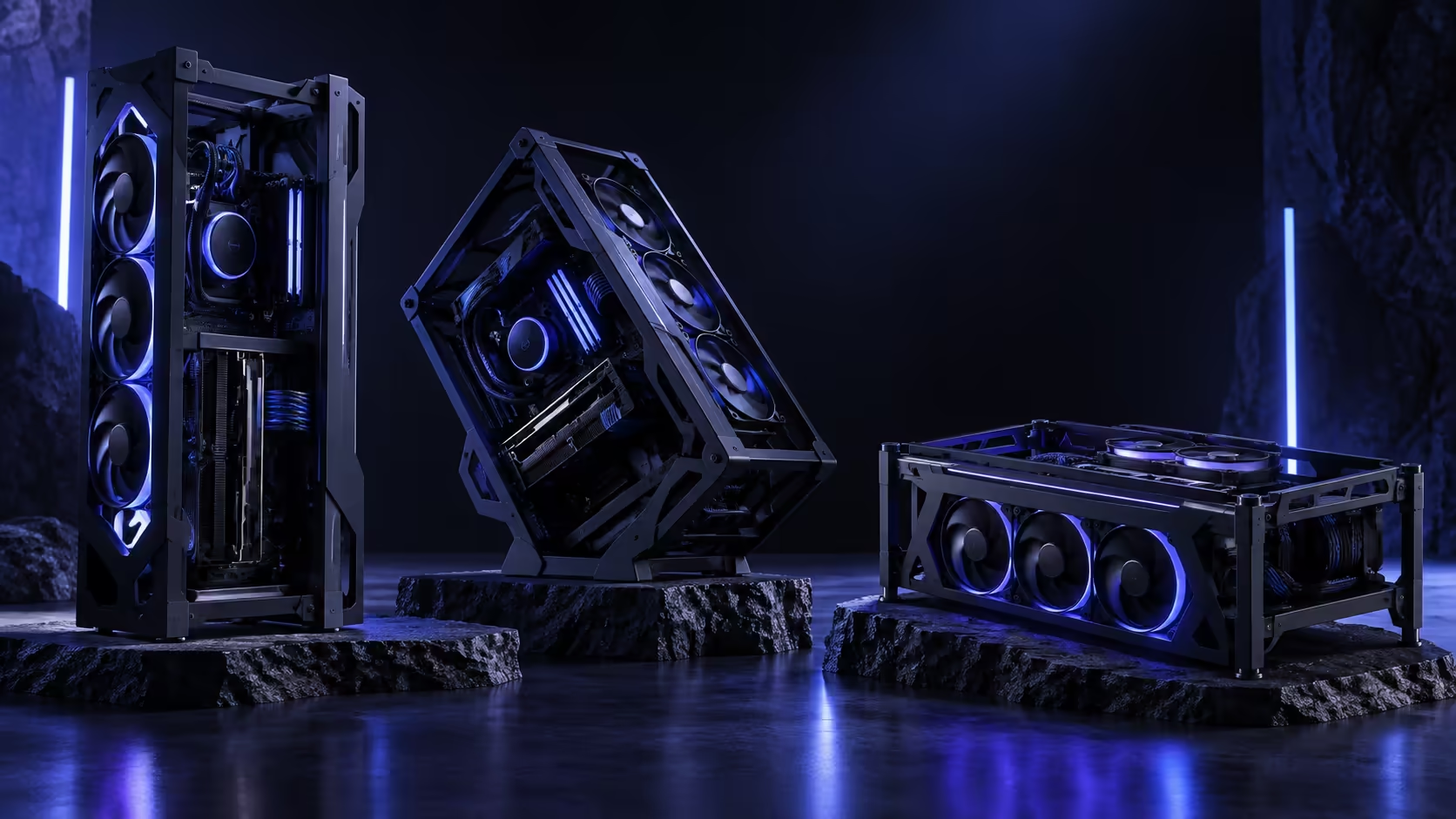
Most mid-tower cases give you exactly one way to stand them, decided by an engineer before the box was ever printed. An open frame hands that decision to you instead, and the three options it offers, vertical, angled and horizontal, are not interchangeable versions of the same layout. Each changes airflow direction, weight distribution and desk footprint in a genuinely different way.
Quick Answer
Vertical behaves closest to a conventional tower and keeps the smallest desk footprint. Angled trades stability for visibility, showing the internals off at a stand-friendly rake. Horizontal lowers the whole build's centre of gravity and takes the most desk area in exchange. The ROG GR20 Edition 20 offers all three from one R15,999 frame, so the decision genuinely comes down to what your desk and your parts need rather than what the case allows.
⬆️ Vertical: why it is the default, mechanically
Vertical works the way gravity already expects a case to work. Heat rises, so a radiator exhausting from the roof is pulling in the same direction convection already wants to move air, which is part of why a 360mm roof mount is the configuration most reviews and most cooler manufacturers design and test around first. It is also, not coincidentally, the stance that needs the least explanation to anyone who has built a PC before, since the cable paths and mounting logic mirror a normal tower almost exactly.
The graphics card's own weight, however, works against this stance rather than with it: mounted vertically through the expansion slot, the card dangles off the connector with no floor anywhere near it to take the strain. That single tension, gravity helping the cooling loop while working against the card, is the defining trade-off of the vertical stance.
📐 Angled: solving a display problem the other two cannot
Angled exists purely to answer a question vertical and horizontal cannot: how do you show off internal components to someone looking at the desk from a normal seated position, rather than from directly above or directly in front? A vertical case is seen edge-on from a seated angle; a horizontal one is seen mostly from above. An angled stance puts the board's face roughly toward the viewer's eyeline.
That benefit comes with a genuine engineering cost. A tilted frame carrying a full build, easily 10kg or more once a radiator and a card are fitted, is not something to prop against whatever is nearby; it wants a stand purpose-rated for that rake, or a wall solid enough to trust with the load indefinitely. A proper gaming desk built for that kind of distributed weight earns its price specifically in this stance, where an uneven or unrated surface risks the frame creeping forward over months of everyday vibration.
↔️ Horizontal: the stance physics favours for heavy hardware
Horizontal is the mechanically simplest of the three, because it removes the tension vertical creates: a card lying flat has its weight carried by the frame through direct contact rather than by the slot alone, and there is no leverage pulling it away from the connector the way an upright mount does.
The cost is footprint. A horizontal build claims meaningfully more desk area than either other stance, since the frame's longest dimension now runs across the desk surface rather than up from it. It suits a case built for a smaller board best, since a Mini-ITX or Micro-ATX build lying flat costs far less desk space than an EATX board doing the same, even inside an open frame rated to accept either.
Cleaning also gets marginally easier lying flat, since gravity keeps dust settling downward onto the board rather than drifting sideways into a vertical frame's open sides, though the difference is small enough that it should never be the deciding factor on its own.
🔧 Choosing based on what your build actually needs
If your graphics card is near the frame's 368mm clearance limit, horizontal removes a mechanical problem before it starts, at the cost of the extra 150mm or so of desk space you will need to have available. If desk space is tight and your card is comfortably under the limit, vertical gives you nearly all of horizontal's practicality in a fraction of the footprint. Where showing the build off outranks either concern, angled earns its extra stand, provided the surface underneath can genuinely take the load.
None of the three is objectively correct. They solve different problems, and the case supporting all three exists specifically so the choice can follow your actual parts and desk rather than a decision made for you at the factory.
Try the stance before committing hardware to it where you can. Standing the empty frame in position, checking sightlines from your normal seated spot and the clearance behind it, costs nothing and catches a mismatch a spec sheet alone never will.
Revisit the decision if your circumstances change, too. A frame chosen for a display build on a permanent desk does not automatically suit the same person a year later working from a shared table, and the same three stances remain available to switch between without buying anything new.
That flexibility, more than any single stance, is the actual argument for an open frame over a fixed-orientation tower: the decision is never truly final, and getting it wrong the first time costs an afternoon of rework rather than a second case.
Frequently Asked Questions
Why does vertical suit liquid cooling particularly well?
A roof-mounted radiator exhausts upward, working with the natural direction heat already rises, which is why most all-in-one coolers are designed and tested with that orientation as the default assumption.
Does angled mounting need special furniture?
It needs either a dedicated stand rated for the angle or a solid surface to lean against. An unsupported lean under a full build's weight risks the frame shifting over time.
Which stance is best for a heavy graphics card?
Horizontal, since the card's weight rests on the frame through direct contact rather than hanging off the PCIe slot the way a vertical mount does.
Does board size affect which stance makes sense?
Yes. A smaller board lying flat costs far less desk space than a larger EATX board in the same orientation, so horizontal suits a compact build better than a full-size one.
Ready to pick a stance based on your parts, not the box art?
Weigh your card's weight and your desk's footprint before settling on an orientation.