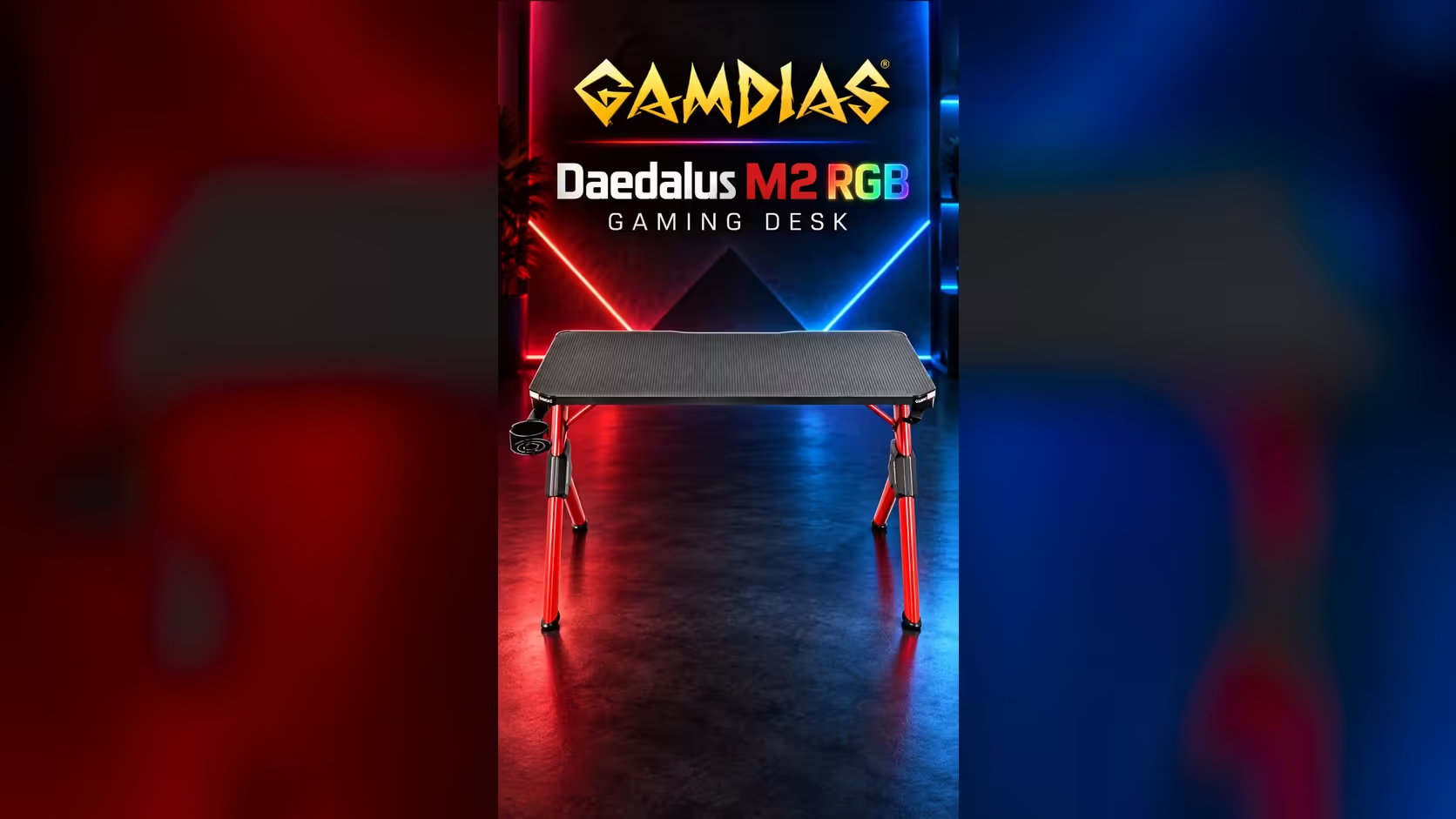
A South African buyer choosing a gaming desk is really choosing for three things at once: the room, the weather and the power. Get those three right and the frame, the surface and the lights matter far more than any spec sheet. In a Durban flat, where coastal air shapes the choice, the gaming desk we use as the example is the Gamdias Daedalus M2, on sale at Evetech for R3,799.
Quick Answer
Before you buy, measure the room, count the power points within reach of the desk, and decide how much humidity and dust your home sees. In a coastal Durban flat, a steel frame, a clear surface and a desk kept away from outside walls give the most trouble-free setup for about R3,799 on the Daedalus M2. Measure first, because a desk that fits the wall is worth more than a bigger one that does not.
📐 Measure the room, not the product photo
Start with the wall you plan to use and the path to the door. Take the wall length and take 60 cm off one end so the chair slides out without knocking the door frame. Most interior doors in South African homes are around 80 cm wide, so check that the desk can be carried through in one piece, or that it arrives in parts you can carry. Corners need their own measurement. A desk pushed into a corner needs the depth of the desk plus the chair's pull-out room, so measure from the corner to the first obstacle, not from the wall's end. Many flats have a plug point or a radiator-free wall in exactly that corner, which is worth knowing before you slide the desk into place.
Consider the room's height too. A tall tower on the desk needs roughly 45 cm of clear height above the desk top, and a monitor arm pushes that requirement higher. If you are in a flat with a low ceiling fan, check the fan's position against the monitor before you commit to the wall.
⚡ Power points, plugs and the coastal spike
The socket type in South Africa is a 16A three-pin at 230V. A gaming desk setup normally needs two sockets nearby: one for the PC and monitor, one for lamps, a router or a charger. Count the sockets within about 1.5 metres of the desk's ends. If there are none, plan a single lead from a multiplug rather than a chain of extension leads.
Coastal Durban adds a specific risk. Summer storms bring lightning and power surges, and a surge protector on the desk costs far less than a motherboard. Use a surge-protected strip for the PC and monitor, and switch the strip off at the wall when you go away for more than a few days.
🌊 Humidity and the material you choose
Durban's coastal air often stays above 70 percent humidity in summer, and that moisture gets into joints and surfaces. A steel frame handles this well when the joints stay dry, because steel rusts only where moisture sits and stays. Wipe the frame joints after a humid week and keep the desk two or three centimetres off an outside wall, where condensation collects.
Whatever the finish, the surface care is the same in a humid room. Keep a dry microfibre cloth on the desk, use a desk mat under the mouse, and avoid leaving a damp glass on the surface for hours at a time. Wipe the surface once a week in summer, and once a fortnight in winter.
Salt is the other coastal factor. Air that blows in off the sea leaves a fine film on anything that sits still, and that film is worst on bare metal. Wipe the steel joints and any exposed fixings with a barely damp cloth once a month, then dry them straight away. A cheap habit like that does more for the frame's life than any protective spray you could buy for it.
💰 Budget against the room, not the price tag
Priced at R3,799, the Daedalus M2 comes with cable management, a power strip holder, a remote and two RGB strips, all on a steel frame with a carbon fibre top. For a first desk in a flat, that is a meaningful slice of a monthly budget, so ask what each feature will do in your room. The lights matter if the desk sits where you can see them from the couch. The cable features matter if the PC and the router share one socket.
Think about the chair and the monitor before you finalise the budget. A chair takes its own share of the money, and a second screen changes how much width the desk needs. Plan those two items in the same week as the desk, so the surface is not chosen for a monitor you have not bought yet.
If you want the wider category before you decide, the gaming desk range on Evetech lists the options side by side. For a fuller setup, the gaming setups range shows the desk, PC and accessories that usually go together, and the gaming accessories range covers the mats, lighting and small add-ons that sit on the surface once the desk is in place.
Frequently Asked Questions
Is a steel-frame desk a good choice for a Durban flat?
Yes, provided you keep the joints dry and the desk away from an outside wall. A steel frame gives a stiff base for a tower and monitor, and a quick dry after a damp week keeps it in good shape.
How many power points does a gaming desk need?
Two nearby is a sensible minimum: one for the PC and monitor, one for lighting, a router or a charger. Use a single multiplug at the desk and avoid chaining extension leads.
Should I use a surge protector with a gaming desk?
Yes. A surge-protected strip on the PC and monitor is cheap insurance against summer storms, and switching it off at the wall when you leave for several days removes the standby load too.
Does the carbon fibre surface stand up to humidity?
Wipe it weekly in humid months and keep damp glasses off it. A dry cloth and a desk mat under the mouse cover most of the day-to-day care.
How much clear height does a PC desk setup need?
Plan for about 45 cm above the desk top for a standard tower, and check the ceiling fan and any wall shelves before you position the desk.
Measure the room, then compare the desk.
Browse gaming desks on Evetech and pick the one that fits your wall, your sockets and the weather in your home.