A gaming desktop bought for R9,999 in December 2025 was estimated at R25,091 by August 2026. The original deal was a discounted display unit, so the two figures are not a clean market index. They still capture the problem facing South African buyers: memory, storage and graphics costs can turn a familiar mid-range specification into a much larger bill within one upgrade cycle.
Quick Answer
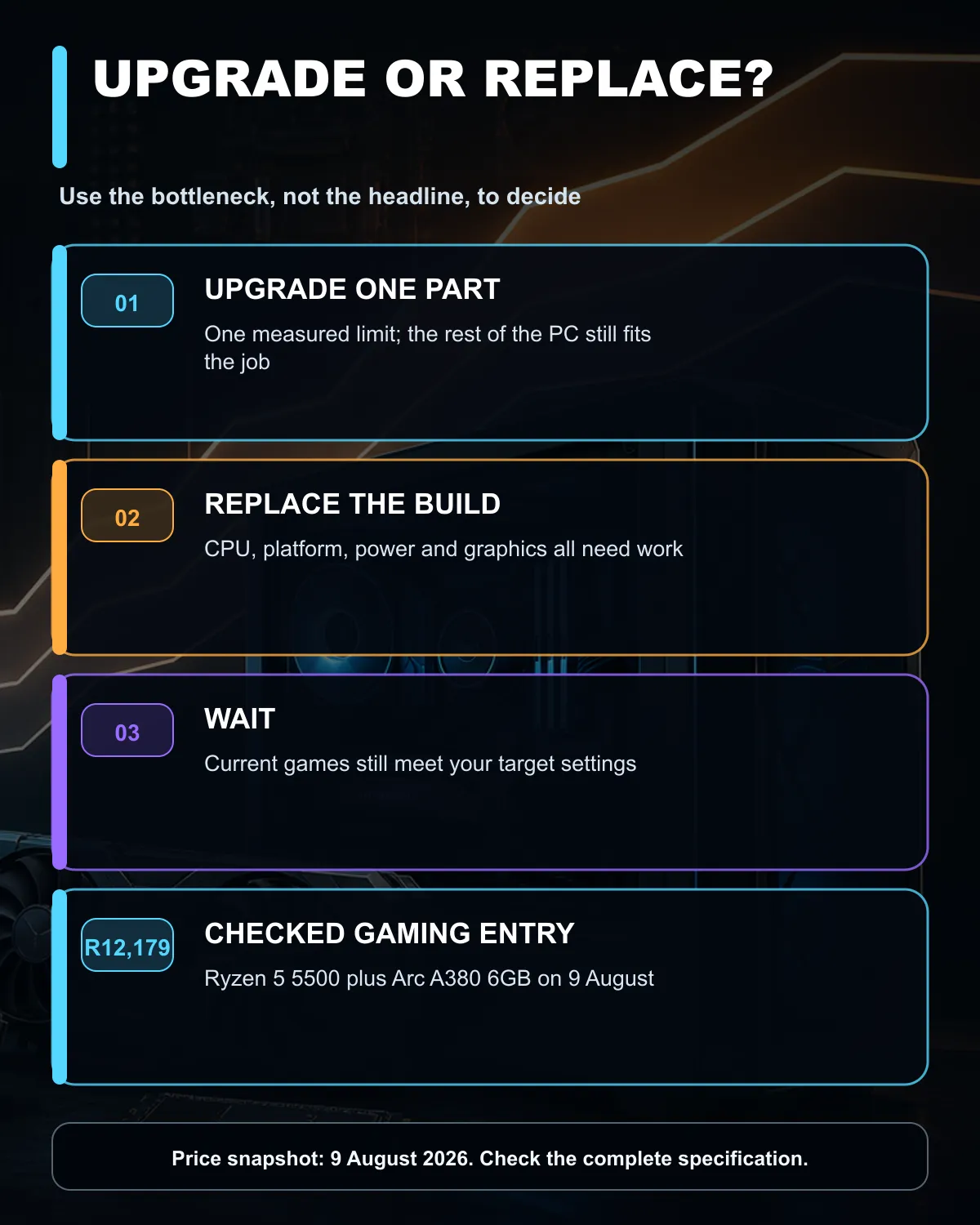
Do not rebuild a working PC because a price headline feels urgent. The 9 August catalogue check found complete in-stock desktops from R6,929, while the first checked discrete-GPU gaming listing was R12,179. Measure the games you play, identify the limiting part and replace only that component unless the processor, platform, power supply and graphics card all need work.
💸 What changed in eight months
The compared machine used a Ryzen 5 5600X processor, an RTX 4060 8GB graphics card, 16GB of DDR4 memory and a 1TB SSD. It was bought as a display unit for R9,999. Its normal December price was already below R20,000, so part of the apparent jump comes from comparing a clearance-style purchase with a later parts estimate.
The August estimate reached R25,091 with Windows 11 Home included. That does not mean every gaming PC rose by the same percentage. It does show how several component increases can stack. Memory and SSD suppliers shifted more capacity towards server and AI demand during 2026, tightening supply for consumer parts. A build with the same headline CPU and GPU can therefore cost more even before a buyer improves the case, cooling or power supply.
Current local listings offer a wider range than the R25,091 example. The checked catalogue started at R6,929 for a Radeon Vega desktop. A Ryzen 5 5500 machine with an Intel Arc A380 6GB graphics card was R12,179, while an RTX 3050 pre-built was R14,384. These prices describe exact in-stock listings on 9 August, not a promise about tomorrow's catalogue.
Use the current gaming PC deals to compare complete-build prices. The budget gaming PC range is useful when the target is a playable entry point, while the Nvidia gaming PC range helps when a specific GeForce feature matters.
🔧 Upgrade one bottleneck first
Start with evidence from the games you already own. If the graphics card sits near full use while the processor has headroom, a GPU change may help. If memory is full and the system stutters while switching tasks, capacity deserves attention. If a nearly full SSD is forcing constant uninstall decisions, storage can improve daily use even when frame rates stay the same.
Platform costs matter. A processor upgrade may require a new motherboard and different memory. A faster graphics card may require a stronger power supply or a larger case. Add those linked costs before deciding that a single component price looks attractive.
Keep a stable part when it still meets the job. A good case, suitable power supply, reusable SSD and working cooling can reduce the cost of a rebuild. Check connector standards, physical clearance and warranty status before moving older parts into a new system.
🧮 When a full replacement makes sense
A complete PC becomes easier to justify when several limits arrive together. An older four-core platform, too little memory, a weak power supply and an entry graphics card can turn four separate upgrades into a complicated project. A current complete build gives you one known configuration and avoids paying labour twice as each new issue appears.
Set a performance target before a budget. Name the games, resolution, quality setting and frame-rate range you actually want. A 1080p esports system and a 1440p high-detail system need different graphics budgets. Buying the most expensive machine you can reach does not guarantee that the extra money improves your workload.
The R25,091 comparison should also temper plans to wait indefinitely. No source confirms a South African date for a broad price drop. If the PC is needed within one to three months, compare complete in-stock options and buy when the specification fits. If the current machine remains smooth, keep it and build a cash reserve for the part that eventually becomes limiting.
✅ A practical buy, upgrade or wait rule
Buy a complete PC now when several core parts are below the target and the checked build fits your total budget. Upgrade now when one measurable component is holding back an otherwise balanced machine. Wait when the current PC still meets the games and settings you use.
Record the exact current specification before shopping: processor, motherboard, memory size and type, graphics card, power supply model, case clearance and storage. That list prevents an attractive component from creating two unplanned purchases.
Frequently Asked Questions
Why did the compared PC rise from R9,999 to R25,091?
The original machine was a discounted display unit. The later estimate also reflected higher memory and storage costs, so the figures are a real buyer example rather than a universal market index.
What was the cheapest checked gaming PC with a discrete GPU?
A Ryzen 5 5500 and Intel Arc A380 6GB gaming PC was R12,179 in the 9 August catalogue snapshot.
Which component should I upgrade first?
Upgrade the part that limits the games you play. Check GPU use, processor use, memory pressure, storage space and frame-time behaviour before spending.
Should I reuse my old power supply?
Reuse it only when its model, age, condition, wattage and connectors suit the new parts. A vague wattage label is not enough for a high-power graphics upgrade.
Will PC prices be lower later in 2026?
No broad South African drop date is confirmed. Buy for a near-term need and compare the full build cost instead of relying on an assumed fall.
Planning a gaming PC around a fixed budget?
Compare complete in-stock systems first, then price the one-component upgrade that solves your measured bottleneck.