Three case fans and a pump on one motherboard can look like a tangle of leads, but the wiring follows a simple rule. Each fan and pump needs a header that matches its connector, and the lighting needs its own header if it has one. Get those two steps right and the rest is a matter of checking the BIOS readings. Here is how to wire a 360mm cooler's fans and ARGB lighting from start to finish, using the three pre-connected 120mm fans on a 360mm cooler as the example.
Quick Answer
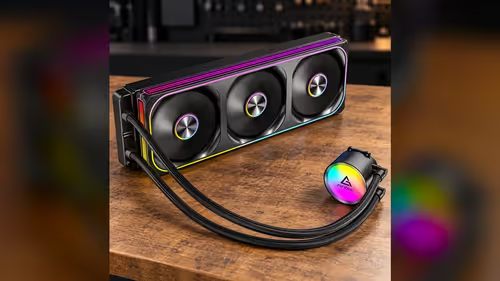
Plug the three pre-connected 120mm fans into one PWM fan header, because a single cable powers all three. If the lighting has its own lead, connect it to a 5V addressable ARGB header, and check the board manual to confirm which header that is. The Antec Omni Matrix 360 at R999 follows that same plan, with the fans on a PWM header and any lighting lead on the addressable one.
🔌 Finding the right headers on the board
Start by reading the labels on the motherboard itself, because the header names tell you which connector each cable belongs to. A PWM fan header carries four pins: one for ground, one for 12V power, one for the speed signal and one for the control signal from the board. Most boards label these as CPU_FAN, SYS_FAN or a similar name, and the manual shows exactly where each sits.
An ARGB header is a different animal. It carries three pins for 5V, data and ground, and it is usually labelled ARGB or D_LED. A 12V RGB header has four pins and uses a fixed 12V supply, so it is not the same connector even though the plugs can look alike. Check the number of pins and the label before you push anything home, because a mismatched lead can damage the LEDs it reaches.
Before wiring, look up the header count in the manual and tally the connectors you need. A cooler with three fans and a pump uses four fan-type connections in total, though the pump usually takes its own header. Knowing that count at the start stops you from running out of headers halfway through the build.
🌀 Wiring the three PWM fans
The three 120mm fans on this model come pre-connected, so the fans need one cable rather than three separate plugs. That single lead runs into one PWM fan header, and the board then drives all three fans together. Each fan on the cooler runs between 800RPM and 1800RPM, which means the board can ramp the whole set through that range from one control signal.
Seat the plug firmly until it clicks, and run the cable well away from the moving blades and the radiator fins. A loose lead causes more trouble than a wrong header, because the fans can stop intermittently and make the readings look fine one minute and fail the next. Tuck the slack behind the motherboard tray where it cannot touch a moving fan.
Once the PC is on, open the BIOS and check the fan readings. A healthy fan header shows a speed figure that changes when you adjust the fan curve. If the reading stays at zero while the fans spin, the header is probably the wrong type, or the speed signal is not reaching the board, so move the cable to a neighbouring PWM header and test again. A PWM header usually reads back as a fan speed, which is the quickest way to confirm the wiring is right.
Our case fans range and our CPU coolers range show the fans and pumps you can add later, which is useful if you want to push more air through a case with extra intake slots. Check the header count on your board before you buy, so the new fans have somewhere to plug in.
💡 Connecting ARGB lighting
Lighting is the part most people get wrong, mainly because the connectors look alike. An addressable ARGB lead has three pins and runs off 5V. A standard RGB lead has four pins and runs off 12V. Plug the 12V lead into a 5V header and the LEDs can be damaged, so match the header to the plug before you connect anything.
If the lighting on your cooler has its own lead, connect it to the ARGB header your board labels for addressable lighting. If the lighting draws power through the fan cable instead, there is nothing extra to plug in, and the board will light the fans once the fan connector is seated. Read the cooler's own instructions to see which situation applies, since the two setups are wired differently.
Lighting control runs in one of two ways. Some boards let you choose a lighting effect in the BIOS or in their own utility software. Others need the lighting software that matches the motherboard brand before the effects respond. Install that software after the hardware is in place, not before, so you can test the connection one step at a time.
A common mistake is to leave the lighting unplugged while you test the fans, then forget to connect it afterwards. Put a small label on the lighting lead when you disconnect it, and tick it off in your build notes once it is back in its header. It takes ten seconds and saves a second trip into the case.
🧪 Testing before the case goes on
Test the wiring on the open bench before you fit the cooler into the case. Power the board, enter the BIOS, and watch the fan readings for the three fans and the pump header. Change the fan curve by a few percent and confirm the readings move with it. If they do, the fan wiring is correct, and you can close the case with confidence.
Next, check the lights. Set an effect in the software, then change the colour and the speed. A working ARGB header responds to each change, and an unresponsive one usually points to a loose lead or a header set to the wrong mode. Switch the header mode in the BIOS if the board offers that option, then test again.
Only then mount the radiator and close the case. Testing before mounting avoids the frustration of pulling a radiator out to fix a lead behind it, which takes far longer than the test itself. Ten minutes on the bench now beats an hour inside a cramped case later.
Frequently Asked Questions
Can I plug the three fans into separate PWM headers?
You can, but a single header is simpler. The pre-connected cable runs all three fans from one connector, so splitting them across headers only adds leads to route and nothing to the cooling.
Which header should the pump use?
The pump goes on the pump-labelled header, which is usually separate from the case fan headers. Plugging it into a generic fan header can give a misleading reading, so check the manual before you connect it.
Why do my fans spin but the lighting stays dark?
The fans and the lighting use different connectors. Check that the lighting lead is seated in an addressable ARGB header, then confirm the lighting software or BIOS option is turned on.
Can an ARGB lead go into a 12V RGB header?
No. An addressable lead runs off 5V and a 12V RGB header supplies 12V, so the mismatch can damage the LEDs. Use the header that matches the number of pins and the label on the board.
Do I need the motherboard software to control the lights?
Not always. Some boards offer lighting control in the BIOS, while others need their own utility before the effects respond. Check the board manual to see which route applies to your model.
Ready to build your cooling loop?
Browse our CPU coolers and case fans, and pick parts whose connectors match the headers on your motherboard.