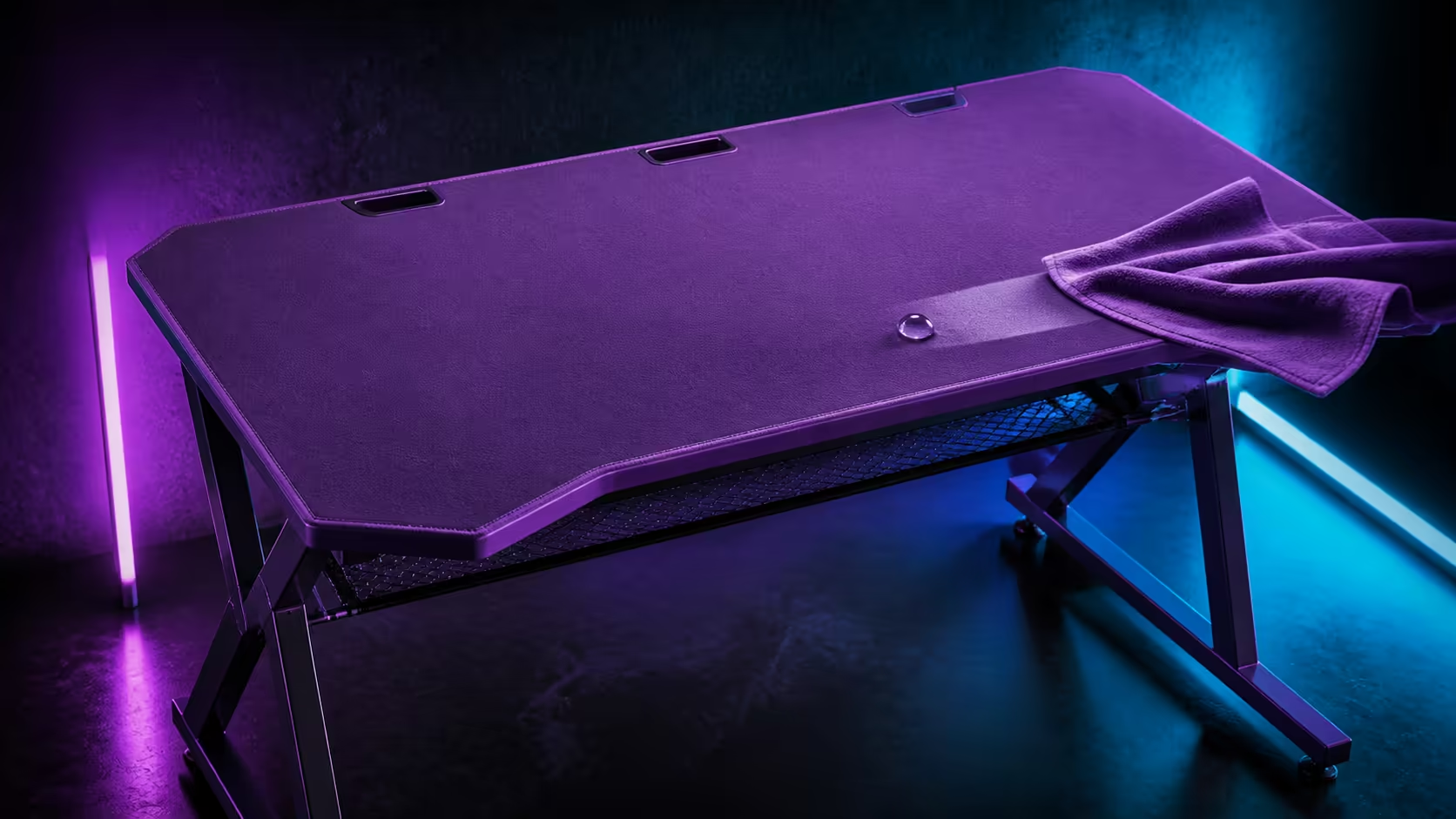
Purple microfiber stays presentable when stains are prevented, treated promptly and followed by an even clean. Keeping a purple gaming desk surface clean and stain-free is practical on the R3,599 AROZZI Arena Medium because its full-surface pad is water-resistant and machine-washable.
Quick Answer
The R3,599 Arena Medium has a purple, full-surface microfiber mousepad that is water-resistant and machine-washable. Keep drinks outside the electronics zone, remove loose debris often, blot spills promptly and wash the cleared pad according to its care guidance. Let it dry fully before rebuilding the desk.
🧹 Prevent embedded debris
Move keyboard and mouse, then lift crumbs and dust gently. Clean mouse feet separately and inspect beneath the pad. Avoid grinding particles into high-contact areas.
The purple Arena Medium desk costs R3,599 and carries the washable textile surface.
💧 Act before marks settle
Protect powered devices and blot liquid without spreading it towards the three cable cutouts. Water resistance provides response time, not permission to ignore a spill.
Compare surfaces through Evetech's gaming desk category. Keep a clean cloth and safe shutdown plan nearby.
Keep products simple
Follow the pad's intended washing method and avoid improvised chemical mixtures. Test no harsh treatment on a visible area.
🧼 Prepare a complete wash
Photograph equipment and cable positions, disconnect devices and lift the full pad clear. Use the machine-washable surface's care instructions, then support it properly through drying.
The Arozzi gaming setup selection can inspire neat rooms. Preserve an equipment-removal path behind the visual arrangement.
Restore even texture
Return the pad only when both sides and desk are dry. Lay it flat, check edges and sweep the mouse across the entire area before replacing accessories.
🎨 Protect the visual baseline
Give stationery, controllers and drinks fixed positions. Dust around the monitor stand and cutouts so dark debris does not collect against the purple surface.
Use Evetech's gaming setup category to coordinate accessories. Photograph the clean baseline and compare it weekly.
Schedule care around use
Record the first successful drying interval. Choose a wash window that does not encourage a rushed, damp reassembly.
Separate dry dirt from wet marks
Dust and crumbs should be lifted before any moisture is introduced. A fresh liquid mark calls for quick protection of electronics and careful blotting. Treating both problems with the same hurried rubbing can press debris into the microfiber or spread a small spill.
Inspect the mouse feet and keyboard base during the cleanup. Returning dirty equipment to a clean purple surface immediately restores the same marks and grit.
Use fixed zones to prevent stains
Choose a drink position beyond the active input and cutout areas. Place pens and art materials in a container rather than directly on the textile. The location should stay practical from both work and gaming positions so the rule survives a busy session.
Water resistance adds useful response time, but electronics remain the priority. A predictable cup position lets the user react without first tracing where liquid may have travelled.
Protect colour through even care
Avoid aggressively treating one visible spot while ignoring the surrounding high-contact area. Follow the surface guidance across the affected area and compare texture as well as appearance after drying. Residue that cannot be seen may still change mouse glide.
View the purple layer under daylight and room light. Side lighting can reveal lint, raised fibres or a remaining edge that the seated view hides. Use that inspection to decide whether another suitable cleaning step is necessary.
Plan the removal route before a spill
The monitor, keyboard and mouse should each have a safe temporary location. Label leads and photograph positions while the setup is clean. Then a deeper wash becomes a controlled sequence instead of an emergency rearrangement across the bed or floor.
Keep the three cutouts accessible and avoid fixing temporary objects over the pad edges. The integrated net can preserve organised cable branches while the top is cleared.
Reset tracking after maintenance
Once the pad is completely dry and flat, run the mouse slowly across the centre, edges and former stain area. Keep sensitivity unchanged and listen for grit beneath the feet. Repeat one precise cursor task before deciding the surface feels different.
Return accessories only after the active sweep passes this check. A clean surface should reopen space, not immediately disappear beneath every object that was removed.
Make the weekly inspection fast
Stand at the desk in good light and divide the purple top into four visual zones. Check the mouse area for texture changes, the keyboard area for crumbs, the outer area for forgotten cups or stationery, and the cutouts for trapped debris. The sequence takes less time than moving every object without a plan.
Finish by wiping or dusting the steel legs and inspecting beneath the integrated net. Dirt below can return to the room and eventually reach the textile through ordinary movement. A complete but brief routine is more sustainable than waiting for a dramatic stain.
Record only exceptions: a mark needing follow-up, a loose cable or a wash date. The surface stays presentable because small signals receive attention before they become a difficult cleaning project.
Consistency also protects the mouse feel between deeper washes.
Note the date.
Frequently Asked Questions
What should happen after a spill?
Move electronics safely, blot promptly and inspect the pad plus desk beneath it.
Does water resistance prevent every stain?
No. Fast response and suitable care still matter.
Can the surface be machine-washed?
Yes. Clear the full pad and follow its intended care guidance.
When may equipment return?
Only when the microfiber and desktop are completely dry.
What does the purple desk cost?
The Arena Medium costs R3,599.
Ready to keep purple microfiber crisp through everyday play and the occasional spill?
Choose the Arena Medium at Evetech, build a quick response kit, and restore the full surface only after a patient dry.