




Chrome secure DNS: Check the provider before changing your router
Chrome secure DNS: Encrypted DNS is not a VPN and does not guarantee a working connection. Check browser DNS mode.
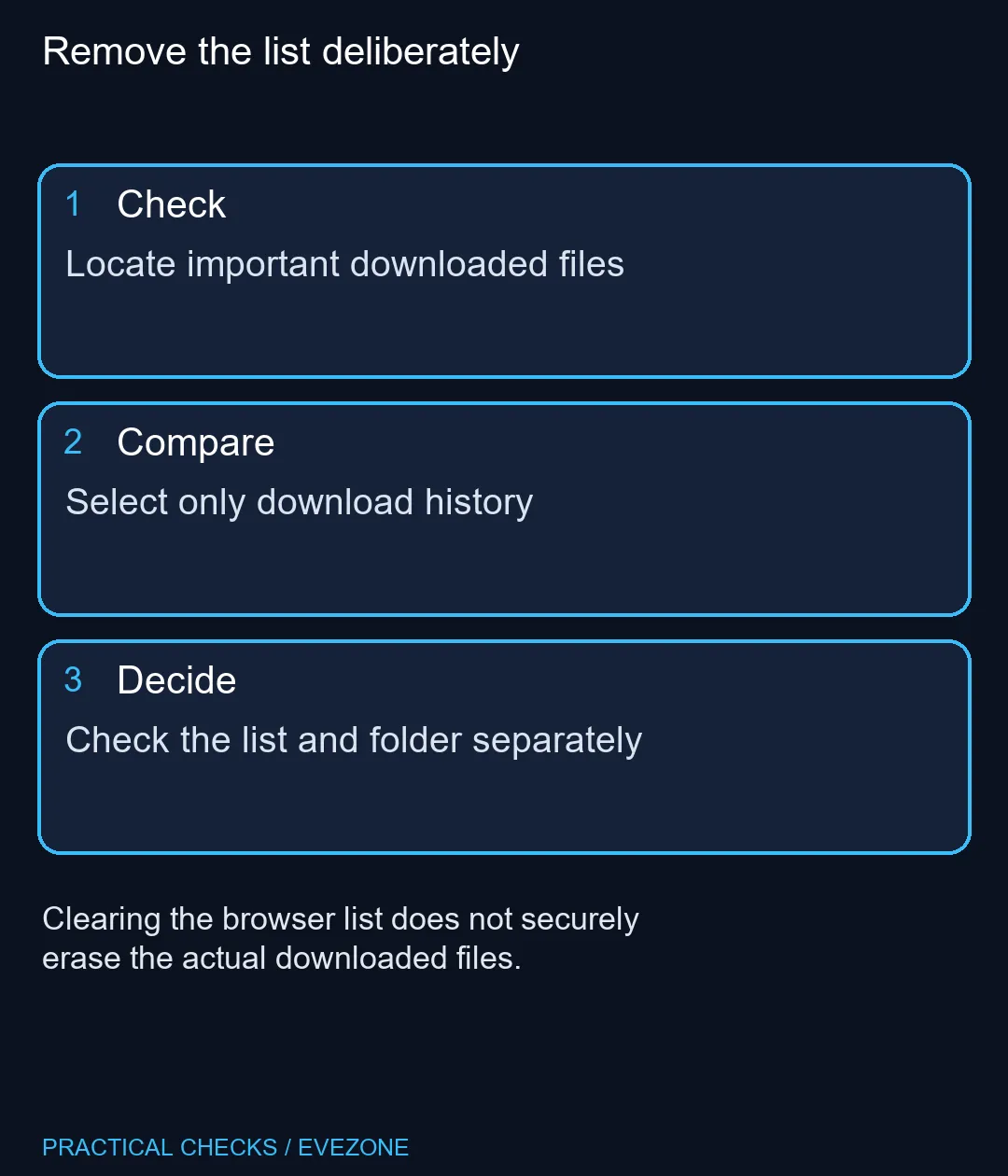
Read moreChrome clear download history: Clearing the browser list does not securely erase the actual downloaded files. Locate important downloaded files.

The Chrome clear download history action removes a browser record, not the files that record points to. That matters when cleaning a shared screen or finding drive space. Clearing the wrong thing can leave the real documents untouched while making them harder to locate later.
Use Chrome's browsing-data controls, select the intended time range and download-history category, and check other selections before confirming. Google states that deleting download history leaves actual downloaded files on the computer. The action costs R0; it is neither a disk-space clean-up nor secure erasure of private documents.
Open the download list and identify documents you still need. Chrome offers a Show in Folder action, which helps establish where a file was saved. Confirm its filename and location instead of relying on the browser row as your only record.
This is useful when several people use a computer or a file was saved outside the normal folder. A missing browser entry does not prove a document is gone. Conversely, a history entry is not a guarantee the file exists if somebody has moved or deleted it.
Open the browsing-data deletion controls and read the selections. Download history, general browsing history, cookies and other stored data serve different purposes. To remove only the downloads list, avoid selecting unrelated categories because they happen to be visible in the same dialog.
Choose the intended period deliberately. A recent housekeeping task does not require deleting every older record. If the computer belongs to somebody else, explain that the list will be removed while the files remain, and let the owner decide what is appropriate before any deletion.
After clearing selected records, inspect the browser list and the folder noted earlier. These are two checks with different expected results. The list should reflect the chosen removal while saved documents remain available unless a separate file action changed them.
If your aim was freeing storage, use operating-system storage tools to inspect actual files. For privacy, remember that clearing a browser list does not securely erase a downloaded document. Those tasks need their own decisions rather than another click on the same browser button.
The captured ASUS Vivobook Go 15 cost R8,499 and the HP Notebook 255R G10 was R8,999. A tidier downloads list does not require either purchase. Compare intel laptops on special and hp laptops only when a measured storage or other hardware requirement remains after sensible file organisation.
No. Google states that the browser list is deleted while downloaded files remain on the computer.
Use its Show in Folder action and note the actual saved location.
No. Removing a list entry does not remove the file's stored bytes.
Only if you intend that separate data change. Check every selected category before confirming.
Use the time-range choice in the browsing-data controls and confirm that it matches your task.
No. Clearing a browser record is different from securely removing the document itself.
Remove the list deliberately Locate important downloaded files.
No. Google states that the browser list is deleted while downloaded files remain on the computer.
Use its Show in Folder action and note the actual saved location.
No. Removing a list entry does not remove the file's stored bytes.
Only if you intend that separate data change. Check every selected category before confirming.
Use the time-range choice in the browsing-data controls and confirm that it matches your task.
No. Clearing a browser record is different from securely removing the document itself.
Chrome secure DNS: Encrypted DNS is not a VPN and does not guarantee a working connection. Check browser DNS mode.
Read more
Chrome always use secure connections: An encrypted connection does not establish that a website is trustworthy. Read the full destination.
Read more
Chrome install web app: A separate app window does not promise offline support or a native desktop program. Confirm the genuine website.
Read more
Chrome find on page: Find on page searches loaded page text; it is not a search of every website. Open the intended page.
Read more
Chrome change language: Display language, translation and keyboard input are separate settings. Identify menus or page content.
Read more
Chrome Safety Check reviews browser warnings for updates, saved passwords, extensions and permissions. Act on the precise finding while keeping connection security separate from claims about a website being trustworthy.
Read more Chrome Safety Check reviews browser warnings for updates, saved passwords, extensions and permissions. Act on the precise finding while keeping connection security separate from claims about a website being trustworthy.

Stalker 2 Heart of Chornobyl PC build under R50,000 should start with balance, not one headline part. Compare CPU, GPU, RAM, SSD, cooling, case airflow, and monitor target before buying in South Africa.

Best 240HZ setup for video editing 4K needs careful context before choosing parts. Use this guide to check parts, settings, compatibility, cooling, and upgrade timing for a South African gaming PC without relying on live stock, price, or benchmark promises.

Peripheral loadout for Kingdom Come Deliverance should be shortlisted around the job it must do. South African buyers should compare fit, performance, compatibility, and upgrade room, warranty path, and upgrade room before treating any pick as best.
Chrome Safety Check reviews browser warnings for updates, saved passwords, extensions and permissions. Act on the precise finding while keeping connection security separate from claims about a website being trustworthy.

Chrome delete saved passwords removes a stored login through Google Password Manager. Match the site and username, confirm another working sign-in method and use the individual action instead of deleting every saved credential.

Chrome microphone not working needs separate checks for the selected input, site permission and operating system access. Test the trusted call site after one change before replacing a microphone or granting broader recording permissions.

Chrome reopen closed tab starts with Ctrl+Shift+T on Windows or Linux. Recover the intended page, inspect its actual state and save valuable work separately before changing how the browser behaves at startup.

A fitness-class headset mic should stay put through jumping, resist sweat and connect to your sound system's input. Check the fit, the sweat protection and the receiver output, and make sure the battery covers a full session.
The Ryzen 5 5500U has six cores and twelve threads; the Ryzen 7 3700U has four and eight, so the 5500U is stronger. It is also a newer design. The laptop around the chip matters too, since cooling and single-channel RAM change what you feel.
svchost.exe is not one program but a host that runs Windows services, so the fix is finding which service is busy. Right-click it in Task Manager and use Go to services, then check Windows Update, Delivery Optimization and the file location.
The 12600K leads in games and includes integrated graphics, while the 5700X sits on cheaper AM4 boards. Neither ships with a cooler, so budget for one before you compare the final totals in Rand.