




Firefox HTTPS-Only Mode: handle an old HTTP site
Turn on Firefox HTTPS-Only Mode and understand what to do when an old device page has no encrypted connection.
Read moreFind the Firefox address autofill controls if available, and tell saved addresses apart from regular form-history suggestions.

Firefox address autofill can be missing because Mozilla rolls it out by region. Its published availability list does not include South Africa. If the option is present, manage it in Firefox's address or autofill settings. If you only see individual suggestions in form fields, check Firefox form history or the website's own saved profile instead.
An address autofill entry can fill related fields from a saved address. A regular form-history suggestion can be a single old value, such as a suburb or company name. And a website may fill an address from an account profile after you sign in. Those sources can look similar when the same information appears, but each has a different place to edit or remove it.
Start by checking whether the suggestion appears on more than one trusted website. Compare a field on a signed-in site with what appears on a page where you are not signed in. Do not enter real personal information merely to test a setting. A blank form is enough to check whether the browser offers an existing entry or whether the website already filled it before you typed.
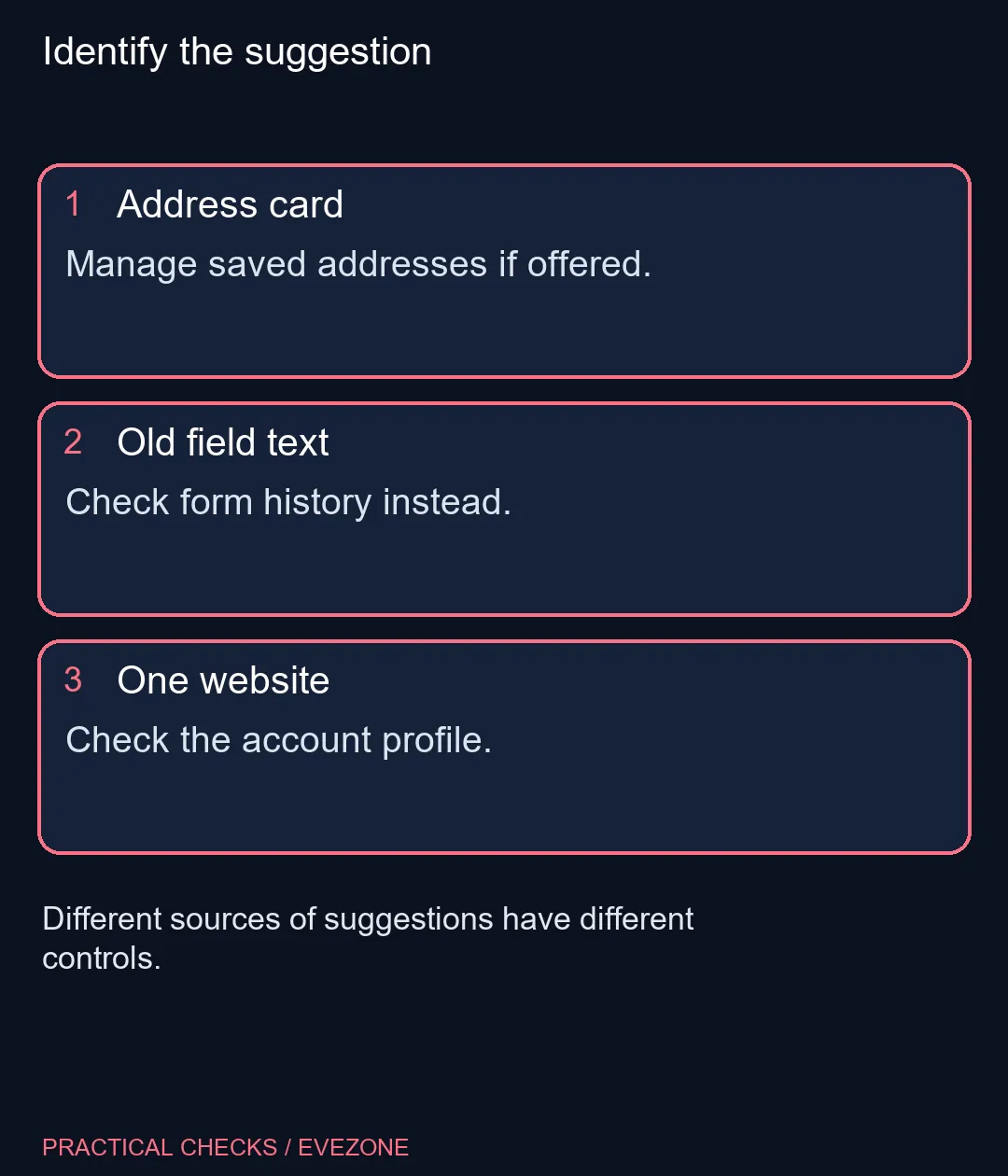
Open Firefox Settings and look for address management in the autofill controls. Mozilla describes the labels and placement across different versions, so search Settings for addresses if you cannot find it by scanning the main headings. If the section appears, use its management screen to view or remove an old address. If it does not appear, the rollout can explain the absence without implying that something is wrong with your computer.
For ordinary form suggestions, check the history preferences and the control for remembering search and form history. Changing that option can also affect search history in Firefox's search bar. Think through that side effect before changing it on a shared profile. If the value appears on only one website, look for the account's own address book or profile.
If other people use the same profile, turning off address saving can prevent the browser from offering a shared list of personal entries on future forms. Review what is already stored separately: switching off an option and deleting an old value are distinct tasks. Check the form before submission even when autofill works. A completed field can still contain an older unit number or the wrong suburb.
The check costs R0. Neither the all laptops on special range nor a new board from gaming keyboards changes Mozilla's regional feature rollout. Consider those only if you have a separate reason to replace equipment. The useful result is knowing which of the three places actually supplies the value you see, and changing that one.
South Africa is not in the list consulted. Mozilla says availability is rolling out.
Yes. A site can supply an address from the account you signed into.
No. Form history can suggest individual field entries rather than a managed address record.
Look in Firefox Settings for address or autofill management if the feature is present.
No. A different keyboard or PC does not change the regional rollout.
Check the site's account profile first if the value only appears there.
Find the source of the suggestion Check address autofill, form history or the website profile before changing all three.
South Africa is not in the list consulted. Mozilla says availability is rolling out.
Yes. A site can supply an address from the account you signed into.
No. Form history can suggest individual field entries rather than a managed address record.
Look in Firefox Settings for address or autofill management if the feature is present.
No. A different keyboard or PC does not change the regional rollout.
Check the site's account profile first if the value only appears there.
Turn on Firefox HTTPS-Only Mode and understand what to do when an old device page has no encrypted connection.
Read more
Adjust Firefox smooth scrolling on desktop and isolate whether uncomfortable page movement comes from the browser or just one site.
Read more
Create Firefox tab groups, tell collapse apart from save and close, and recover a named group without searching through every open tab.
Read more
Restore Firefox camera permissions for one trusted website without changing permission defaults for every site.
Read more
Use Firefox containers to keep two accounts signed in to the same site and understand where that separation stops.
Read more
Set Firefox as the default browser to open normal web links from other apps in it. Use Firefox Settings or Windows Default apps, then test an outside link; opening Firefox manually does not prove the default changed.
Read more
Firefox can mute one noisy tab using its speaker button or context menu. Check the tab control before changing Windows volume or replacing a working headset.

ASUS PA329CDV combines a 4K 120Hz QD-OLED panel with USB-C charging and Auto KVM. Compare colour work, laptop power and desk connections before treating overseas availability as an SA offer.

Teclast N30 Pro pairs Core 3 304 with 12GB memory and USB4. Its expansion connection is useful, but an external graphics plan needs a complete cost and compatibility check.

Firefox private browsing separates a temporary session from normal browsing history. It does not make you anonymous online, and files or bookmarks you deliberately save can remain after the last private window closes.
Set Firefox as the default browser to open normal web links from other apps in it. Use Firefox Settings or Windows Default apps, then test an outside link; opening Firefox manually does not prove the default changed.
Firefox can mute one noisy tab using its speaker button or context menu. Check the tab control before changing Windows volume or replacing a working headset.

Firefox has a startup-cache control on its Troubleshooting Information page. Use it for a focused interface test and keep it separate from clearing website data or refreshing the profile.

Firefox Primary Password protects access to locally saved logins. It is separate from a website or Mozilla account password, and forgetting it can put saved credentials at risk during reset.
Turn on Firefox HTTPS-Only Mode and understand what to do when an old device page has no encrypted connection.

Find the Firefox address autofill controls if available, and tell saved addresses apart from regular form-history suggestions.
Adjust Firefox smooth scrolling on desktop and isolate whether uncomfortable page movement comes from the browser or just one site.
Create Firefox tab groups, tell collapse apart from save and close, and recover a named group without searching through every open tab.