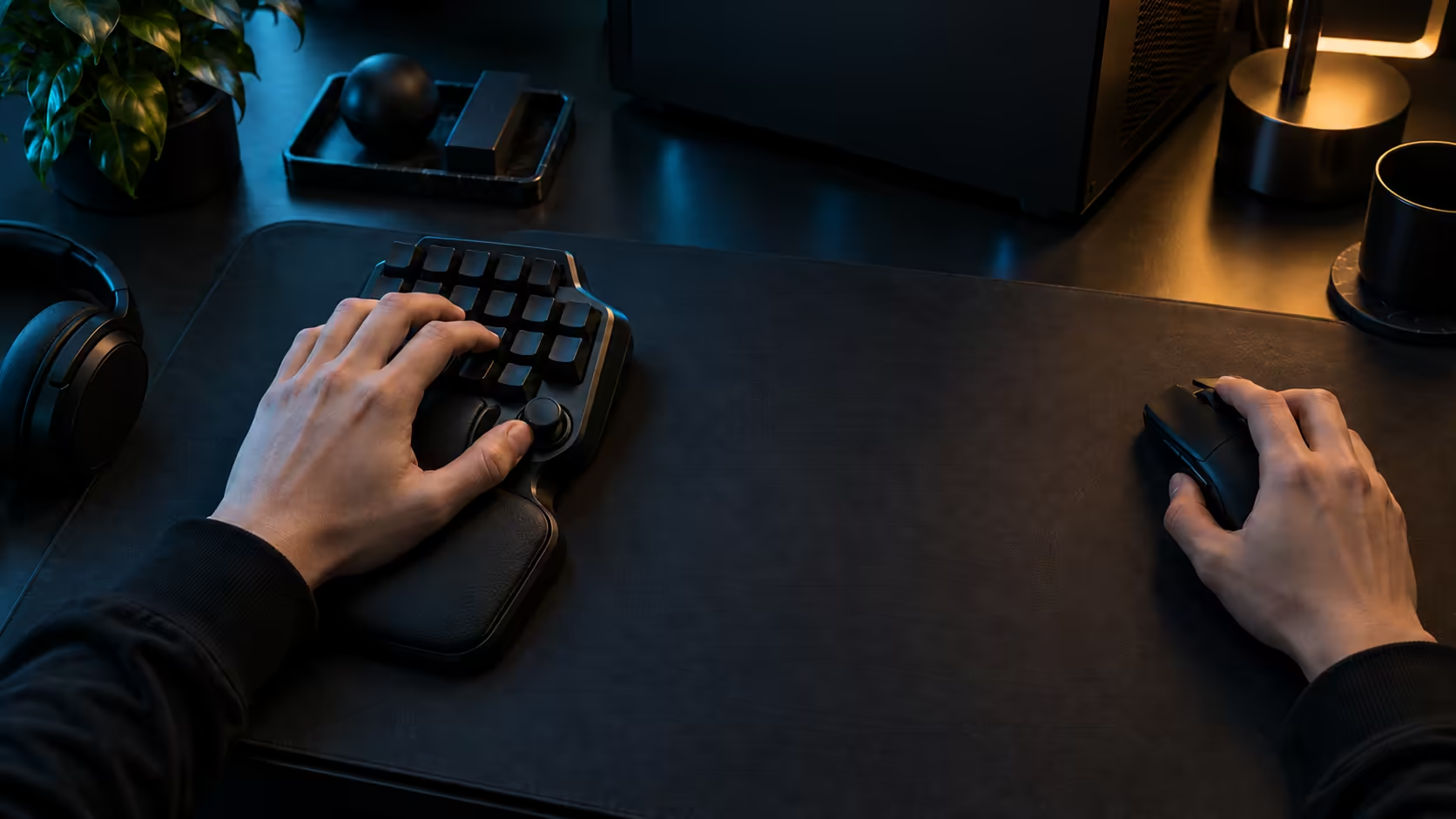
MOBA players are the clearest case for a keypad, and also the easiest to oversell. A MOBA match runs on a long list of abilities, item activations, ping shortcuts and camera moves, and most of them sit on keys that are awkward to reach from a standard layout. A programmable keypad can take a large share of that work off the main board. The question is whether your own binds justify the cost, and whether the extra depth and reset features matter in a MOBA at all. This guide works through both for the Razer Tartarus V2 Pro.
Quick Answer
The Tartarus V2 Pro suits a MOBA player whose ability and item binds crowd the main keyboard, because its 31 programmable controls can carry those binds under the left hand. Rapid Trigger and the analog depth matter less in a MOBA than in a shooter, so judge the keypad mainly on bind space. At R4,799 priced with VAT included, the case is strongest when the keypad absorbs binds you press every few seconds.
🧱 Count the binds that a MOBA actually uses
Open your MOBA's keybind screen and list the actions you use in a normal match. Typically that covers the four or so abilities for your hero, the summoner spells, the item activations, the shop or recall keys, and the ping and camera shortcuts. Mark each one as frequent or occasional, then decide which frequent binds are awkward on your main keyboard. Four abilities, 2 summoner spells and a few item keys soon fill a bar. Spend 5 minutes on the count, then review it after 1 week.
Frequent and awkward is the combination a keypad solves. An ability you cast every few seconds belongs under the left hand, resting where the fingers already are. Occasional binds can stay on the main board, because a stretch for a rare action costs you little.
⚡ Where the keypad helps in a MOBA
The biggest gain is consistency. When every ability sits in the same grid under the left hand, you stop looking down at the keyboard mid-fight, and your eyes stay on the lane. That shift matters more than any single feature, and it is the difference you will notice first. A grid of 8 frequent binds sits in the same spot every match. Keep the grid at 8 binds for 1 week before you add more.
The thumbstick and its three buttons can carry a secondary set of binds, such as item actives or a recall, with the thumb staying close to rest. Keep the most frequent of those on the stick's nearest button, and the rarest on the far one.
🔢 Where the analog features matter less
Analog depth and Rapid Trigger are most valuable in shooters, where a quick reset and a light movement tap change the result of a fight. In a MOBA, most of your inputs are ability casts and clicks rather than repeated movement taps. A mid-range depth still works well, and you may never need the Rapid Trigger reset. A mid-range depth such as 1.5mm is a sensible starting point.
That does not make the features useless. If you also play shooters, the same keypad covers both, and the depth control lets you set the movement keys for those games and the ability keys for the MOBA. Tune once for each game, and save the layout for each.
🏠 A MOBA session in a South African flat
Many South African players run MOBA matches on a shared PC in a flat or a student res room, and the desk is often tight. Check the space under your left hand with a tape before ordering. A keypad that pushes the mouse off the mouse mat costs you more time than it saves, because the mouse is what drives movement and targeting in a MOBA. Measure the strip in centimetres and wipe the keypad every 7 days.
Dust is the other constant. Fine Highveld dust builds up between keys withafter just a few days, so brush the keypad weekly and cover it between sessions. A sticky ability key is an expensive problem in a fight.
Frequently Asked Questions
Is the keypad worth it for a MOBA player?
It is worth it when your frequent ability and item binds crowd the main keyboard. Count those binds first, because the case rests on how many you press every few seconds.
Do I need Rapid Trigger for a MOBA?
Not usually. Rapid Trigger is most useful for repeated movement taps, which matter more in shooters. A MOBA player can keep the default reset and focus on bind placement.
How many binds should go on the keypad?
Put the frequent ability and item binds on the keypad, and leave occasional actions on the main board. Test the layout for a week before you move anything else.
What is the price against my binds?
It is R4,799 priced with VAT included. Weigh that against the binds you press every few seconds, since those are the ones the keypad will save you from reaching for.
For other MOBA add-ons, the gaming add-ons range is worth a look, and the gaming keyboards range shows the keypad with its alternatives.
Want your MOBA abilities under one hand?
Browse our gaming keyboards and accessories, then build the ability grid around the way you play.