The cable that shipped inside your power supply's box already does the job. It carries the right pins, it is rated for the unit it came with, and nobody has ever had to think about it twice. So the honest starting point for the Hydrus 16-pin cable is this: swapping it in does not make your GPU run any differently. What it changes is how the run looks, and whether that is worth R699 depends entirely on what you actually want out of the upgrade.
Quick Answer
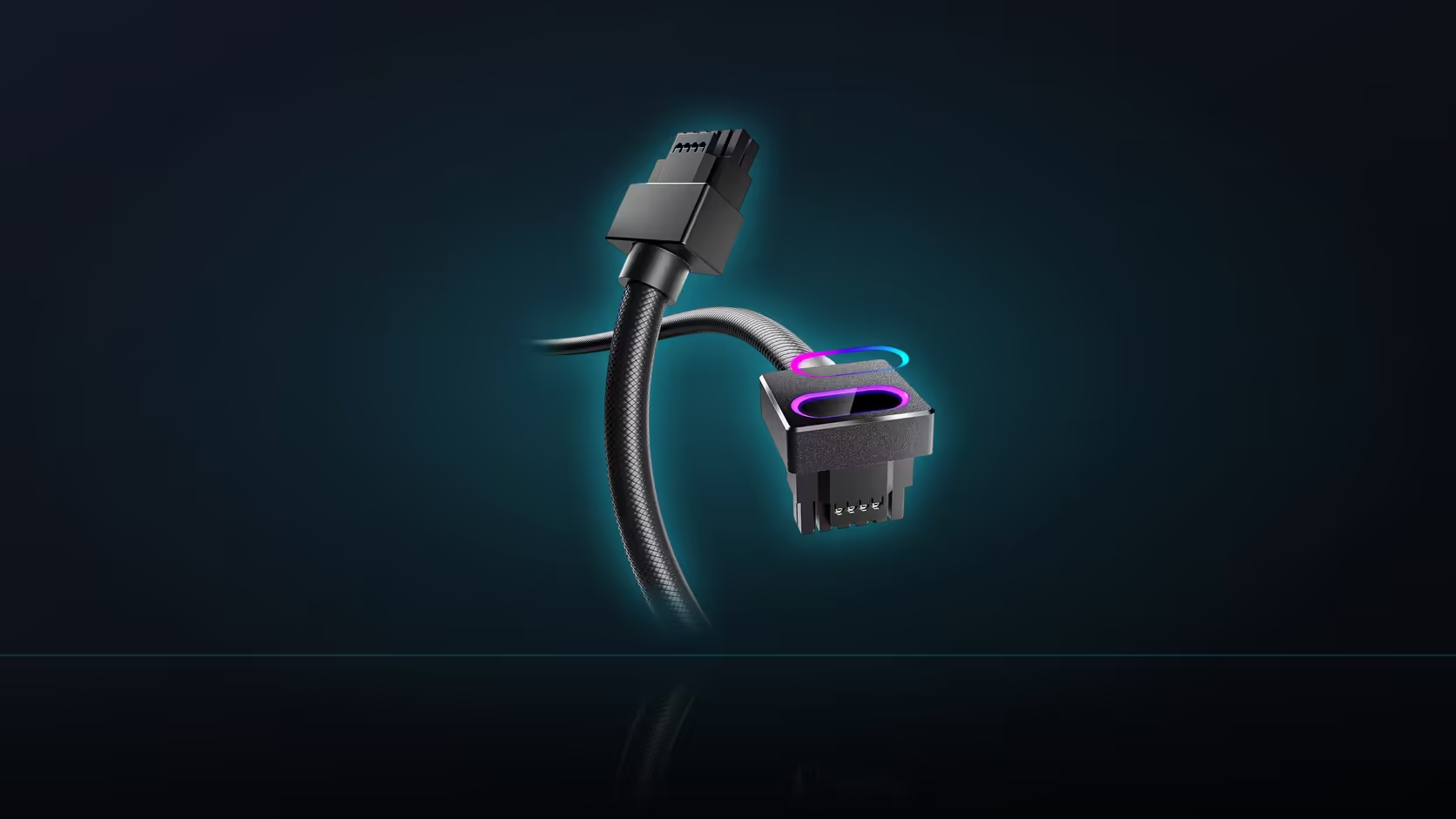
At R699 in black or white, the AsiaHorse Hydrus 16-pin (12VHPWR) modular cable is a full replacement for your power supply's native cable at that socket, not an electrical upgrade. It adds a diamond-frosted jacket, a 90-degree right-angle ARGB head, and a 5V 3-pin lighting connection. The card still gets the same power either way, provided your supply carries a native 16-pin port and your card is on AsiaHorse's compatible list (RTX 40-series plus RTX 5080/5070; not the RTX 5090).
What the swap does not touch
Start with what stays exactly the same, because it is the more important half of the decision. The power path is identical in function whether you use the factory cable or this one: same connector standard, same number of conductors doing the same job, same amount of power reaching the card. Nothing about the electronics on either side of that connection knows or cares which physical cable is delivering the current. AsiaHorse rates this particular cable at 480W, and that figure describes the cable's own capacity, not a performance ceiling your card either gains or loses by using it.
Nor does the swap change what your card draws under load, or what your power supply can put out in total. Those numbers are set by the card's and the supply's own manufacturers, and they stay fixed regardless of which cable physically connects the two. If you were hoping a cable change would somehow unlock more headroom, that is not what this product does, and it is worth saying plainly so nobody buys it expecting a performance gain that was never on offer.
What the swap actually delivers
What does change is entirely visual, plus one small mechanical difference at the card end. The jacket goes from whatever plain black sleeve came in the box to a diamond-frosted finish that catches light more evenly than a standard cable. The head at the GPU end turns through a 90-degree right angle rather than plugging straight out, which is a genuine functional gain in a case with limited depth behind the card - it needs less clearance to the side panel than a connector standing straight up. And the head carries an ARGB window synced through its own 5V 3-pin lead to the motherboard, entirely separate from the power circuit, so the lighting can be switched off in software without touching the power connection at all.
Put together, that is the whole case for this cable: a cleaner look through the window, a head shape that may solve a clearance problem the factory cable did not, and lighting that syncs with the rest of an ARGB build. None of it is about power delivery.
Reasons to keep the factory cable
There is a genuine argument for leaving the supplied cable exactly where it is. It is already matched to your specific power supply - modular pinouts are not universal across manufacturers, so a cable pulled from a different unit is not a safe substitute even if the connector looks the same. Keeping the original also means the change is fully reversible: if the case gets rebuilt, the card changes to something outside AsiaHorse's list, or the supply turns out to be a Lian Li or Sharkoon unit that AsiaHorse specifically cautions against pairing with this cable, you can put the factory lead straight back with nothing lost.
That last point deserves its own line. AsiaHorse reports elevated damage with Lian Li and Sharkoon power supplies when this cable is used, and recommends a different pairing where either brand is involved. It is a caution about the combination, not a defect in the cable on its own, but it is one more reason the factory cable earns a spot in a drawer rather than the bin.
Making the call
If your reason for looking at this cable is that you want the look and the case has room for a right-angle head, the swap is straightforward: confirm your supply has the native 16-pin socket, confirm your card is on the list, check it is not a Lian Li or Sharkoon supply, and go ahead. If your case has a depth problem behind the card, the right-angle head might solve something the factory cable cannot, independent of the aesthetics. But if none of those apply and the factory cable already looks fine to you, there is no functional reason to change anything. The comprehensive cable solutions range is worth a browse either way, and graphics card accessories covers the rest of what a 12VHPWR-equipped build typically needs.
Frequently Asked Questions
Why would anyone keep the factory cable instead of upgrading?
It is already matched to your specific supply and works correctly. Keeping it costs nothing and means the swap can be undone at any point.
Does the Hydrus cable improve performance in any way?
No. Both cables carry the same connection to the same standard, so any difference sits in appearance and, at the card end, connector shape.
Is the right-angle head purely cosmetic?
Not entirely. In a case with limited depth behind the graphics card, turning at the connector genuinely uses less space than a straight plug.
Does swapping cables change the wattage available to the card?
No. AsiaHorse rates the cable at 480W, but what actually reaches the card is set by the supply and the card, not by the cable choice.
Should the original cable be kept or discarded?
Keep it with the power supply. You may need it back if the build changes or if your supply turns out to be one AsiaHorse cautions against.
Is the ARGB lighting required for the cable to work?
No. The power path functions normally with the 5V 3-pin lighting lead disconnected, so the lighting is entirely optional.
Can I use this cable with any 12VHPWR-equipped card?
Only if the card is on AsiaHorse's named list - RTX 40-series plus RTX 5080 and 5070. The RTX 5090 is specifically excluded.
Weighing up the swap for your own build?
Check your power supply's modular panel for a native 16-pin socket, then explore Evetech's cable range to compare your options.