




IPS vs VA for Strategy and Sim Games in SA
IPS vs VA for strategy and sim games should be judged by fit, not a single winner. Compare compatibility, latency, capacity, upgrade path, cost planning, and South African setup needs.
Read moreComparing AMD B850 vs B650 chipsets to help you decide on your next PC build. Get the best performance for your budget with our expert breakdown! 🖥️⚡
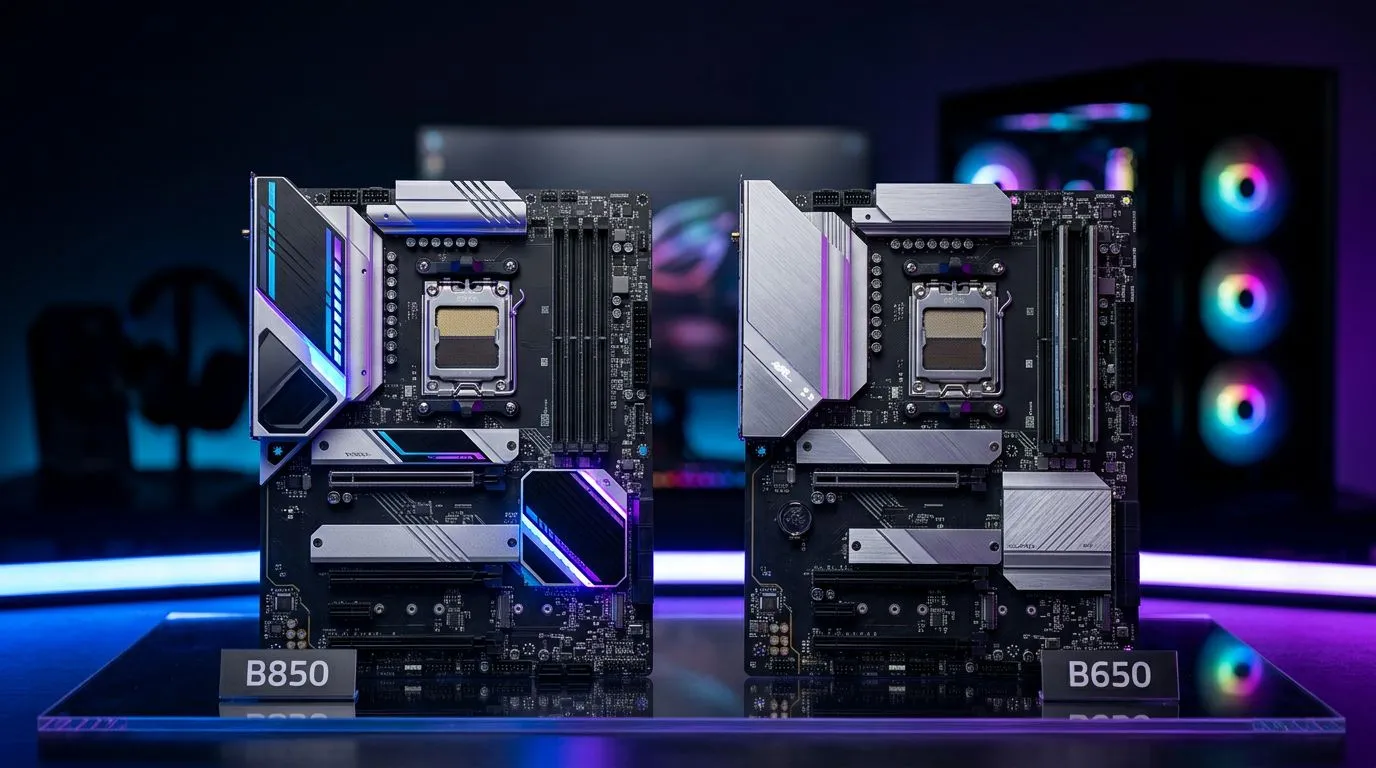
If your PC budget is tight in South Africa, the motherboard isn’t a place to “just hope for the best”… but it’s also not where you should overpay. AMD users are seeing lots of new board options, and the AMD B850 vs B650 Chipset question comes up fast: do you prioritise newer features, or value today? ⚡
Let’s break it down like you’re standing in front of two boxes at Evetech… and you have to choose.
Most people don’t buy chipsets for marketing names. They buy them for the day-to-day: how many storage drives you can run, what connectivity you’ll actually use, and how easily the board will grow with your upgrades.
That said, I can’t responsibly list exact B850 vs B650 lane counts or feature specifics here without a matching official reference page from Evetech or AMD. Instead, here’s a safe, buyer-focused way to compare boards across those chipsets based on what reputable retailers list: ports, expansion slots, storage support, and power delivery.
Use this checklist whenever you’re comparing an AMD B850 vs B650 Chipset board:
If you’re building around AMD motherboards in general, start by browsing the current options on Evetech:
In most real-world builds, B850 boards tend to appeal if you want a board that feels “newer” and you plan to lean into modern connectivity and storage configurations. That can mean fewer compromises if you want multiple NVMe drives and a cleaner front-panel/USB setup.
But there’s a catch. Paying more for a chipset only helps if the features you’re paying for actually show up on that exact board model. Two boards with the same chipset label can still differ heavily by:
So… don’t buy “B850” as a concept. Buy the board that fits your plan.
For most gamers in SA, storage is the tangible upgrade. If you install one fast NVMe SSD today but you’ll likely add a second later, prioritise a board with enough M.2 slots and sensible spacing so your GPU doesn’t block the next drive installation.
Also consider how you connect your gear. Do you stream on the side? Do you record gameplay? Extra USB and better rear I/O reduces cable chaos, and it makes your setup feel less like a spaghetti festival.
If you’re trying to keep your total build under control, the B650 route often wins for value. The key is to compare boards, not just chipsets.
A simple approach:
If you want to compare across the broader ecosystem, you can also check Intel board options to sanity-check your pricing and feature sets:
And if your build is more “budget beast” than “overclocking lab”, Evetech also groups useful affordable board options here:
Here’s a micro-story from the shop floor reality. A customer once told us they “picked the higher chipset” because it sounded better. Then they realised too late their board had fewer M.2 slots than they needed… and their second SSD upgrade meant re-cabling and moving drives around. That turned into time, not just cost.
Avoid that by focusing on expansion and maintenance. Your future self will thank you.
On Windows, use the PowerToys FancyZones utility to create custom snap layouts for your windows. It's a lifesaver for managing multiple apps on an ultrawide monitor, letting you organise your timeline, preview window, and asset folders perfectly for video editing.
No matter what you choose, match the board to your upgrade timeline. That’s the real win.
If you’re building right now and want the safest path to good value, start with B650 options and only move to B850 if the exact board model offers clear benefits you can list on paper: M.2 capacity, USB you need, and strong enough VRM cooling for your CPU plan. 🔧
If you’re unsure which board model best fits your use case, browse Evetech’s AMD motherboard range and compare the spec sheets side by side. Then, pull the trigger on the board that matches your real needs, not just the chipset name.
Ready to Build Around B850 or B650? Compare current B850 motherboards with B650 boards before choosing the platform features you will pay for.
The B850 chipset offers improved connectivity and updated features compared to the B650, making it a better choice for future-proofing your AM5 build.
Yes, B850 motherboards are designed with enhanced PCIe 5.0 support for both GPUs and NVMe storage, outperforming standard B650 configurations.
Yes, B850 motherboards utilize the AM5 socket, ensuring full compatibility with existing Ryzen 7000 and 9000 series processors.
If you require faster data transfer speeds and additional USB4 support, the upgrade to B850 is worth it. Otherwise, B650 remains a solid value choice.
Yes, both the B850 and B650 chipsets exclusively support DDR5 memory, ensuring high-speed performance for modern gaming rigs.
The B650 chipset is generally more cost-effective, providing excellent performance for mid-range gaming builds without the premium price of B850.
IPS vs VA for strategy and sim games should be judged by fit, not a single winner. Compare compatibility, latency, capacity, upgrade path, cost planning, and South African setup needs.
Read more
Gen 5 NVMe SSD guide for Bloemfontein gamers should be shortlisted around the job it must do. South African buyers should compare capacity, speed, thermals, and motherboard support, warranty path, and upgrade room before treating any pick as best.
Read more
Skip the RTX 5070 if your first-time builder budget needs better balance. Better SA picks can free room for the right CPU, PSU, case, monitor, storage, and cooling while still giving a strong first gaming PC experience this year in South Africa.
Read more
RTX 5080: weighing the pros and cons for SA should be shortlisted around the job it must do. South African buyers should compare GPU tier, VRAM, cooling, and PSU headroom, warranty path, and upgrade room before treating any pick as best.
Read more
Core i5-13400F gives South African PC builders a capable mid-range CPU choice with clear limits. Check its gaming fit, discrete GPU requirement, LGA1700 platform costs, and upgrade path before locking in your parts list.
Read more
Pros and cons of the Wi-Fi 7 routers for SA should be shortlisted around the job it must do. South African buyers should compare WiFi standard, coverage, latency, and device support, warranty path, and upgrade room before treating any pick as best.
Read more
Steam content servers unreachable needs a download-path check, not an immediate reinstall of every game. Restart the client, inspect download settings and compare another connection when practical. Clearing the download cache is separate from deleting installed games.

Keychron G6 HE has built-in and swappable battery versions with different weights. The product brief lists 42g and 46g respectively, each with a 3g tolerance. Choose by grip and battery preference before treating one headline weight as universal.

Corsair HS80 v2 MAX supports 2.4GHz wireless and Bluetooth. Its maximum battery figures use RGB-off conditions and differ by connection. Check microphone routing, comfort and the exact device support before assuming every wireless mode behaves alike.

Windows taskbar notification badges can be shown or hidden in Taskbar behaviours. This changes the small app indicators, not the underlying messages. Choose a calmer desktop while keeping a deliberate routine for checking important conversations and app updates.
Windows taskbar notification badges can be shown or hidden in Taskbar behaviours. This changes the small app indicators, not the underlying messages. Choose a calmer desktop while keeping a deliberate routine for checking important conversations and app updates.

Windows USB device in use can mean a program still has the drive open. Finish transfers and close files before retrying ejection. Better performance caching requires safe removal; a replacement drive is not the first fix for an open-file warning.

Windows Nearby Sharing not working starts with feature, Bluetooth and visibility checks on both PCs. My devices only depends on matching Microsoft accounts. Test a small harmless file before buying networking hardware or changing your home router.

Windows hardware reserved RAM is different from memory used by applications. Compare installed memory with firmware detection and the usable amount before buying modules. Reservations and reporting limits vary by system; no universal setting restores every byte.

Windows title bar window shake can minimise other open windows when you shake the active window by its title bar. Inspect the Multitasking setting and switch it off if that gesture interrupts your work. The preference costs R0 and does not require new hardware.

Windows Print Screen opens Snipping Tool when its keyboard preference is enabled. Change the option under Accessibility, Keyboard to choose another workflow. Test whether you need a clipboard image or a saved file.

Windows desktop icons missing may be a visibility setting. Right-click the desktop, choose View and inspect Show desktop icons. If only system icons are absent, use Desktop icon settings. Check the Desktop folder before assuming files were deleted.

Windows set time zone automatically greyed out calls for a location and device-policy check. Automatic time-zone selection relies on location services. A manual time-zone choice is separate from synchronising the clock; check both before replacing hardware.