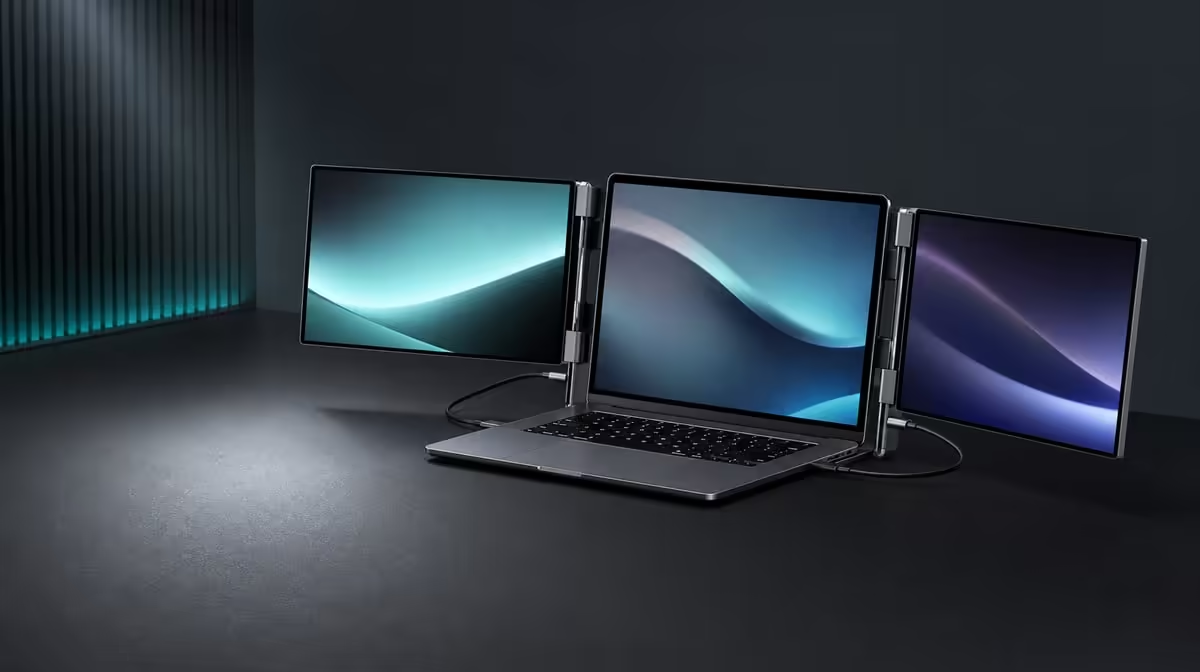
Business work gains from extra screens when information can stay visible without making the workstation harder to operate or move. Portable dual-screen monitors for business should be assessed as a complete system: independent display area, laptop compatibility, physical support, travel routine and the applications that will use the space. At R4,299, the UPERFECT Delta packages two Full HD panels into one folding assembly.
Quick Answer
The R4,299 Delta suits business users who need two independent 15.6-inch 1920 x 1080 work areas beside a laptop, can confirm the required USB-C host path and regularly change locations. Its integrated stand, 360-degree folding and separate-device support add flexibility. The 25ms response fits documents and productivity more naturally than speed-sensitive gaming.
📋 Turn business processes into screen roles
List the information that must remain visible during a normal task. A finance workflow may pair a spreadsheet with a report. Procurement can keep supplier material beside an internal comparison. A sales call may use notes on one panel and the presentation on another while communication remains on the laptop.
Assign each display a stable role before adding more applications. The Delta screens are independent, so extension can create distinct work areas. Mirroring is valuable when identical content must be shown to another person, but it does not provide the same multitasking layout.
The notebook remains the source and can remain visible. Arrange its screen with both external panels so pointer movement follows the physical desk. A simple map protects employees from spending the first minutes of every session rearranging windows.
Set each Delta panel to native 1920 x 1080 and begin with matching system scale. Test the size of text, tables and controls at the intended viewing distance. A business screen has to remain readable throughout a working block, not just make a dashboard look impressive in a short demonstration.
Use the Evetech portable monitor range to compare current mobile display options after the required process is mapped.
🔌 Make host approval part of deployment
One-cable use can reduce desk clutter and speed reconnection, but only from a compatible USB-C host. The exact laptop port must carry two external pictures and satisfy the Delta's power requirement. A connector that fits is not proof of those functions.
Record the approved laptop model, port and working route. If a fleet contains several notebook models, test each relevant configuration instead of transferring the result from one computer to another. A portable monitor process is only as repeatable as its host compatibility.
Deploy the built-in stand before connecting. Keep the lead relaxed and clear of the 360-degree hinge, then wait for both external displays. Identify them in system settings, choose extension and move a basic window through the planned order.
Test sleep, wake and a full disconnect. These are ordinary business transitions, especially for hybrid workers. A successful initial picture is useful, but dependable reconnection is what saves time across the week.
The independent panels can instead show separate compatible devices, one source per screen. This can support comparisons, monitoring or mixed-system work. It is different from a single laptop desktop and may require another cable and input-control plan.
🪑 Check the stand on real business surfaces
The integrated stand reduces loose support equipment, yet it still needs a stable surface. Try the main desk, a meeting-room table and a smaller temporary workspace. Confirm that the keyboard, pointer and notebook remain comfortable beside the dual panels.
Use the hinge positions the task needs rather than treating 360 degrees as a target. An angle is useful only when the monitor remains planted, both screens are readable and cables do not pull on the assembly.
Consider privacy and sight lines as part of placement. The dual monitor expands visible information, so arrange it appropriately for the workplace. Do not infer a privacy feature from the panel; physical orientation and working practice are what can be assessed here.
Run an actual meeting or production block. Notice whether references remain visible, whether the display layout reduces interruption and whether the stand is stable when the table is used normally.
For a permanent office desk, bring Evetech's PC monitor category into the comparison. A folding design delivers less business value when it never moves.
🎒 Standardise the travel cycle
Create a short shutdown order: save work, close applications, disconnect, clear the hinge and fold while supporting the panels. Pack the leads so hard connectors cannot press into a screen.
Test the Delta with the assigned laptop, power equipment and accessories in the intended bag. The compartment should close normally and the complete load should remain sensible for the route.
At the next location, open the monitor on its stand before attaching the source. Connect to the approved port, verify both displays at Full HD and restore the saved window map. Time the process after the first learning attempt.
A shared checklist can include the laptop port, display order, cable routing and application roles without turning the setup into a technical project. Its purpose is to make a successful routine repeatable.
Judge R4,299 by frequency and outcome
The complete Delta price covers the two 15.6-inch IPS panels, folding body and integrated support. Do not create imaginary line items for the second panel or stand. Instead, compare the R4,299 cost with the business process it improves.
Track a simple before-and-after measure: window switches, setup time, missed reference checks or the ability to preserve a familiar layout away from the office. Use a representative week rather than a polished test session.
Motion is part of the fit. The 25ms response supports a productivity-led case, while rapid competitive play should look for a different priority. Video editors can place controls, files or a timeline on the Delta and decide where the motion-critical preview belongs.
Count travel frequency. A consultant moving daily can use the folding value repeatedly; an employee at one assigned desk may be better served by fixed monitors. Neither answer should be forced by the category name.
After compatibility and workflow pass, confirm the live product listing on Evetech. Its popular monitor collection offers a broader reference.
For a shared business process, document the successful layout in plain operational terms: approved notebook port, left-panel task, right-panel task, laptop role and shutdown order. That note helps another user reproduce the result without copying personal application preferences. It also gives support a clear baseline if one display later stops returning after sleep.
Frequently Asked Questions
Which business tasks can use two independent screens?
Analysis, reporting, procurement comparisons, presentations, communication and document-heavy work can keep related views visible.
What must an approved laptop provide?
Its chosen USB-C port needs to drive both panels and deliver the necessary power for one-cable operation.
Can the Delta show two computers?
The independent panels can each display a separate compatible source.
Does the built-in stand remove all desk checks?
No. Stability, viewing angle and space for the laptop and input devices still need to be tested.
Will it fit every company backpack?
Test the folded monitor with the assigned computer and full kit in the intended bag.
Is 25ms intended for competitive gaming?
No. The stronger business case is productivity and reference-heavy work.
What does the Delta cost?
The dual portable monitor is priced at R4,299.
When should fixed screens also be compared?
Compare them when the workstation remains at one desk and travel features would rarely be used.
Ready to give a business process two stable work areas wherever it moves?
Explore Evetech portable monitors and test the Delta through host approval, a real work block and a repeatable travel cycle.