



Hot-Swappable PCB Architecture in Modern Keyboards: Guide
Learn hot-swappable PCB architecture in modern keyboards—what it is, how sockets and traces work, and how to pick the right board. Speed up swaps, reduce risk, and upgrade faster 🔧⚡
Read moreSustained 250W-class CPU loads are where a mid-tower ATX case pulls ahead, particularly with gaming PC use. Verify GPU length, radiator mounts and front I/O before checkout; Type-C and ARGB hubs add real convenience.
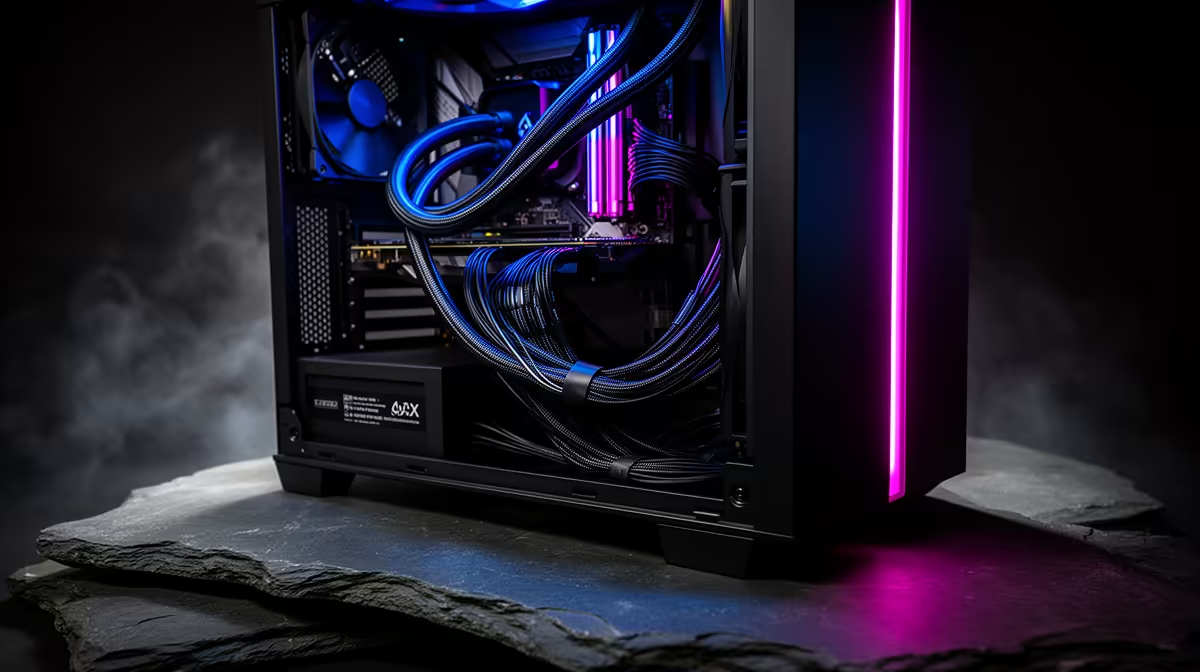
The most effective way to reduce cable clutter in a mid-tower ATX build is to route every cable behind the motherboard tray before any component is powered on, use Velcro ties to bundle and secure cables away from the main airflow corridor, and choose a fully modular PSU so unused cables are never in the case to begin with.
A fully modular PSU is the single most impactful purchase decision for cable cleanliness. Unlike non-modular or semi-modular units, a fully modular PSU has no permanently attached cables, meaning you connect only the exact cables your build needs: the 24-pin ATX, the CPU EPS 8-pin, the GPU 16-pin, and SATA or peripheral cables for drives.
A spacious mid-tower ATX case, typically 480mm to 510mm tall with 200mm or more of depth behind the motherboard tray, gives you room to bundle cables into tight vertical runs along the case spine. The 24-pin ATX cable, which is the thickest bundle in the build, should exit the PSU shroud area through the nearest grommet cutout and travel directly up behind the tray to the motherboard header, never crossing the front of the motherboard.
Once cables are routed behind the tray, the visible interior through the tempered glass panel should contain only the motherboard, GPU, RAM sticks, CPU cooler, and any visible fan cables. Any fan extension cables or ARGB daisy chains that cannot be fully hidden should be tucked into the gap between the PSU shroud and the case floor using a folded Velcro strap. Colour-coordinated cable extensions (black-sleeved, white-sleeved, or matching the build colour scheme) are available as aftermarket accessories from R150 to R400 for a full set and make a significant visual difference if any cables remain partially visible through the glass panel. SA builders focusing on a showcase build for content or streaming backgrounds will find the investment worthwhile.
The mistake most builders make is routing cables from the components side toward the tray, which means fighting against the cable's natural curve. Instead, feed each cable from behind the tray forward through the grommet first, connect it to the component, then pull the slack back through the grommet before securing. This approach keeps tension away from the connectors and results in cleaner routing with less manual bending of cables against their natural direction.
At minimum, 15mm of clearance behind the motherboard tray allows thin cables to be routed without the side panel pressing against them. For a complete ATX build with multiple storage cables, 20mm to 25mm of clearance behind the tray is more comfortable. Cases in the R1,000 to R2,000 range typically offer 20 to 30mm, and this figure is sometimes listed in the case specification sheet.
Yes, for almost all use cases. Velcro cable ties can be adjusted and removed without cutting, which is essential when you change a component and need to reroute a cable. Zip ties require cutting and replacing each time, and cut zip ties left inside the case present a short circuit risk if they contact PCB traces. Velcro ties in a 12-pack are available for R30 to R80 and are reusable indefinitely.
In a well-configured airflow setup, the thermal benefit of clean cable management is 2 to 5 degrees Celsius compared to a build with cables obstructing the primary airflow corridor. The benefit is more pronounced when cables cross directly between intake fans and the GPU, which is the most common cable obstruction point in an uncabled build.
Want a clean build inside and out? Find fully modular PSUs, cable management accessories, and quality ATX cases with generous behind-tray routing space at Evetech.
Learn hot-swappable PCB architecture in modern keyboards—what it is, how sockets and traces work, and how to pick the right board. Speed up swaps, reduce risk, and upgrade faster 🔧⚡
Read more
Mechanical switch lifespan explained—what the 50 million keystroke rating really means, plus tips to extend switch life and reduce double-press issues 🔧⌨️
Read more
60-percent vs full-size mechanical keyboard layouts—learn what each layout includes, who it suits, and how to choose the right fit 🧩⌨️ for typing, gaming, and productivity.
Read more
Double injection keycaps last far longer than standard printed keycaps in most setups. Learn typical lifespan ranges, what shortens them, and how to maximize durability for smoother daily typing and gaming 😊⌨️
Read more
Full-key anti-ghosting: does it stop missed inputs during fast-paced gaming? We break down latency, polling, and key matrix limits so you can buy smarter 🎮⚡
Read more
Protect mechanical keyboard switches from South African dust and summer humidity with practical cleaning and storage habits. Keep your switches smooth, reduce failures, and extend lifespan. 🌬️💧
Read more
Wondering if a TKL wireless mechanical keyboard is worth it for everyday productivity? We break down latency, battery life, comfort, and workflow gains for real work. ⚡⌨️

Maximise battery life on a fanless 15-inch laptop using efficiency core architecture. Cut idle drain, tune power profiles, and improve thermals for longer runtime. 🔋⚙️

Learn how to reduce desk clutter with a TKL wireless keyboard using fewer cables, smart placement, and tidy essentials. Get a faster, calmer workspace with better ergonomics. ✅🧼

RGB keyboard lighting too distracting? Learn how to manage backlight modes, set brightness, and reduce distraction for focus and productivity 😌🖱️

Are themed gaming keyboards worth the extra cost? Compare build quality, switch options, features, and resale value to find the best fit for your setup 🎮⌨️

Full-Size vs Tenkeyless mechanical keyboards for gaming: find out if a smaller layout truly improves aim, speed, and comfort. We break down layout, desk space, latency-feel, and keybinds 🎮⌨️

Dedicated media rollers vs function key shortcuts: learn which setup gives you better workflow control, faster media access, and fewer mistakes. 🖱️🎧

Best Mechanical Switch Type for Gaming: Clicky vs Linear vs Tactile. Find your feel, speed, and noise balance with practical guidance for FPS, MOBA, and productivity 😄🎮

Direct mouse answer: Mouse not keeping up with your work? Everything that matters about dual-mode 2.4GHz + BT 5.0: DPI behaviour, channel switching, battery curves and per-app button mapping. Covers when 2.4GHz USB wins (low-latency desk) and when BT 5.0 wins (laptop, d

Plain wireless mouse guide: Mouse not keeping up with your work? Everything that matters about wireless productivity mouse: DPI behaviour, channel switching, battery curves and per-app button mapping. Includes DPI tuning tips, channel switch shortcuts, and ZAR-aware fea

Real productivity numbers: Set up your wireless mouse in this order: everything that matters about wireless productivity mouse: DPI behaviour, channel switching, battery curves and per-app button mapping. Includes DPI tuning tips, channel switch shortcuts, and ZAR-aware

Pen not feeling like paper? Stylus lag and skipping usually trace to old drivers, dirty nibs, or display refresh mismatches, not the pen itself. Covers pressure curve tuning, tilt thresholds, nib swap timing, and SA pricing brackets.