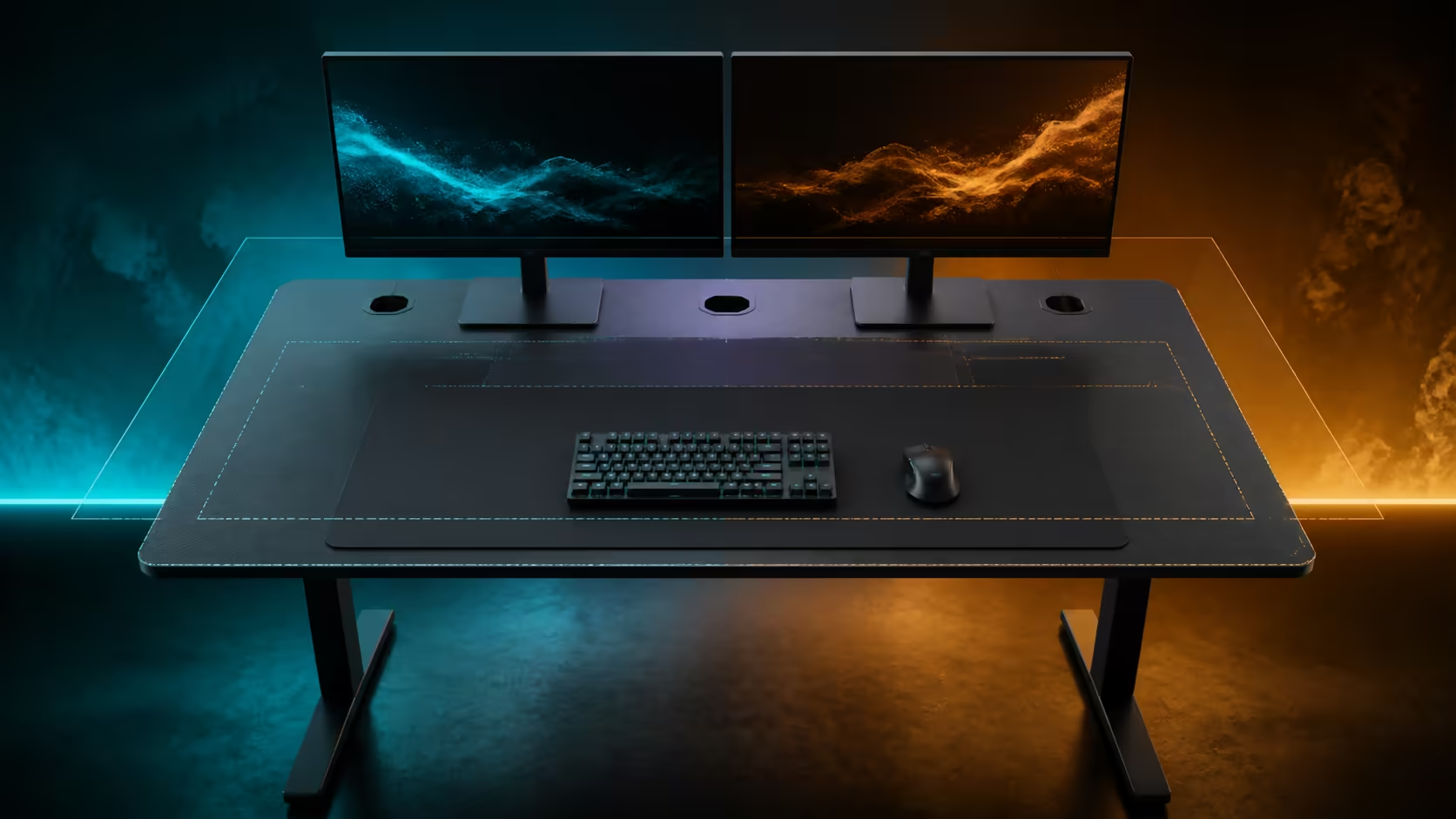
A large desk should be sized from the objects that must coexist, not from a vague preference for more room. Large gaming desk sizes monitor space and peripheral layouts connect room clearance, display bases, input travel, PC placement and cable service. The R5,099 dark grey Arozzi Arena provides a 160x82cm full-surface example for building the complete plan.
Quick Answer
Trace the desk footprint in the room, then draw monitor stands, keyboard, mouse sweep, PC and active peripherals at full scale. Preserve a centred input zone and readable viewing distance before assigning the remaining space. The R5,099 Arena combines its 160x82cm size with adjustable height, monitor attachment, three cable cut-outs and a huge water-resistant mousepad, so test dimensions and features as one system.
📐 Measure the room around the desk
Desk width is only the first dimension. Depth determines how screens and controls separate, while the installed height shapes the relationship between chair and hands. External room clearance determines whether any of those benefits remain usable.
Mark 160cm by 82cm on the floor. Pull the chair back as far as it travels, open doors and drawers, and walk the normal route through the room. Include skirting, wall plugs and window treatments that can prevent the top from reaching the expected position.
Measure the route into the room, including doorway width and turns. Decide where assembly can happen without dragging the completed desk or blocking an exit. Keep the directions and hardware organised for any later move.
Compare large gaming desk dimensions on the same floor plan. A slightly smaller surface that preserves circulation can deliver more useful space than a larger one pressed into a corner.
Depth also affects cleaning and cable access. Leave a way to reach rear openings, wipe the surface beneath movable equipment and inspect any monitor attachment. A top that cannot be serviced is effectively smaller than its measurements suggest.
🖥️ Build the display zone from stand geometry
Record every screen's full panel width, stand depth and widest foot position. Curved screens, angled side monitors and rear projections can occupy more area than a straight front view shows.
Centre the main display on the chair. For two equal screens, place their meeting point or primary working area according to how applications are used. Angle secondary panels towards the user without creating an extreme neck turn.
Viewing distance depends on screen size, resolution, readable scaling and user preference. Use the 82cm Arena depth to explore positions, but keep the keyboard close enough that shoulders remain relaxed.
Monitor attachment can change stand footprints. Any chosen arm still needs compatible screen hardware, a suitable installation point and clear underside contact. Map the complete movement arc so panels do not strike walls, lights or each other.
Check webcams and speakers after the screen zone is settled. They should not displace the primary input lane or block display ventilation. Items used occasionally can move to storage rather than remain permanent stand neighbours.
Use Arozzi gaming setup examples to study zoning, then rebuild each footprint from the owned hardware.
🖱️ Protect active peripheral space
Place the keyboard directly in front of the main viewing area. Mark the mouse's farthest movement at the sensitivity used during real games. The full sweep, not the resting mouse position, defines the protected input rectangle.
The Arena's huge mousepad covers the broad worktop, letting controls shift without crossing a standard mat edge. Physical objects can still interrupt the sweep, so keep docks, phones, speakers and drinks beyond the marked boundary.
Decide whether the PC case belongs on the desktop after monitor stands and controls are fixed. If placed above, preserve ventilation and service access. A position below needs a stable clean area and cable lengths that reach without tension.
Separate always-active peripherals from session equipment. Controllers, drawing devices or creator hardware can use a temporary zone and return to storage. A large desk becomes flexible when empty working margin survives.
Set the Arena's adjustable height after the chair supports stable feet. Bring the top near relaxed elbow level, then recheck monitor gaze. Shared users should keep individual posture and input references rather than one average setting.
Run a full work block and game session. Note forward leaning, shoulder reach, collisions and accessories that migrate into the mouse zone. Revise the map around observed behaviour.
🧵 Route and maintain a wide setup
Use the three Arena cut-outs to create short surface runs for display, PC and peripheral groups. The exact assignment follows device positions; no opening needs an arbitrary cable type.
Label both ends before the leads drop below. Keep small service loops near moving monitors or wired inputs, then support adapters and excess length with a separately chosen underside solution.
Test cable slack at the chosen desk height and through every intended monitor movement. No lead should pull a port, lift a power brick or enter leg and chair space. Keep accessible connections distinct from stable long-term routes.
The full-surface pad is water-resistant and easy-clean. Move electronics and blot spills promptly, collect dry debris without grinding it into the pointer lane, and restore gear only when the area is dry.
Browse complete gaming setup combinations after the base layout works. Each added device must identify its footprint, reach and cable path before it receives surface space.
Photograph the completed zones and underside. When equipment changes, compare the new shape with the saved plan instead of pushing the existing arrangement sideways.
Create a minimum free-space rule for the desk. Preserve enough open area to service a connector, place a notebook temporarily or move the keyboard for cleaning. Empty surface is not wasted; it is the working margin that lets a large layout adapt without immediate rearrangement.
Revisit the room plan after a week. The chair may travel farther during gaming than expected, or a rear cable may be difficult to reach. Update measurements from real behaviour before adding another display or peripheral.
Frequently Asked Questions
Which dimension matters most for large monitors?
Width and depth work together. Panel and stand width need lateral room, while stand depth and readable viewing distance consume front-to-back space.
How should a peripheral zone be planned?
Protect the centred keyboard and full mouse sweep first, then place active accessories inside easy reach and store occasional gear elsewhere.
Where can the PC case fit?
It can sit on the top when ventilation, display stands and input travel remain clear, or on a suitable lower area with safe cable reach.
What does full-surface mousepad coverage change?
It lets keyboard and mouse positions move across one broad layer, although equipment can still reduce the physical sweep.
Why are multiple cable cut-outs valuable?
Distributed openings allow shorter surface routes from equipment groups instead of one congested drop.
How does height adjustment enter sizing?
It aligns the worktop with the seated input position. Screen height and gaze still need a separate check.
What room clearance belongs in the measurement?
Include chair travel, doors, drawers, walking paths, wall plugs and access for cleaning or cable service.
How much is the Arozzi Arena Dark Grey?
The 160x82cm gaming desk costs R5,099.
Ready to size a large desk from screen feet, mouse travel and chair clearance?
Compare Evetech's gaming desk dimensions, trace every active footprint, and preserve a serviceable margin before the first cable is connected.