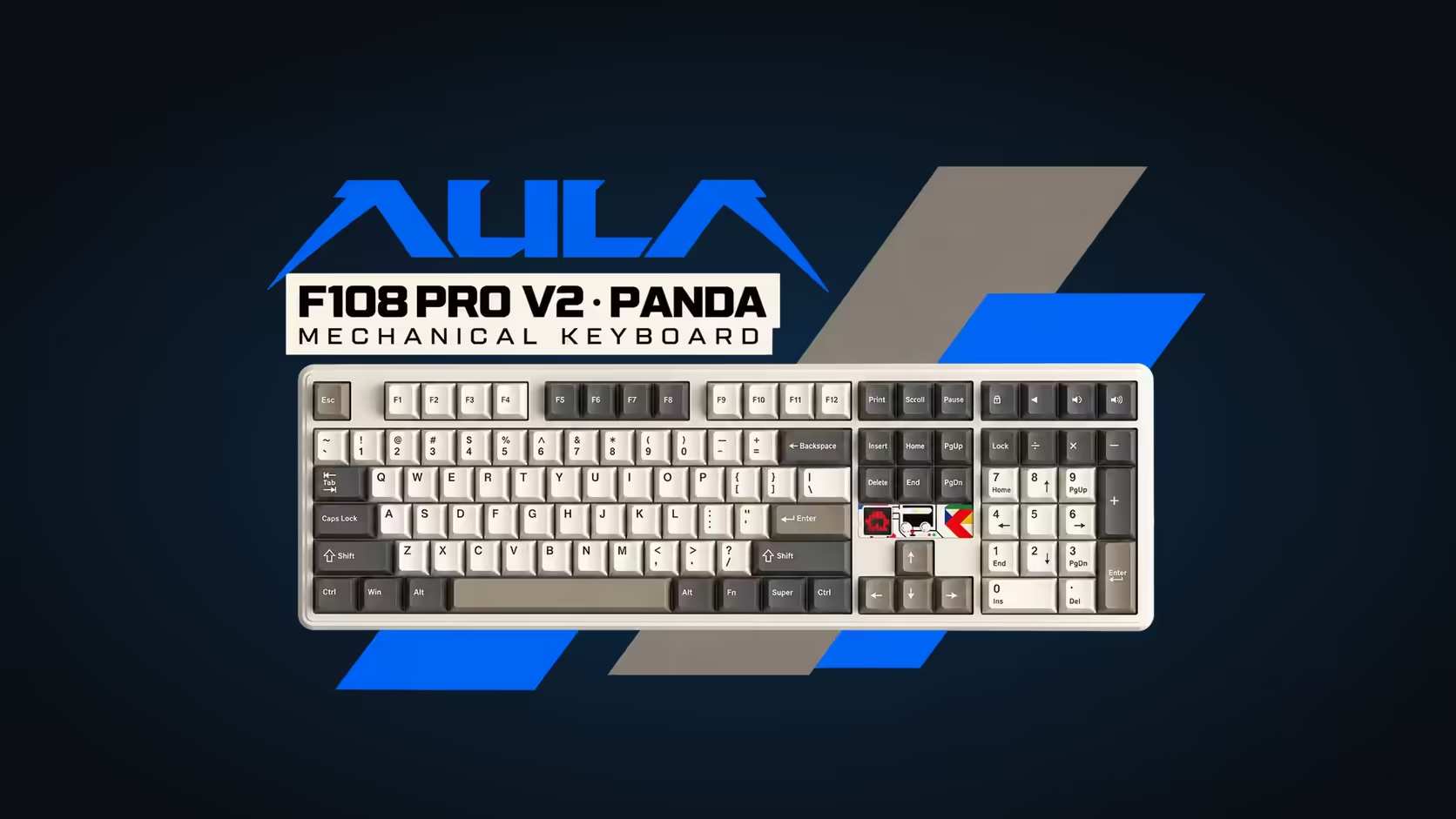
Look at almost any full-size keyboard and there is a small dead patch of plastic above the arrow keys, just below the Insert, Home and Page Up block. AULA put that space to work. The AULA F108 PRO V2 fits a dot-matrix keyboard display into that pocket above the arrows, so the board gains a moving panel without giving up a single key.
Quick Answer
The F108 PRO V2's display sits between the arrows and the navigation cluster on a full-size layout that still keeps its number pad. Out of the box it pulses with sound and runs its own animations, and your own GIFs can be loaded onto it with AULA's driver software. Both editions of the board, the Sea Dome and the Panda, carry the same panel. Evetech sells the F108 PRO V2 for R1,099 in Dark/Light Grey and R949 in Black/Grey/White.
🔲 Why that particular spot works
Full-size keyboards are laid out in blocks: the main typing area, the function row, the navigation six-pack, the arrows and the number pad. Between the navigation keys and the inverted-T arrows there is normally a small empty rectangle. Nothing lives there because nobody wants a key in an awkward reach.
A display does not need to be reached, only seen. Putting it in that pocket means the panel sits close to your right hand and within your line of sight, while every key stays exactly where muscle memory expects it. Nothing gets shrunk, moved or dropped to make room, which is the usual cost of adding a screen to a keyboard.
🎵 What the panel shows
The F108 PRO V2's display has two stock jobs.
- Audio reaction: play music or game sound and the dots move with it, a small visualiser that sits beside the arrows.
- Animations: preset motion for when you want something moving without audio playing.
The third option is your own artwork. AULA's driver is also the route for your own GIFs, meaning a logo, a pixel character or a brief loop can take over from the built-in effects. Because it is a dot-matrix panel rather than a full-colour screen, simple shapes and bold outlines read far better than detailed pictures.
🧩 How it fits the rest of the board
The display is one of several lighting elements on the F108. There is per-key RGB under the caps, three separately programmable LEDs below the spacebar and a linear light bar. The panel works alongside those rather than replacing them, so a desk can go fully lit or keep things calm with just the display running.
Under the keys, the board is a gasket-mounted design with seven layers of sound-dampening material and hot-swap sockets on every switch. You can run it wired through USB-C, cut the cord with its 2.4GHz USB dongle, or pair it by Bluetooth. The two editions differ in nothing but switch and colour: dark grey and light grey with LEOBOG Sea Dome linears, or black, grey and white with LEOBOG Panda linears.
If you are comparing it with other screen-equipped boards, Evetech's gaming keyboards section lets you line the F108 up against compact and tenkeyless options, and the keyboard best sellers page shows what else is popular right now.
🛡️ Cover for a board with moving parts
A display is one more component that has to keep working, so it is worth knowing who stands behind it. Evetech covers the F108 with a 1 Year Local Warranty, handled in South Africa.
Frequently Asked Questions
Does the display replace any keys?
No. It uses the empty area between the arrows and the navigation cluster, so the full layout and number pad are untouched.
Is it a full-colour screen?
No, it is a dot-matrix panel. It works best with simple, high-contrast images and animations.
How do I load my own image?
Use AULA's driver software, which supports uploading your own GIFs to the display.
Does the panel react to any sound?
AULA describes it as audio-reactive, so it responds to what your PC is playing.
Is the display different on the Panda edition?
No. Both editions carry the same panel; only the switch and colourway change.
Want a panel that moves with your music?
Browse Evetech's gaming keyboards and compare full-size boards with a display against compact layouts with screens.