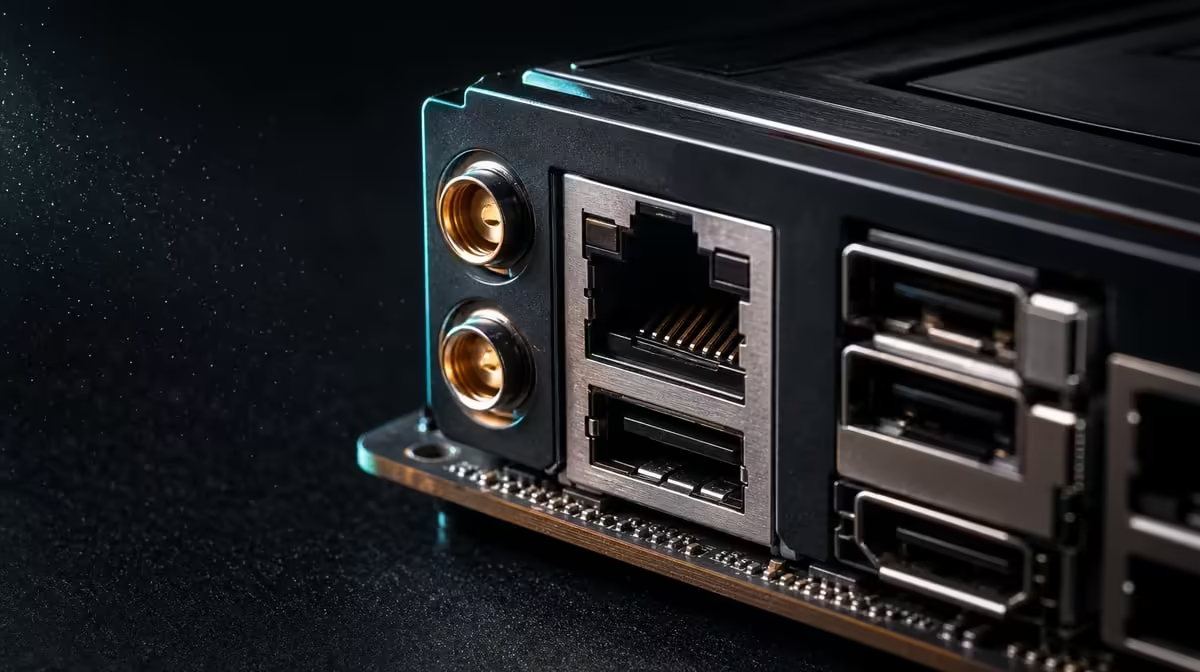
Fast network ports only become fast connections when the equipment beyond them can keep pace. To optimise Wi-Fi 7 and multi-gig Ethernet, divide workloads between wireless convenience and wired capacity, then test each path through compatible infrastructure. The ROG Crosshair X870E Extreme gives builders three strong interfaces rather than one automatic answer.
Quick Answer
Use Wi-Fi 7 where cable-free placement matters, 5G LAN where it matches existing wired equipment, and 10G LAN for a compatible high-throughput local route. At R24,899, the X870E Extreme includes all three, but router, switch, cabling, endpoint and service limits still determine the realised result.
?? Build the wireless path
Wi-Fi performance depends on both ends of the connection and the room between them. Confirm that the router can support the intended standard, attach and place the PC's antenna as directed, and avoid hiding it behind dense furniture or the metal case. Distance, walls and nearby wireless activity can all change a result.
Test near the router and again at the desk. If the close result is strong but the working position is not, investigate placement and signal conditions before changing motherboard settings. One speed test is insufficient; compare latency consistency, downloads and the actual game or creation workflow.
The X870 board selection offers context for other modern platform configurations. Treat Wi-Fi 7 as one component of the board decision, not proof that the rest of the wireless environment has been upgraded.
?? Give wired links distinct jobs
The Extreme provides both 5G and 10G LAN. A 10G path can suit large local transfers when the switch, storage destination, cabling and remote endpoint all support it. A 5G route may fit a different part of the existing network without demanding that every device operate at the maximum port rate.
Map the chain from the motherboard to the destination:
- selected board port;
- cable and wall run;
- switch or router interface;
- receiving PC or storage device;
- disk performance at both ends.
The slowest relevant part sets the practical ceiling. For online gaming, stable routing and latency can matter more than a very high local link figure.
?? Separate traffic by purpose
A creator might place large project transfers on the 10G interface, general wired access on 5G and mobile or flexible use on Wi-Fi. A gamer may prefer one stable wired route and keep wireless available for a room where cable installation is impractical. The correct split follows the household and workspace, not a universal hierarchy.
CPU and platform balance still come first. Evetech's AMD CPU category helps frame the processor side of the build, while the network premium should be measured against the tasks remaining after the core platform is funded.
Avoid trying to repair a weak internet route by purchasing a faster motherboard interface. Local connection capability cannot make an external service exceed its own plan or remove delay elsewhere.
?? Test without changing everything
Measure the same transfer or download over one interface at a time. Record the destination, distance, cable, router or switch port and system conditions. If a setting changes, repeat the original test before drawing a conclusion.
At R24,899, this board asks a builder to value broad networking alongside five M.2 positions, PCIe 5.0, DDR5 and E-ATX construction. Evetech's wider AMD motherboard range can reveal whether a more focused board meets the same real network needs.
Keep a simple network diagram
Label every important link with its supported connection and intended job. That drawing often reveals where a premium port would sit idle or where a single infrastructure upgrade could unlock it.
Measure local and internet traffic separately
An internet speed result says little about a 10G transfer between two devices inside the home or studio. Test a known local endpoint when evaluating the multi-gig ports, then run internet checks as a separate exercise. This distinction prevents an external service limit from making a healthy local link look defective.
For wireless, record the channel conditions and physical location with the result. Repeat at a similar time if possible, since nearby activity can change. For wired transfers, record the selected port at both ends, the path through any switch and the storage devices involved.
Design a fallback route
Important work should not depend on a single fragile connection choice. A creator using Wi-Fi for desk flexibility can keep a tested wired path for large scheduled transfers. A system using 10G for a local storage target can retain 5G for ordinary network access or diagnosis.
Fallback does not require bonding interfaces or changing advanced settings. It means knowing which cable or radio path will be used if the preferred one is unavailable, and verifying that route before a deadline or competitive session.
After setup, ask whether each connection can be explained in one sentence. If the owner cannot identify why traffic uses Wi-Fi, 5G or 10G, simplify the network before adding more controls or equipment.
Frequently Asked Questions
Does 10G LAN guarantee faster internet'
No. It describes the local port capability. The internet service and every relevant part of the path still impose their own limits.
Why keep 5G LAN when 10G is present'
The two ports can match different equipment or traffic roles. A 5G path may integrate cleanly with an existing wired segment while 10G serves a specialised transfer route.
Is Wi-Fi 7 always worse for gaming than cable'
Not automatically. Wireless conditions vary, so compare stability and latency in the actual room. A suitable wired route is generally easier to make physically predictable.
What should be tested for creator transfers'
Use a representative large file or project set and monitor both ends. Storage performance, not only the network interface, can influence the result.
Should networking decide the whole motherboard purchase'
Only when the planned infrastructure and workloads can use it. CPU support, memory, case fit, storage and expansion remain foundational.
Ready to design a cleaner network path'
Review Evetech's AMD motherboard choices alongside your router, switch, cabling and storage endpoints, then fund the interfaces your real traffic can reach.