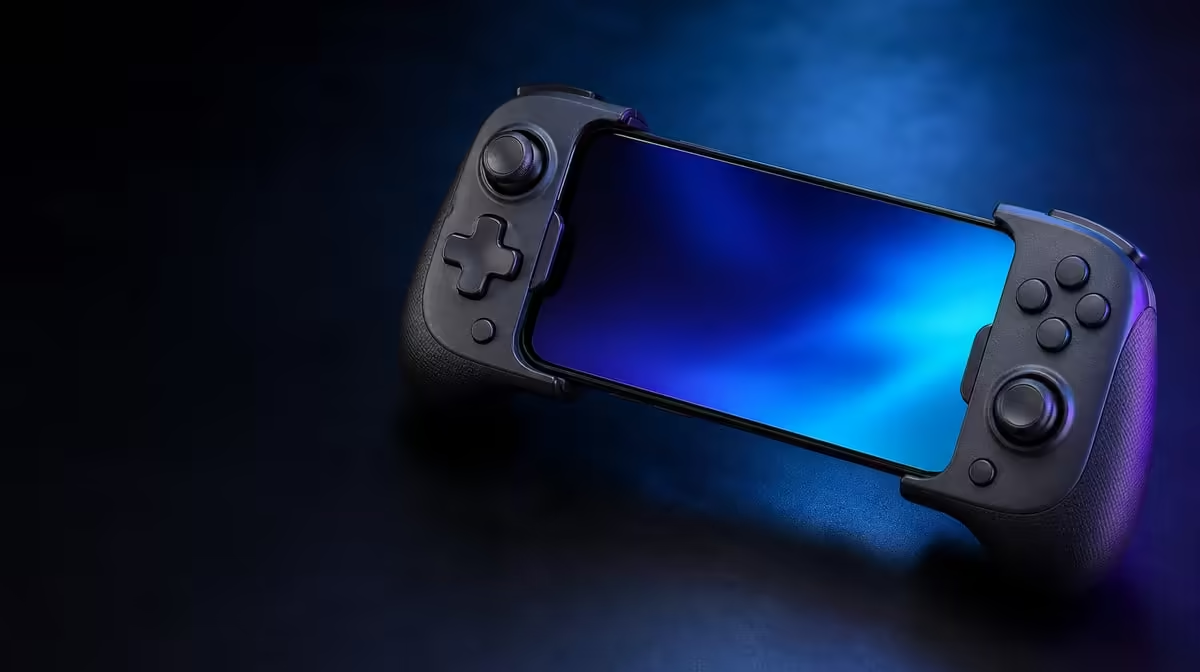
Touch keyboards work for messages, but they interrupt play when a command demands a different input route. Built-In Keyboard Mode gives the GameSir Pocket Taco another way to communicate with compatible mobile software. The feature is useful only when the app recognises those signals, so the right setup begins with a specific task rather than an assumption that every game will respond.
Quick Answer
Pair the Pocket Taco over Bluetooth, identify the text field or command you want to improve, and enable Keyboard Mode where the app supports keyboard-style input. Test a few essential keys before building a control routine around it. The Pocket Taco costs R599 at Evetech.
⌨️ Define the job before changing modes
Keyboard Mode is not a magic speed setting. It changes the kind of input the connected software may receive. That can help with a text field, a menu command or an action that the app already accepts from a keyboard-like device. It cannot make an app recognise commands that its developers did not provide.
Begin by writing down the exact friction. Perhaps opening chat forces you to release the controller and reach across the screen. Perhaps a supported game has a menu shortcut that is awkward on touch controls. A narrow goal makes testing faster because you know which result counts as success.
Pair the Pocket Taco normally in Android Bluetooth settings first. Confirm that the phone can see it and that the connection remains stable. Only then switch attention to Keyboard Mode. If pairing and input mode are changed together, a failed command gives you two possible causes and no clean answer.
Evetech's gaming controller category lets you compare phone-focused hardware with broader controller formats before deciding which input style fits your software.
🧪 Test commands in a safe sequence
Open the target app and choose a place where an incorrect input cannot delete work, send a message or ruin a live match. A settings screen, practice area or empty text field is ideal. Try one action at a time. Check whether the app accepts the input, whether it repeats unexpectedly and whether the on-screen focus moves in a predictable direction.
For text, test a short phrase before attempting a long message. The aim is not merely to make characters appear. Check whether spaces, deletion and confirmation behave as expected. Mobile apps handle external input differently, and some text boxes accept typing while ignoring navigation commands.
For game commands, start with low-risk actions such as opening a menu or moving through an inventory. If the software offers its own control settings, inspect those before assuming the controller needs a different configuration. A recognised keyboard-style input still needs a matching command inside the game.
Keep notes while testing several apps. Record the app name, the mode used and the commands that worked. This prevents one successful example from being mistaken for universal compatibility. It also gives you useful information if an update changes behaviour later.
The Pocket Taco's 62.2g vertical design is intended for portable phone play, so Keyboard Mode makes most sense when it reduces how often you need to leave that handheld position. The wider accessory range may suit setups where a separate typing device is more appropriate.
📱 Make text faster without making control messier
Speed comes from reducing transitions, not from forcing every task through one mode. If a short command works reliably, keep it. If entering normal text becomes confusing, return to the phone keyboard for that part. A mixed approach can be quicker than trying to replace touch input completely.
Avoid mapping many actions on the first attempt. Learn two or three useful commands, play a full session, and add more only if the pattern remains clear. Dense control schemes are difficult to remember on a compact device and can turn a convenience feature into another source of mistakes.
Bluetooth supplies the connection, while the app decides what it will do with the input. If commands stop working, first confirm that the Pocket Taco is still connected. Then check whether the app changed focus, opened a text field or switched control context. Re-pairing should come later, after simple software causes have been ruled out.
Battery preparation matters too. The controller carries a 600mAh battery and Smart Power On-Off, but a long session should still begin with enough charge. Power management can reduce needless idle use; it cannot protect a workflow from a battery that started nearly empty.
At R599, the Pocket Taco offers Keyboard Mode as part of a small Bluetooth controller rather than as a promise of desktop-style typing. That distinction keeps the buying decision practical. Choose it for mobile control and treat faster text or command access as an app-dependent benefit.
Before buying, check the current price and availability, then verify the apps that matter to you. Evetech's accessory best sellers provide a quick view of other common setup additions.
Frequently Asked Questions
Will Keyboard Mode work in every mobile game?
No. The phone can recognise the Pocket Taco while an individual game ignores keyboard-style input. Check the game's control settings and test the exact commands you need.
Is Bluetooth the same thing as Keyboard Mode?
Bluetooth carries the connection between controller and phone. Keyboard Mode determines a type of input sent across that connection, so successful pairing does not automatically prove that a command will work.
What is the safest way to test text entry?
Use an empty, unsent text field and type a short phrase. Check characters, spaces, deletion and confirmation separately before relying on the mode for a longer message.
Can Keyboard Mode make mobile commands faster?
It can reduce touch-screen switching when the app already accepts the relevant input. The gain comes from keeping useful actions under your fingers, not from changing the app's underlying capabilities.
Should I keep the mode active all the time?
Use it where it makes interaction clearer. If navigation, typing or game controls become unpredictable, switch back to the simpler input route rather than adding more mappings.
Ready to streamline supported mobile commands?
Browse Evetech's controller and gaming accessory categories, then check current Pocket Taco availability for a compact Bluetooth setup.