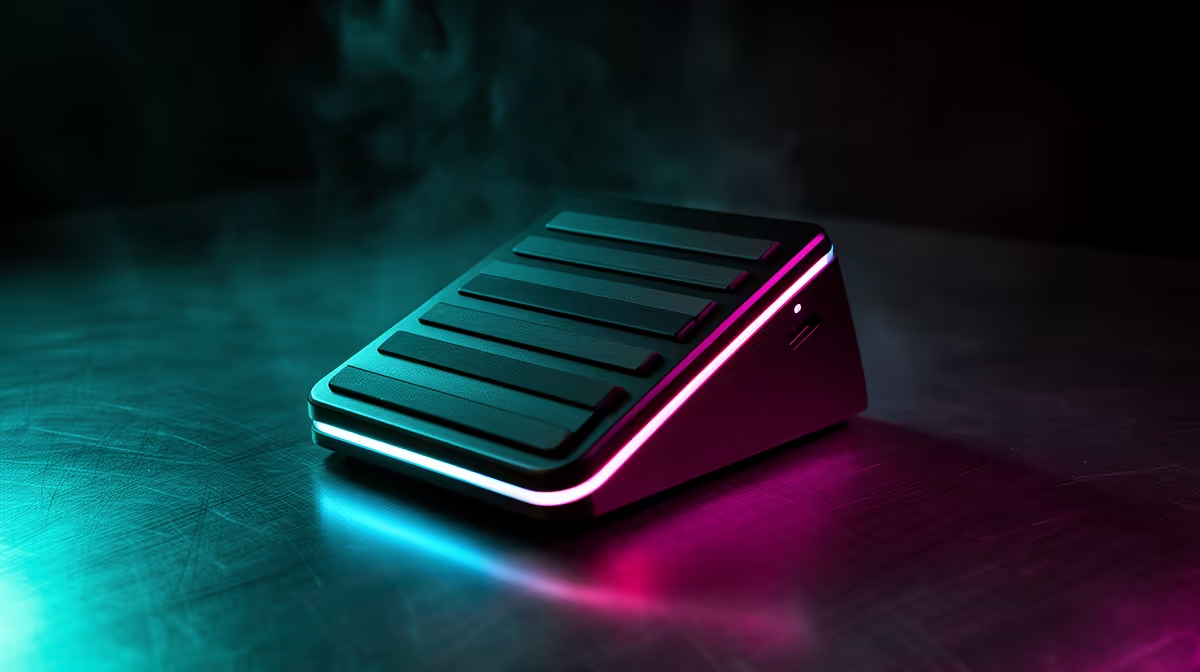
A foot pedal is one of those streaming tools that seems unnecessary until both hands are busy. One press can mute a microphone, switch a scene or trigger push-to-talk without breaking eye contact. For the Elgato Stream Deck Pedal in South Africa, the important checks are current local availability, software support and whether your foot can find the right control without looking.
Quick Answer
Elgato Stream Deck Pedal listings and Rand prices can change as streaming stock moves, so check the current South African category rather than relying on an old figure. Evetech's live streaming essentials range is the correct place to confirm locally listed Elgato and creator gear. Compare the pedal with the tasks you need to move away from your hands.
🦶 Decide what your foot should control
The Stream Deck Pedal provides three foot-operated inputs. The centre and side pedals can carry different actions through supported software.
Mute is the obvious use. It lets you cough, speak off-stream or manage voice chat without hunting for a keyboard key.
Push-to-talk also suits a pedal because the action can remain active only while your foot holds it, depending on the configured command.
Scene changes, clip markers and sound effects are other options. Keep high-impact actions away from a pedal you may press by accident.
For editing, a pedal can control playback, markers or shortcuts. Confirm the target application accepts the chosen hotkey or plugin action.
Three clear commands are better than a complex set you cannot remember. Label the intended functions in your stream notes.
Place safety-sensitive or destructive actions on a hand control with visual confirmation instead.
🛠️ Fit the pedal to your desk and posture
The pedal needs a flat surface and enough grip to stay put. Carpet, tile and a chair mat can change how it moves.
Position it where your foot rests without twisting the knee or lifting the heel. A control that creates hip strain will not stay useful.
Test whether the centre pedal requires more force or travel than the sides. Assign the most common command to the easiest movement for you.
Route the USB cable away from chair wheels and foot traffic. Give it strain relief so a kick does not pull the computer port.
Keep the pedal clear of power strips and loose cables. Your foot should never find mains plugs while reaching for a stream command.
If you use driving or flight pedals at the same desk, separate their positions. Avoid accidental stream commands during a simulator session.
Clean dust and grit from the moving surfaces using approved methods. Do not spray liquid into the pedal mechanism.
📦 Check the local setup around the pedal
Use the live product listing for the Stream Deck Pedal model, package, connection and current Rand price. Streaming prices can move with stock, so a checkout-day figure is more useful than an amount copied from an older article.
Confirm current operating-system and Stream Deck software support before buying. Plugins can change, and one application may need a normal keyboard shortcut instead.
Check whether the software account, marketplace or plugin you plan to use has any separate requirements. Keep core commands able to work through simple hotkeys where possible.
Evetech's current webcam range helps you build the wider creator setup around the control surface.
Compare the pedal with a hand-operated Stream Deck, keyboard macro or mouse button. A pedal earns its place when hands-free control solves a repeated problem.
Keep proof of purchase, serial details and packaging. Foot controls face dust, movement and cable strain, so document any early mechanical fault.
Check the seller's first-fault steps and longer warranty route. Test all three switches before the initial reporting window closes.
Do not claim current model stock from an old article. Evetech's streaming category is the live source for what is available when you check.
If the pedal will serve several applications, confirm whether profiles switch with the active window. A mute command meant for chat should not become an edit shortcut when another program moves to the front.
🧪 Configure a dependable pedal profile
Connect the pedal directly for first setup and install supported Stream Deck software from the trusted source.
Record the detected device and software version. Test each physical pedal with a harmless action.
Assign mute to one switch and use a visible on-screen or Stream Deck indicator for state. A mute toggle without feedback can leave you talking to nobody.
Set push-to-talk as a hold action if the application supports it. Confirm release ends transmission.
Map the third pedal to a low-risk workflow command such as a marker. Use it during a full practice stream.
Check that the pedals do not double-trigger when pressed from an angle. Reposition the unit rather than compensating with awkward foot movement.
Test the profile after restarting the computer and application. Software that has not loaded can leave the pedal inactive.
Export or record the profile. Keep a list of any required plugins and versions.
Inspect the cable and underside after a week. Add a desk-safe non-slip solution if the pedal creeps.
Practise one failure routine: know the keyboard or mouse backup for mute and scene switching if the pedal or software stops responding.
Record the cable route before moving the desk. A photo helps you restore strain relief without running the lead beneath a chair wheel.
If another person uses the workstation, show them the pedal actions and backup mute. Hidden controls under a desk can surprise a guest or colleague.
Frequently Asked Questions
Is the Elgato Stream Deck Pedal available in South Africa?
Listings move. Check Evetech's current streaming category for the live product range and delivery status.
Does Evetech carry other Elgato Stream Deck accessories?
The category page is the current source for listed Elgato and creator accessories. Do not rely on a static range claim.
How does the pedal help streamers?
It moves three supported commands to your foot, freeing both hands for a game, camera work or other controls.
What does it cost at Evetech?
Check the live Evetech listing for the current Rand amount and package. A dated page is safer than an old quoted price.
Can buyers obtain South African warranty support?
Warranty follows the current seller terms. Read the product listing and keep proof of purchase.
Who benefits most from a foot pedal?
Streamers, editors and creators whose hands stay occupied can gain the most, provided the pedal fits their posture and software.
Ready to move mute and scene controls under your desk?
Browse Evetech's current streaming essentials and webcams, then build a creator setup whose controls fit your hands, voice and workspace.