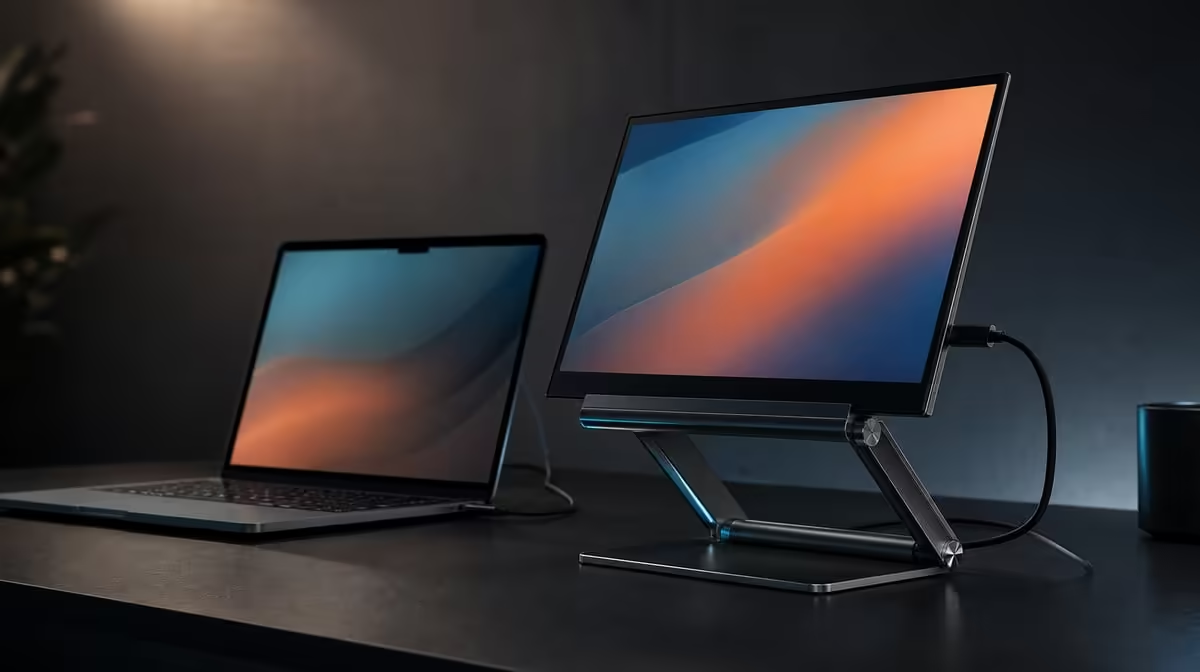
Two adjustable joints give a portable screen options, but they also make the order of adjustment important. To adjust 360-degree rotation and a folding arm, support the device, choose its orientation first and then shape the R599 UPERFECT UStand's 135-degree arm around a balanced footprint.
Quick Answer
Rotate the screen with one hand supporting its weight, then use the 135-degree folding arm to set reach, height and tilt without forcing a joint. The UStand costs R599. After each change, confirm that the compatible 7-15.6-inch device remains centred, the base stays flat and connected cables retain relaxed slack.
🔄 Choose orientation before reach
Decide whether the task benefits from landscape, portrait or another supported angle. Full 360-degree rotation lets the screen move through a complete circle, but that movement is a positioning option rather than permission to spin a mounted device carelessly.
Begin with the arm close to the base. Hold the display on both sides, take its weight and rotate slowly. Watch the edges of the device, its ports and any case lip as they move around the support.
Stop at the intended orientation and check that the device still contacts the anti-slip rubber evenly. A position that looks straight can remain poorly balanced if more of the display sits to one side of the footprint.
Use the Evetech monitor accessory range to compare the role of rotating and fixed supports after the screen orientation has been defined.
📐 Shape the arm in small stages
The UStand's folding arm moves through 135 degrees, creating choices for height, reach and tilt. Adjust one part of that position at a time while continuing to support the display.
Start with the shortest useful reach. Move the screen towards the required height, pause and test the base. Extending farther increases leverage, so the largest possible angle is rarely the best automatic setting.
Do not force resistance or use the mounted screen as a handle. If a joint does not move as expected, remove the device and inspect the stand in an unloaded state rather than applying extra pressure through the display.
Return to the chair and work position before finalising the angle. The aim is a readable screen that does not require awkward posture, while keeping the centre of the device over secure support.
⚖️ Recheck balance after every move
Place the UStand on a level, firm surface and look at the base from more than one side. The aluminium frame and all-around anti-slip rubber assist support, but poor centring can still make an adjustable position unstable.
Release hand pressure gradually. If the arm settles, the screen twists or the base lifts at an edge, take the device off and use less reach. Do not wedge paper beneath a moving base or add an unrelated object as a counterweight.
Type, use the mouse and make a small desk movement away from the stand. This shows whether normal work sends visible vibration through the surface. Relocate the support if the desk itself flexes heavily.
Owners matching the stand to a second display can compare Evetech portable monitor options, then check the monitor's weight against current stand guidance. The UStand's device range is 7-15.6 inches.
🔌 Preserve cable movement
Set the main viewing position before attaching charging or display leads. Identify where the ports will travel during rotation and arm movement, then connect the correct device cables with enough slack for that exact path.
Support cable weight near the connector. A heavy loop hanging from one side can change orientation or pull against the port. Route excess length around the stand's footprint rather than across a folding joint.
Move only through the tested cable range. If the connector begins to angle, a lead becomes taut or the base shifts, stop and disconnect before adjusting again. Charge-while-mounted access is useful only when the cable remains gentle and the support stays balanced.
Record the successful orientation and arm position for repeat setups. A quick photograph can help travellers rebuild the same geometry without relying on the joint end stops. Browse Evetech's popular accessories once the cable path and viewing angle are proven.
Repeat the preferred arrangement after folding the stand flat. Rebuilding it tests whether the position is understandable rather than a lucky result of several small adjustments. Compare the new setup with a side photograph, then verify base contact and screen centring before reconnecting cables.
If more than one person uses the screen, save a separate physical reference for each main position. Do not move a loaded arm by pulling on the top edge of the display. Support the device, shorten the reach first and then make the larger change.
The same discipline applies when switching between work and entertainment. A lower or more distant view can be useful, provided the changed leverage, cable path and anti-slip contact all pass again.
Frequently Asked Questions
What does 360-degree rotation allow?
It allows the mounted device to change orientation around a full circle, including portrait and landscape positions where the device fit remains secure.
How far does the UStand arm fold?
Its folding arm has a 135-degree adjustment range for reach, height and angle.
Which adjustment should be made first?
Set orientation while the arm is close to the base, then adjust reach and tilt. This keeps leverage easier to assess.
Why support the screen during adjustment?
Supporting it prevents the device from becoming a lever on the joints and lets you stop safely if the balance changes.
What signals a poorly balanced angle?
A lifting base edge, settling arm, twisting screen or shifting anti-slip contact indicates that the position needs correction.
How much cable slack is enough?
Use enough for the complete planned movement without tension at the connector or a loop that pulls the stand. There is no useful universal length.
What does this adjustable stand cost?
The UPERFECT UStand is R599 with 360-degree rotation and a 135-degree arm.
Ready to turn two adjustments into one dependable screen position?
Explore Evetech monitor accessories and set the UStand's rotation, arm and cable path around the way you actually work.