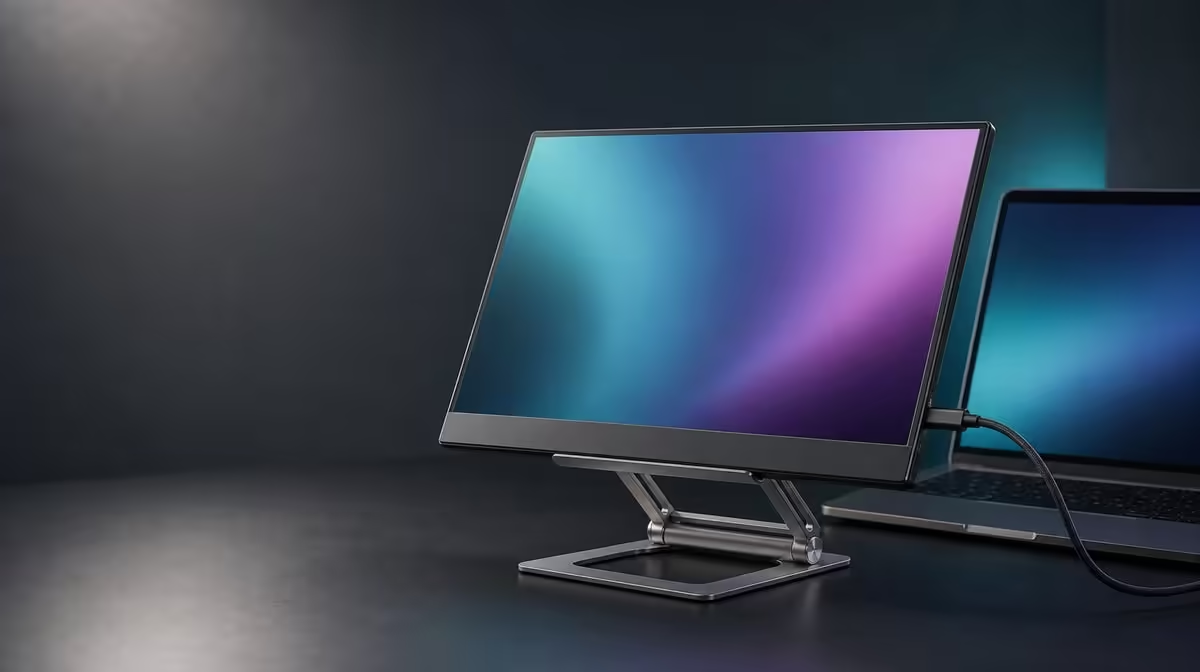
A portable screen becomes useful only when its support stays calm as you type, connect cables and change the viewing angle. A stable portable monitor stand setup starts with the base, not the display: open the R599 UPERFECT UStand fully, establish its footprint, then centre a compatible 7-15.6-inch device before adding any cable load.
Quick Answer
Set the UStand on a firm, level surface, open its support completely and place the display centrally against the anti-slip contact. The stand costs R599 and folds flat for travel. Test stability at the intended height and angle before connecting power or video cables, because cable pull can change an otherwise balanced position.
🧭 Establish the support before mounting
Clear enough desk space for the base, the screen and the path your hands will use during placement. Loose adapters, notebooks and cable loops should stay outside the footprint while the stand is being opened.
Unfold the UStand without forcing either joint. Its aluminium structure gives the support a rigid frame, while the working position still depends on how the 135-degree arm and base are arranged. Stop when the chosen shape rests evenly and does not rock on the surface.
Inspect the anti-slip rubber where the base meets the desk and where the device will touch the support. The material should be clean and unobstructed. Rubber improves grip, but crumbs, dust or a folded cloth beneath one side can create a poor foundation.
The Evetech monitor accessories category gives useful context for comparing support formats once the working area has been measured.
🎯 Centre the display and confirm contact
Support the screen with both hands and lower it into the stand rather than dropping one edge into place. A 7-15.6-inch device falls within the UStand's stated size range, yet diagonal size does not confirm weight, thickness, case fit or port clearance.
Position the display so its centre remains over the strongest part of the footprint. Check that the contact surfaces hold the device evenly and that no case lip or raised section creates a narrow pressure point.
Release one hand gradually while the other remains ready to catch the screen. If the stand shifts, the arm settles unexpectedly or the device leans away from its support, remove it and shorten the reach before trying again. Do not rescue an unstable setup by pressing the base down with another object.
Test both landscape and portrait only when you intend to use them. The 360-degree joint changes orientation, but every new position changes leverage. Hold the display during rotation and retest the footprint before letting go.
📐 Set a practical viewing position
Use the 135-degree folding arm to establish height, reach and tilt in small steps. Begin closer to the base, where leverage is easier to control, and extend only as far as the required viewing position needs.
Sit or stand where the screen will be used. The useful angle is the one that keeps the image clear without requiring the stand to reach farther than necessary. Adjustment range is not a target that must be used in full.
Tap the desk lightly away from the stand, type normally and move the mouse. A portable display may show movement if the work surface flexes. Distinguish vibration coming through the desk from movement caused by poor centring or an overextended arm.
People planning a second-screen setup can browse Evetech portable monitors after they have confirmed the stand's supported size range and their device's physical fit.
🔌 Add cables without disturbing balance
With the screen stable, identify its power and video ports before connecting anything. The UStand permits charging while a compatible device remains mounted, but it does not select the charger or cable for that display. Use the equipment intended for the device.
Support each cable near the connector so its weight does not hang from the port. Leave a relaxed loop for the planned angle and rotation, then route the rest away from the base. A taut lead can pull the display sideways or slowly rotate the stand.
Repeat the stability test after every cable is connected. Move the screen only within the slack already provided. If a lead crosses a moving joint or catches as the arm folds, disconnect it and redesign the route before continuing.
For travel, remove the device and cables before folding the stand flat. Pack the UStand so the rubber contact surfaces stay clean, then rebuild the setup from the base outward at the next desk. Evetech's accessory best-seller page can help plan the surrounding portable workspace.
Photograph the finished arrangement from the side. The image records base opening, arm reach, screen position and cable loop, making the next travel setup faster. Rebuild from that reference, but repeat the surface and balance checks because a different desk can change the result.
Frequently Asked Questions
What should be opened before mounting the display?
Open the stand and establish a stable base first. The display should be added only after the folding arm and footprint rest evenly.
How should the display be centred?
Place its middle over the main support area with even contact on the anti-slip surfaces. Avoid extreme reach until the closer position has passed.
Which screen sizes fit the UStand?
The stated compatibility range is 7-15.6 inches. Weight, thickness, case shape and port placement still need individual checks.
When should stability be tested?
Test after opening the stand, after mounting the screen, after every major angle change and again after cables are connected.
Can the screen charge while mounted?
Yes, provided the device's port stays clear and its correct power equipment is used. Cable slack must not pull against the screen or stand.
What makes this support useful for travel?
The UStand folds flat and can be rebuilt at another location. Remove the screen before folding or changing modes.
How much is the UStand?
The UPERFECT UStand Portable Monitor Stand is R599. Check Evetech's current listing when ready to buy.
Ready to build a portable screen position from a stable base?
Compare monitor accessories at Evetech, confirm your device fit and set up the R599 UStand one balanced step at a time.