The best WiFi mesh system South Africa shoppers can buy is not always the kit with the largest speed number. A stable result comes from suitable node placement, enough wired capacity, clean backhaul between nodes and a layout matched to the walls and distances inside the property.
Quick Answer
Choose mesh by backhaul and coverage before headline WiFi speed. The captured local router sample ranged from R699 for an AC1200 mesh-capable model to R3,599 for an ASUS WiFi 7 router, with Cudy WiFi 7 choices at R2,449 and R2,599. Use Ethernet backhaul where practical; otherwise place wireless nodes where they still receive a strong signal.
📡 Backhaul is the hidden link
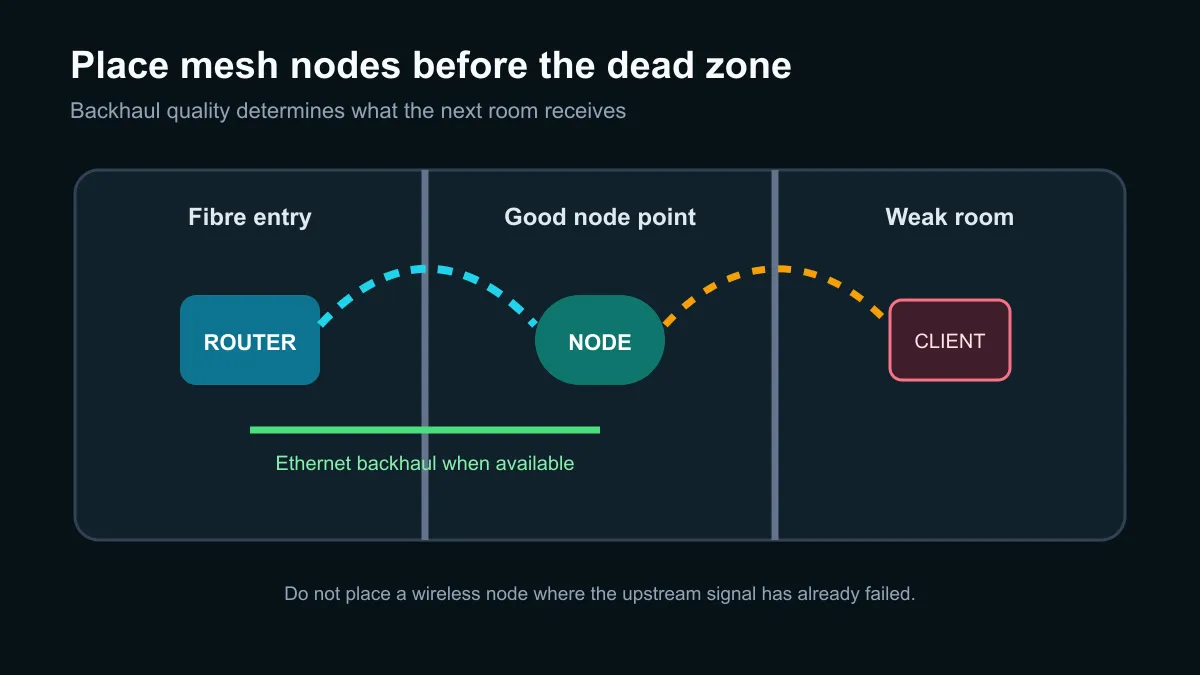
Mesh nodes must communicate with the main router as well as client devices. With wireless backhaul, walls and distance affect that inter-node link. A node placed inside the dead zone may display a strong local WiFi icon while forwarding traffic through a weak upstream connection.
ASUS documents both wired Ethernet and wireless backhaul for AiMesh. Wired backhaul gives each node a predictable path and frees radio capacity for phones, televisions and PCs. It is especially useful in long homes, multi-storey buildings or rooms separated by dense walls.
When cable is not possible, place the node partway between the main router and the problem area. Test at the actual work desk or television, not only beside the node. One correctly placed node can outperform a larger kit arranged badly.
🏠 Size the system for the property
Count the floors, dense walls, outdoor areas and wired devices. A small apartment may need only one capable router. A larger house can benefit from two or three nodes, but every extra wireless hop can reduce usable throughput if the backhaul is already weak.
The Cudy WR11000 specification illustrates the high end of the current feature set: WiFi 7 mesh support, an aggregate headline rate up to 10.6Gbps and four 2.5Gbps Ethernet ports. Those figures provide capacity, but they do not guarantee internet speed. The fibre package, device radios, interference and placement remain hard limits.
💰 Use local prices as a tier guide
The captured category-filtered sample started with a Cudy AC1200 mesh router at R699 and an AX3000 mesh model at R999. Cudy WiFi 7 options appeared at R2,449 and R2,599, while an ASUS RT-BE82U was R3,599. These are individual router prices, so confirm whether a listing is a single unit or a multi-node pack.
Compare current wireless routers and the narrower fibre router range. Match WAN and LAN port speeds to the fibre line and local transfers. Paying for multi-gigabit WiFi while using a slower WAN port or an old client device will not produce the advertised result.
Frequently Asked Questions
Is wired backhaul better than wireless backhaul?
Usually, yes. Ethernet gives the nodes a stable dedicated path, while wireless backhaul shares radio conditions with the property.
Where should a wireless mesh node go?
Place it where the main router still provides a strong signal, not at the centre of the dead zone. Then test from the room that needs service.
Do I need WiFi 7 for fibre?
Not necessarily. WiFi 7 adds capacity and newer features, but an affordable WiFi 6 system may already exceed the fibre line and client-device needs.
What did mesh-capable routers cost in the snapshot?
The captured range ran from R699 to R3,599. Confirm pack size, port speeds and mesh compatibility because similarly named products can include different hardware.
Will a faster mesh fix every dead zone?
No. Dense walls, poor node placement and weak backhaul can limit an expensive system. Layout and cabling often matter more than the headline rating.
Fixing whole-home WiFi?
Map the weak rooms, choose the backhaul route first, and compare enough nodes and ports for the property rather than the box number.