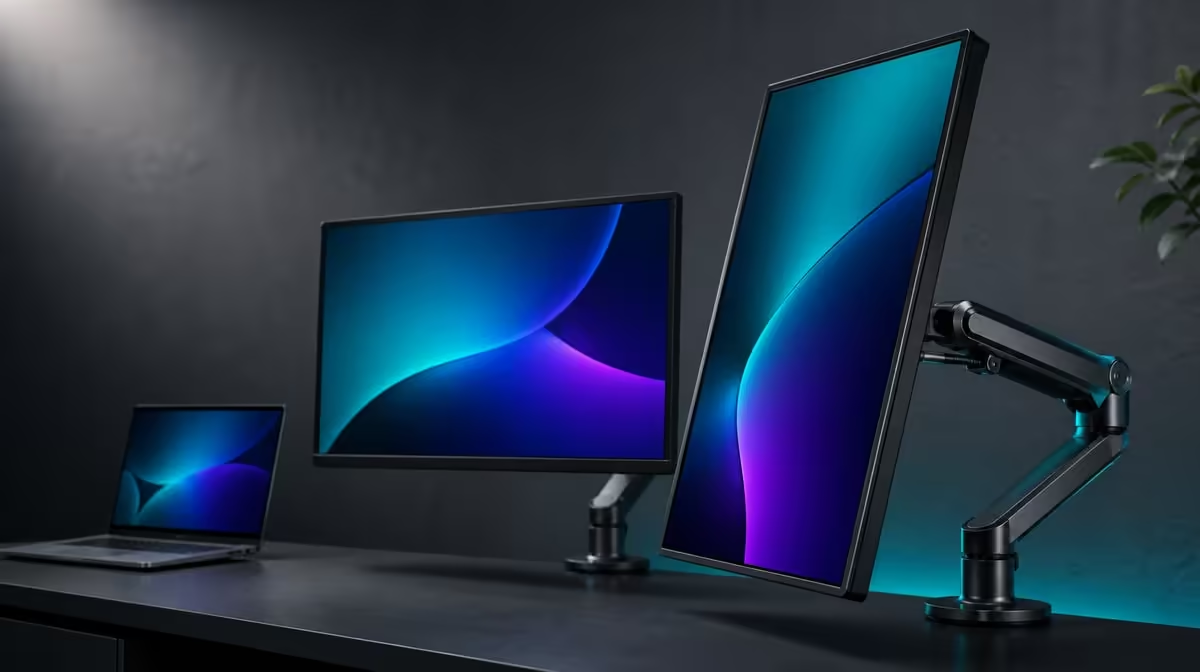
A 360-degree hinge range creates choices, not a promise that every physical position will be comfortable or stable. Folding two 23.8-inch screens without losing useful angles requires enough desk room, controlled cables and a layout matched to the work.
Quick Answer
The R6,899 UPERFECT Delta Mega's two 23.8-inch Full HD IPS panels fold through 360 degrees for horizontal, vertical and sharing arrangements. Large screens can still usefully change position, provided the user supports the structure, leaves cable slack, manages reflections and remaps the Windows or Mac laptop display layout after major moves.
📐 Translate 360 degrees into real positions
The confirmed folding range describes how far the structure can move. It allows the panels to be arranged as a wide pair, stacked one above the other or turned for a sharing view. It does not mean that every point in that movement is equally valuable on every desk.
A horizontal arrangement works well when two applications deserve similar attention and there is enough width. A vertical stack uses less lateral room and can reduce repeated side-to-side viewing. Because the stack is intended to reduce neck strain, place sustained work on the panel closest to the natural gaze and treat the upper one as supporting space until personal comfort is proven.
Sharing positions use the folding range differently. One screen can face another person for a presentation, review or customer conversation while the laptop operator keeps control of the source. Check privacy and viewing lines before placing sensitive material on either panel.
Start with paper outlines if desk fit is uncertain. Mark two 23.8-inch rectangles, the stand area, the laptop, keyboard and mouse. Sweep the outline through the intended movement instead of measuring only the final pose. Nearby walls, shelves and desk accessories can stop an otherwise valid fold.
Use Evetech's portable display category to compare laptop companion formats after mapping the available surface.
🧱 Protect balance through each adjustment
Two full-size panels create more leverage than a small screen, so position changes should be deliberate. Put the stand on a firm, level surface and clear the movement path. Hold the assembly as intended while opening or rotating it rather than pushing one distant edge.
Pause at the chosen angle and test ordinary desk disturbances. Type, move the mouse, adjust the chair and touch a cable lightly. The screens should remain steady enough for comfortable work. If the desk flexes or the arrangement feels precarious, choose a less extended position rather than assuming hinge range guarantees stability.
Keep vents, controls and speakers unobstructed. The built-in speakers can simplify meeting audio, but their presence does not remove the need to check whether a folded position changes the listening result. Low blue light can support a reading preference without correcting glare produced by a poor angle.
Reflections matter because a technically possible fold can point a panel directly at a window or lamp. View a dark page and a light document on both IPS screens, then make small angle adjustments. The best pose is one that preserves readable Full HD content without forcing the user to lean.
Compare the flexible approach with displays in Evetech's desktop monitor section if the workspace rarely needs to change shape.
🔌 Route cables for movement, not just connection
Windows and Mac computers have two supported ways into the Delta Mega: Type-C and HDMI. Those source choices are useful, but the cable path must accommodate the selected fold. A connector pulled sideways or a cable stretched across a hinge can turn a smooth adjustment into unnecessary strain.
Connect the laptop after placing the screens near their working position. Provide a relaxed curve rather than a taut line, and keep plugs clear of the movement zone. Before a major rearrangement, watch the whole cable route and guide it by hand; do not rely on the connector to stop the motion.
Port capability still needs attention. Not every laptop Type-C connection necessarily supplies display video, and cable capability can vary. HDMI provides another supported route, but the intended dual-screen and 100Hz result depends on the full source path. Establish a stable image before evaluating folding convenience.
Once connected, set both screens to native 1920 x 1080. Select 100Hz where supported and verify it per display. The listed 14ms response remains a separate motion characteristic. Moving a panel physically does not change those specifications, although operating-system orientation and application placement may need revision.
If the laptop stays open, decide whether its own panel is a third work area or merely the source. Assign it a defined purpose so the fold is designed around actual tasks rather than the desire to display every available screen.
🗺️ Save a map for every useful shape
Windows and macOS represent displays as rectangles. After turning a wide pair into a stack or sharing position, drag those rectangles to match the physical order. Set orientation correctly, choose the primary screen and test pointer travel across every boundary.
Create a short profile note for each arrangement. Record which application belongs on which panel, the preferred scaling, the laptop role and the cable route. The notes make a flexible monitor faster to reconfigure and stop a 360-degree feature from becoming an occasional novelty.
Photograph each useful position from the chair and label it by purpose rather than hinge angle: comparison, stacked reference or shared review. This gives another user a visual setup guide and makes it obvious when two supposedly different profiles are really the same pose with renamed applications.
At R6,899, value comes from the positions that solve repeated problems. A wide layout might support comparison work, a stack may conserve width and a sharing angle can improve an in-person review. Angles that never enter the workflow do not need to carry part of the buying case.
Check Evetech's frequently chosen monitors after identifying the two or three poses that the room can genuinely support.
Include transition time in the judgement. If moving from private work to a sharing view requires untangling cables and rebuilding every display setting, the angle is mechanically possible but operationally weak. A valuable fold should be stable, connection-safe and quick enough to use when the relevant task arrives.
Frequently Asked Questions
What folding range is confirmed?
The Delta Mega has 360-degree folding across its two-screen structure.
Which arrangements can use that range?
Horizontal, vertical-stack and sharing positions can all use the flexible movement, subject to desk fit, viewing lines and stable support.
Does 360 degrees mean every angle is useful?
No. A position can be mechanically reachable yet unsuitable because of balance, glare, cable tension or uncomfortable viewing.
How should cables behave during adjustment?
They should remain loose enough to move without pulling on ports, rubbing across the hinge path or limiting the intended angle.
Why does stand balance matter more with large panels?
The two 23.8-inch screens extend weight away from the support as they move, so the desk and final pose need a deliberate stability check.
What should be updated after a major fold?
Match the operating-system display map, orientation, primary-screen selection and pointer direction to the new physical layout.
Can one screen be used for sharing?
Yes. The folding range supports a sharing position, while the laptop can retain control and the other panel can remain with the operator.
Choose the folds your desk can turn into useful work.
Map the laptop, cable sweep and viewing lines first, then shape the Delta Mega around the wide, stacked or shared layout you will repeat.