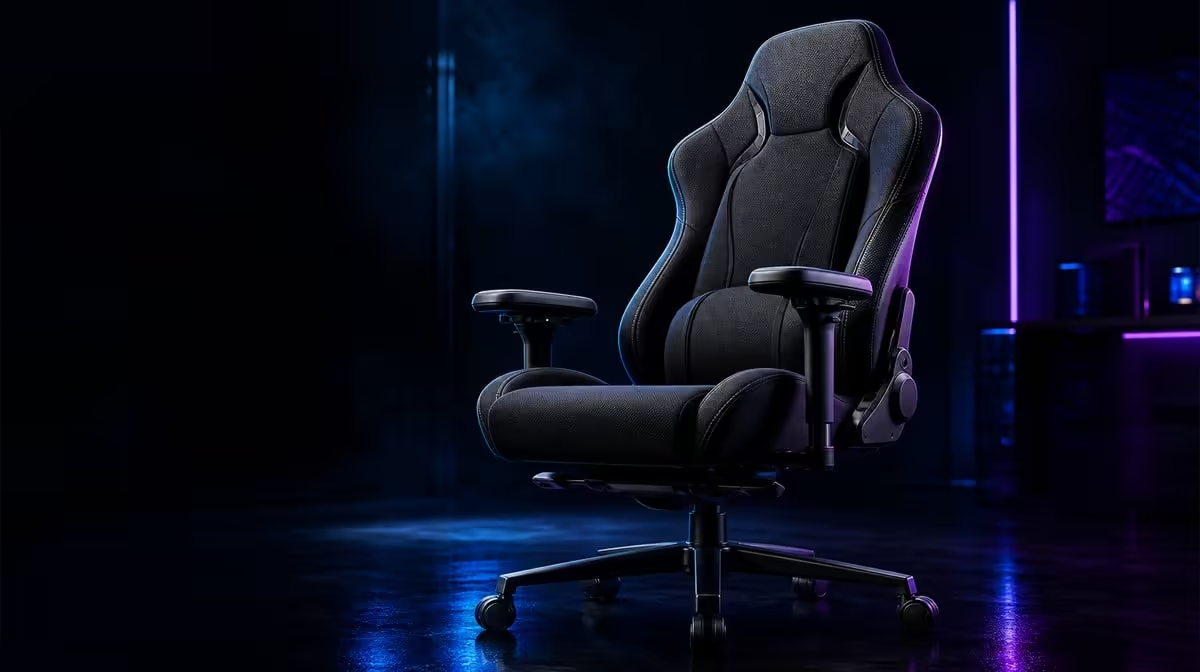
Daily posture responds most to where the back and forearms receive support and whether the desk allows the body to use it. Gaming chair features that affect posture should therefore prioritise useful contact over styling. On the R8,599 noblechairs HERO Black Edition, infinite lumbar adjustment and enlarged 4D armrests provide the two main tuning points.
Quick Answer
Prioritise lower-back contact, relaxed forearm support and desk reach before surface details. The R8,599 HERO lets users tune lumbar depth continuously and move enlarged pads in four directions. Its steel frame and 150kg user design provide structural context, while posture still benefits from movement and task changes.
🧭 Begin with desk reach
Sit back and bring keyboard, mouse and screen towards the supported body. Reaching can undo otherwise useful chair settings.
Check feet, torso and shoulders as a neutral reference rather than forcing a rigid pose.
Evetech's noblechairs gaming chair range anchors the HERO facts.
🎚️ Tune lower-back contact
Start with mild lumbar depth and increase gradually. Stop where the backrest meets the curve without pushing the torso forward.
Test a full task before changing it again. More pressure is not more posture benefit.
Persistent pain needs professional assessment; the control is not treatment.
Compare work and gaming positions. A controller can keep the hands close while a keyboard may draw them forward, changing the useful lower-back contact.
Check the screen before increasing support. Difficult viewing can pull the head and torso away from the chair.
Save the successful contact as a feeling and task reference for that chair, desk and user.
Use a short sequence: sit back, read the screen, type, move the pointer and hold a controller. The user should remain supported through each task without one chair control doing all the work.
If the lower back loses contact only during pointer use, move the mouse before increasing lumbar depth. If it happens while reading, inspect screen distance or text size.
Reassess after the user stands. The useful position should be easy to find again, especially on a shared chair.
More adjustment is not automatically more ergonomic. Infinite control is valuable because it permits fine stopping points, not because the maximum must be used.
↔️ Support the forearms
Position the 4D pads under relaxed elbows and follow the keyboard, mouse or controller location. Each side can differ.
Check desk clearance and wrist line. Enlarged pads should spread contact rather than trap the chair away from work.
Adjust height first, then location and angle. The shoulders should remain down throughout the sequence.
Test the two sides independently. Mouse and keyboard arms can follow different paths without creating poor posture.
Move the chair in and out once. A pad that catches the desk can destroy the saved position.
Observe whether the elbows remain near the torso. Pads too far apart can encourage reaching sideways even when their height looks correct.
Check the wrist line with the keyboard and mouse. Forearm support should not force the hands to bend towards the controls.
Save work and gaming references separately where needed. A controller generally brings the hands closer and can justify another pad depth.
Do not treat armrests as restraints. The user should be able to move briefly and return without twisting around them.
Compare support designs through Evetech's gaming chair category.
🔄 Reassess through the day
Stand and move during long sessions. Return to the neutral setup before retuning.
Use breaks to reset rather than remaining seated through every task transition. Movement is part of the posture plan.
The HERO's up-to-150kg user design helps filter structural suitability but does not select body position.
Test the chair after another person moves it. Useful controls should let the user restore support without a long guessing process.
Record which feature actually changed the posture: closer controls, lumbar depth, pad location or screen position. This keeps value tied to outcomes.
Include the seated base and feet in the check without prescribing one rigid position for every person. Stability at the base makes the back and arm contacts easier to assess.
The breathable covering and air channels can improve surface ventilation, which contributes to comfort but does not control posture directly.
The robust steel frame carries structural significance, while the 150kg user design filters intended use. Neither chooses how the user sits.
If discomfort persists or worsens, stop the adjustment exercise and seek appropriate professional assessment. A chair article cannot diagnose pain.
At R8,599, the HERO should be compared as a complete system. A user who never changes the armrests may still value lumbar control, while another may rely on both throughout the day.
Create a daily review with four questions. Did the lower back remain in useful contact? Did either shoulder rise? Could the hands reach every regular control? Did the user stand and move? Those answers identify whether the chair, desk or routine needs the next correction.
Repeat the review after changing from work to gaming. A feature that supports one task but creates a mismatch in the next needs retuning rather than a universal verdict.
Keep a photograph of the physical desk and a short note about successful contact. This is particularly useful when another user changes the chair or the keyboard moves.
Compare another suitable chair with the same four questions. The HERO's feature list should earn its R8,599 position through better observed results, not by being longer.
The HERO applies styled air channels and breathable PU to contact heat, not posture directly. Steel construction and the intended range are structural facts.
At R8,599, value comes from how often the lumbar and arm controls solve real tasks. Compare Evetech's chairs over R4,000 and check the current range.
Frequently Asked Questions
Which feature affects lower-back contact?
The HERO's infinitely adjustable lumbar system changes support depth.
Why do armrests influence posture?
Poor pad position can encourage raised shoulders or reaching.
What does the HERO offer?
It combines continuous lumbar tuning with enlarged 4D armrests.
Does the steel frame improve posture?
Not by itself. It provides structural context.
How should priorities change for long sessions?
Give more weight to useful contact, task changes and movement.
Can covering affect the decision?
Yes. Surface warmth can affect comfort, but it remains separate from support alignment.
Why should the desk move towards the user?
Comfortable reach helps the body maintain the support the chair provides.
Can one posture be held all day?
No. Change position and include movement rather than trying to preserve one rigid pose.
Does 4D mean every direction must be used?
No. Use only the movements that solve an observed forearm or desk mismatch.
Ready to rank chair features by the posture points they actually change?
Compare Evetech gaming chairs and test the HERO's lumbar and arm support through a full day.