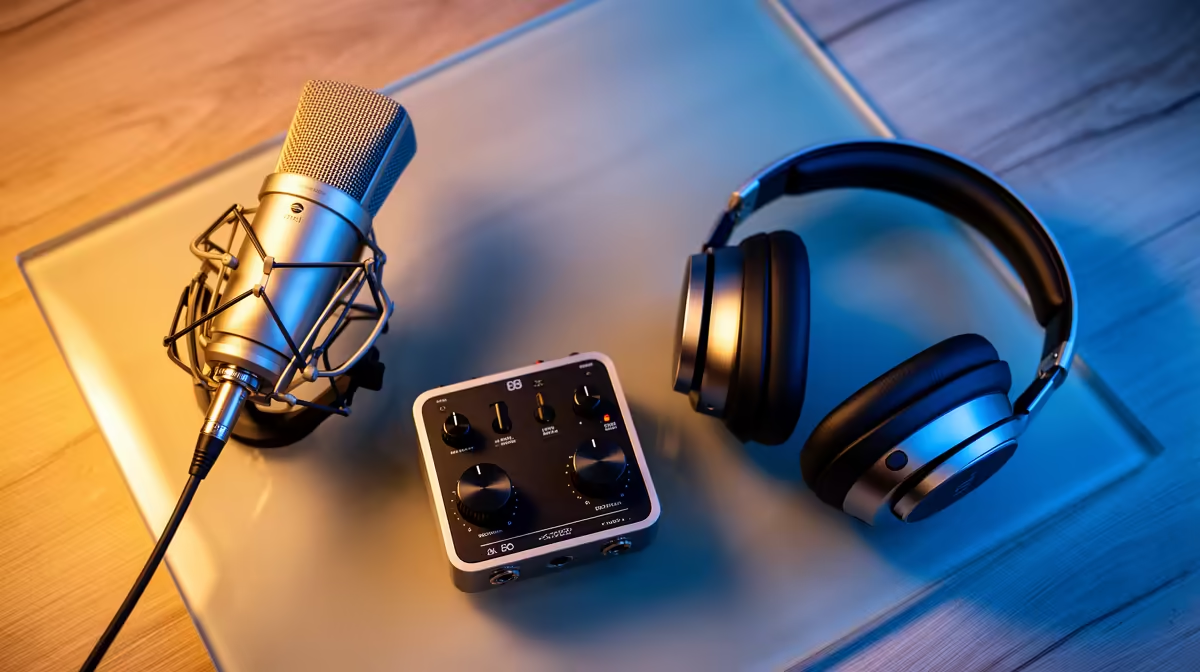
Viewers forgive a soft camera long before they forgive bad sound. A thin, echoey, hissy voice is the single fastest way to lose a stream, which is why the streaming audio setup deserves more attention than most creators give it. The professional chain is not complicated once you understand what each piece does: a cardioid dynamic XLR microphone to reject room noise, an interface to supply clean gain, and proper monitoring so you hear problems as they happen.
Quick Answer
A professional streaming audio chain pairs a cardioid dynamic XLR mic such as the Shure SM7B or Rode PodMic with an audio interface that delivers clean gain and zero-latency hardware monitoring. A quality dynamic mic and a clean interface together will set you back somewhere in the R3,000 to R6,000 range, with the SM7B alone pushing the upper end significantly higher.
Why a Dynamic XLR Mic Beats a USB Condenser
Most first-time streamers reach for a USB condenser because it is simple, but that choice is also why so many streams sound like they were recorded in a bathroom. Condensers are sensitive by design, so they pick up your keyboard, your PC fans, traffic outside and the natural reverb of an untreated room. A cardioid dynamic mic does the opposite: it captures sound from directly in front and pushes away nearly everything that comes in from off-axis angles.
The Shure SM7B is the mic you see on the desks of partnered streamers and podcasters, prized for a warm, controlled voice and excellent off-axis rejection. The Rode PodMic is the value champion that gets you most of the way there for a fraction of the price. Both are dynamic, both are cardioid, and both forgive a noisy bedroom or home office far better than any condenser. You can compare these and other options across the microphone and headset range at Evetech to see what fits your desk and budget.
The Interface Is Where Gain Lives
An XLR mic produces no sound on its own. It needs an interface to convert the analogue signal to USB and, critically, to supply preamp gain. This is where the SM7B trips people up, because it is a notoriously quiet mic. The PodMic is hungry too, wanting somewhere around 55dB to 60dB of clean, stable gain to sound full.
What to Look For in a Streaming Interface
A weak or cheap interface adds hiss, thins out your voice and leaves you constantly riding the gain. Look for an interface with genuinely clean preamps and enough headroom for a quiet dynamic. Units in the class of the Focusrite Scarlett 2i2 or the MOTU M2 are the common recommendations, the latter often praised for its converters and clear front-panel metering. If your mic of choice is especially quiet, an inline gain booster between the mic and interface solves the noise problem without forcing a more expensive interface.
Channels and Room to Grow
A two-input interface is the sweet spot for most solo streamers. One channel runs your mic now, and the second is there the day you add a co-host mic or a second source. Going beyond two inputs only makes sense once you genuinely have multiple people or instruments to capture.
Monitoring: Hearing Yourself in Real Time
Hardware monitoring is the part beginners overlook and professionals treat as non-negotiable. Software monitoring routes your voice through the PC and back, which adds a delay long enough to throw off your own speech. Hardware monitoring on the interface, sometimes called direct monitoring, sends your voice to your headphones instantly, before it ever reaches the computer, so what you hear matches what you say with no perceptible lag.
Use closed-back headphones for this. Closed-back cups stop your monitor audio leaking back into the mic, which keeps your stream clean and prevents echo for your viewers. Set a comfortable monitor level, confirm your peaks sit with headroom to spare rather than slamming into distortion, and you will catch a knocked mic, a dead cable or a clipping level within seconds instead of reading about it in chat. A good set of closed-back cans, plus everything else in the chain, is easy to assemble from the best-selling headsets at Evetech.
Treating the Room Without Spending a Cent
Even the best dynamic mic benefits from a calmer room, and the fixes cost nothing. Soft furnishings absorb the reflections that make a space sound hollow, so a rug on the floor, curtains over a window and a bookshelf along one wall do real acoustic work. Position the mic close, a short distance from your lips and angled slightly to the side so you speak across the capsule rather than straight into it. That single placement habit reduces plosive pops and pushes your voice well above the background, letting you run lower gain and a quieter result.
A Sensible Buying Order for SA Creators
Do not buy everything at once. Start with the dynamic mic and a clean two-channel interface, since that pairing delivers the biggest jump in quality. Add a proper boom arm next so the mic sits at mouth height and stays off your noisy desk. A pop filter and closed-back monitoring headphones round it out. Build the chain in that order and each purchase audibly improves the stream before you spend on the next, which is far smarter than blowing the whole budget on a flagship mic plugged into an interface that cannot drive it.
Frequently Asked Questions
Is USB audio ever good enough for serious streaming?
For a beginner on a tight budget, a quality USB dynamic mic is a reasonable start. But the XLR-plus-interface chain gives you cleaner gain, real hardware monitoring and room to expand, so the XLR and interface route has become the go-to for creators who take their audio output seriously.
Why does the SM7B sound so quiet on my interface?
The SM7B is a low-output mic that demands a lot of clean gain. If your interface runs out of headroom, you get hiss instead of volume. Either choose an interface with strong preamps or add an inline gain booster between the mic and the interface.
Do I need an XLR mic or will a hybrid USB and XLR mic do?
A hybrid such as the Rode PodMic USB or Shure MV7+ is a smart hedge. You can start on USB today and switch the same mic to an XLR interface later, so you upgrade the chain around it without rebuying the microphone.
What headphones should I use for monitoring while streaming?
Closed-back headphones, always. Open-back cups leak audio back into a sensitive mic and create echo for your viewers, while closed-back designs keep the monitor signal contained and your captured voice clean.
How important is a boom arm in the chain?
More than it looks. A boom arm gets the mic to mouth height, isolates it from desk knocks and keyboard thumps, and lets you position it close and off-axis for the best rejection. It is the cheapest upgrade that makes the biggest practical difference after the mic and interface.