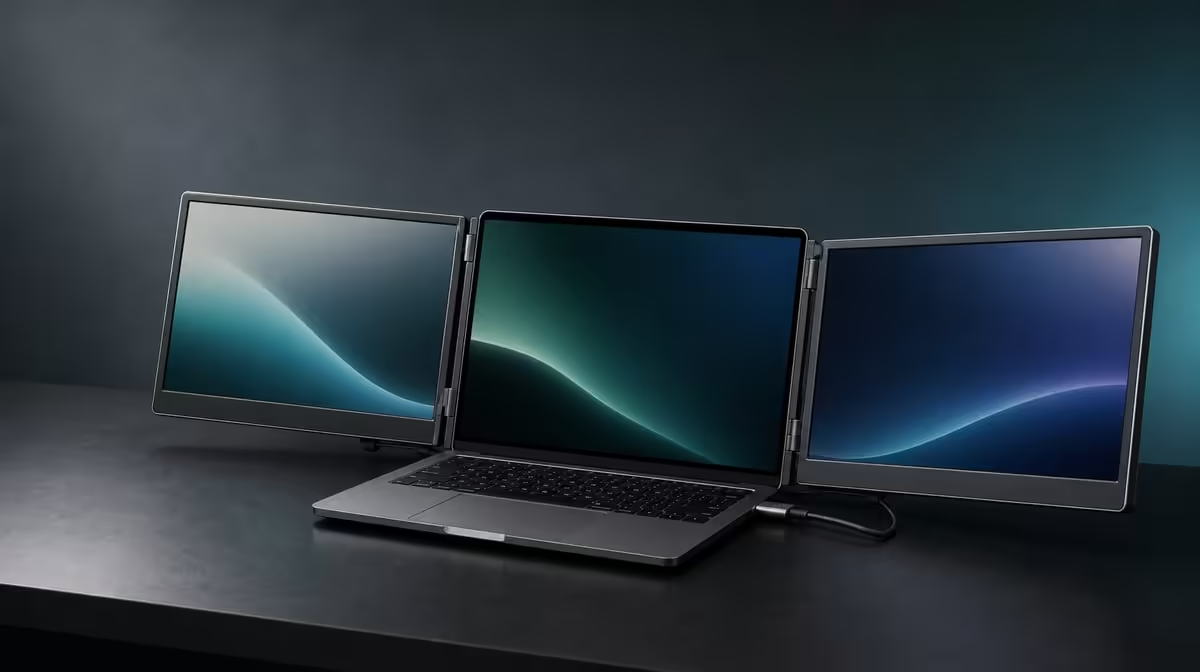
A portable workstation is practical only when its screen space, connection and packing routine all survive an ordinary working day. The UPERFECT Delta as a portable workstation makes a strong first case at R4,299: it combines two independent 15.6-inch Full HD IPS panels with a built-in stand and 360-degree folding body. The laptop companion and the user's route decide whether that package becomes useful.
Quick Answer
The Delta is a practical portable workstation for people who can assign real tasks to both Full HD screens, have a compatible laptop path and regularly rebuild their desk elsewhere. One approved USB-C connection can run the pair, while the independent panels can instead accept two source devices. Test the R4,299 assembly on typical surfaces, through sleep and reconnection, and inside the complete travel bag.
🖥️ Make two panels answer to the work
Begin with the applications, not the monitor. List a task that improves when two references remain visible: a spreadsheet beside a report, an edit timeline beside files, a CAD view beside properties, or a working document beside research. Put those roles onto the two Delta panels.
Keep the laptop screen in the layout. It might hold communication, a calendar or a third supporting view. The practical arrangement does not have to fill every display constantly; it has to reduce covering, searching and repeated switching at the moments when information is needed.
Both external screens have a native 1920 x 1080 canvas. Start there, use a common operating-system scale and test readability at the planned viewing distance. Change application zoom only where a particular interface needs it. A useful workstation is readable for a sustained session, not merely capable of showing many small windows.
Choose extension when separate content is the purpose. Mirroring repeats an image and can help during a presentation, but it does not use the independent work areas for multitasking.
The Evetech portable monitor category provides a place to compare current mobile display formats once the intended layout is written down.
🔌 Prove the connection before counting convenience
One cable can reduce setup time and clutter, but only from a host that outputs both Delta images while satisfying its power needs. USB-C describes the connector family, not every function behind the port. Confirm the exact laptop model and selected socket.
Open the monitor on its integrated stand before attaching the lead. Keep slack away from the hinge, connect to the approved port and wait for both panels to appear. Identify them in display settings, arrange their rectangles around the notebook and move a basic window across every boundary.
Test sleep, wake and a complete disconnect. A portable workstation will repeat those transitions frequently, so a successful first picture is not enough. Save a screenshot of the display order and note the known working port to shorten later rebuilds.
The two independent screens can also display different compatible devices, one per panel. This is useful when a work laptop and another source need to remain visible together. It is a different mode from one notebook extending a desktop across the pair, so the source plan and required connections should be drawn separately.
If a connection problem appears, simplify the desk. Remove optional peripherals, restore the approved laptop-and-monitor path and add equipment back individually. Changing several items at once hides which part caused the instability.
🧭 Test the built-in workstation, not a showroom pose
Place the Delta on the main desk, a smaller table and any other surface that represents the route. Deploy the stand fully before connecting and check whether the assembly remains stable while the laptop keyboard and pointer device stay comfortable.
The hinge can move through 360 degrees, but maximum movement is not the goal. Choose positions that keep both panels readable and supported. Do not use cable tension to hold an angle, and support the monitor while changing its position.
Work for a normal block. Open the same document, model, timeline or dashboard that created the need for extra screens. Observe pointer travel, text scale, window placement and whether one panel becomes visual clutter. If it does, give that screen a quieter role rather than filling it simply because space exists.
Motion deserves the same practical test. The stated response is 25ms, which points the Delta toward business, creative support and general productivity rather than speed-focused gaming. Streaming or casual play may suit users who are not sensitive to blur, while competitive motion should be judged against another display priority.
For a workstation that will never leave one desk, include Evetech's fixed PC monitor choices. Folding features earn less when they are not used.
🎒 Run the complete portable cycle
Close active work, disconnect in a deliberate order and fold the monitor while supporting both panels. Keep leads clear of the hinge and protect the display faces from plugs or other hard items.
Put the closed Delta in the intended compartment together with the laptop, charger and cables. The zip should close normally, the panels should not carry point pressure and the full load should remain reasonable for the journey.
At the destination, reverse the process. Open the assembly on its stand, connect to the known laptop port and restore the screen map. Time the cycle twice: the first includes learning, whereas the next better represents repeated hybrid use.
Record any friction. A reversed display order, forgotten lead, unstable small table or application opening off-screen may not reject the product, but each needs a practical correction. A short checklist can preserve the approved connection and layout.
At R4,299, value grows with the number of days the two-screen arrangement travels and performs useful work. A person moving daily can reach a different conclusion from someone taking one occasional trip. Recheck the product's live status on Evetech, while the popular monitor list supplies broader buying context.
Finish with a one-week observation rather than a launch-day impression. Note which panel roles survived, how often the laptop port reconnected cleanly and whether the bag left the house. If the layout only proves useful on the widest desk, the travel case needs revision. If it returns at each location and prevents repeated switching, the workstation has produced evidence beyond its specification list.
Frequently Asked Questions
What makes the Delta a workstation rather than just two screens?
It combines two independent panels, support, folding and connection options in one assembly that works beside a laptop.
Which tasks suit the separate panels?
Documents, references, spreadsheets, CAD tools, edit controls, files and communication can be assigned stable positions.
What must USB-C provide for one-cable use?
The host port needs the required video path for two external displays and the necessary power route.
Can one panel show a different device?
Yes. Each independent screen can accept its own compatible source.
Is every hinge angle equally practical?
No. Use the positions that keep the monitor stable, readable and clear of cable strain.
Will it fit a specific backpack?
That needs a physical test with the intended backpack and complete travelling kit.
Is the Delta intended for rapid competitive play?
Its 25ms response makes productivity the stronger purchase case than speed-focused gaming.
What does the workstation cost?
The UPERFECT Delta is priced at R4,299.
Ready to find out whether the Delta works as a complete travelling desk?
Explore Evetech portable monitors and test its two screens, host path, stand and packing cycle as one workstation.