Most creators buy a laptop for the apps, not the chip. MSI built its launch story for the MSI Prestige N16 Flip AI+ around four of them: DaVinci Resolve, Blender, Premiere Pro and ComfyUI. Each one uses a different part of the RTX Spark platform, so it is worth knowing what MSI says each app gains before you spend R84,999 or more.
Quick Answer
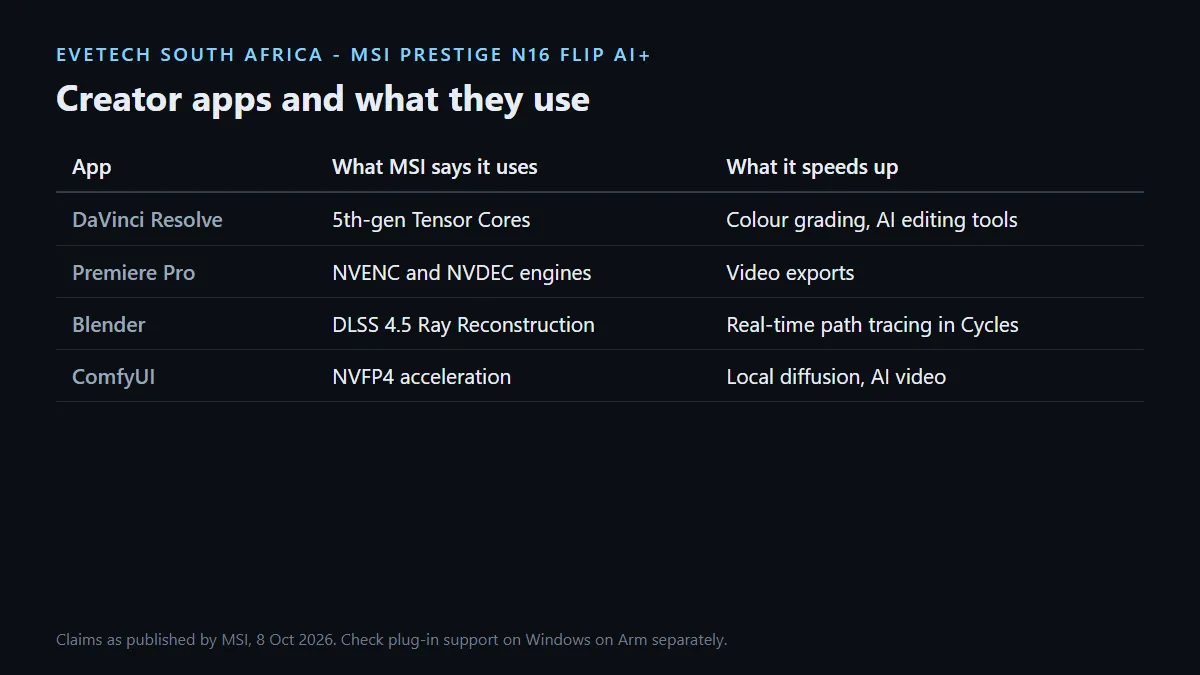
MSI says DaVinci Resolve uses the GPU's 5th-generation Tensor Cores for colour grading and AI editing, Blender uses DLSS 4.5 Ray Reconstruction for real-time path tracing in the Cycles viewport, Premiere Pro uses NVENC and NVDEC to speed up exports, and ComfyUI runs diffusion workflows with NVFP4 acceleration. In South Africa the laptop costs R84,999 with 64GB or R134,999 with 128GB and the sharper UHD+ Tandem OLED.
🎬 Video: Resolve and Premiere Pro
For colourists, MSI points to DaVinci Resolve using 5th-generation Tensor Cores to speed up grading and AI-powered editing tools. For editors on Adobe, it says Premiere Pro taps the Blackwell architecture's NVENC and NVDEC engines, the hardware blocks that encode and decode video, to cut export times. MSI's product page goes further and talks about editing 12K 4:2:2 footage and generating 4K AI video.
The hardware around the chip helps a video workflow too. There is a built-in SD card reader for camera cards, two USB4 ports for fast drives, and HDMI 2.1 rated for 8K at 120Hz if you grade on a larger screen. A portable monitor gives you a second canvas for timelines or scopes when you work away from a desk.
🧊 3D: Blender and big scenes
MSI says Blender uses DLSS 4.5 Ray Reconstruction to keep real-time path tracing usable in the Cycles viewport. NVIDIA adds that up to 128GB of unified memory handles 3D scenes up to 90GB, with OptiX and DLSS keeping the ray-traced viewport moving.
That 90GB figure belongs to the 128GB configuration. On the 64GB model, plan for smaller scenes or lighter texture sets, because the scene shares memory with Windows and every other open app.
🖼️ AI images and video: ComfyUI
For generative work, MSI says ComfyUI runs local diffusion workflows with NVFP4 acceleration for faster video generation. Running these locally keeps source images and client work on your own machine, which matters for anyone working under an agreement that limits uploads to online tools.
Check your exact app builds first
Because this is an Arm-based Windows machine, the app list needs one extra step. MSI says RTX Spark is optimised by the applications creators already use, but plug-ins, LUT packs and third-party effects are separate software. Confirm that each one you rely on supports the platform before you move a paid project across.
🎨 Which configuration suits a creator
Colour work favours the R134,999 model. Its 3840 x 2400 UHD+ Tandem OLED is Calman Verified with Delta E below 1 and covers 100% of DCI-P3, according to MSI. The R84,999 model uses a 2880 x 1800 OLED that also covers 100% of DCI-P3 and is the better value if your output is mostly web and social video.
Project files grow fast, so budget for an external SSD for archives and cache. Compare the rest of the MSI laptop range if you work in apps that do not need RTX Spark.
Frequently Asked Questions
Does DaVinci Resolve use the RTX Spark GPU?
MSI says Resolve uses the 5th-generation Tensor Cores to accelerate colour grading and AI-powered editing tools.
Will Premiere Pro exports be faster?
MSI says Premiere Pro uses the Blackwell NVENC and NVDEC engines to speed up exports. Gains depend on codec and project.
How large a Blender scene can it handle?
NVIDIA quotes 3D scenes up to 90GB with 128GB of unified memory. The 64GB model suits smaller scenes.
Is the screen good enough for colour grading?
The UHD+ Tandem OLED on the R134,999 model is Calman Verified with Delta E below 1 and 100% DCI-P3, according to MSI.
Can it read camera cards?
Yes. Both configurations have a built-in SD card reader.
Will my plug-ins work?
Check each plug-in vendor for Windows on Arm support. Plug-ins are separate from the main app.
Moving your creative work to RTX Spark?
List the apps and plug-ins in your daily workflow, confirm their Arm support, then choose the memory and screen tier your projects need.