Memory decides which AI models a laptop can run on its own, and the MSI Prestige N16 Flip AI+ is sold in South Africa with either 64GB or 128GB of it. Because that memory is soldered and shared between the processor and graphics, the size you pick at checkout is the size you keep. Here is how to match it to the models you actually plan to run.
Quick Answer
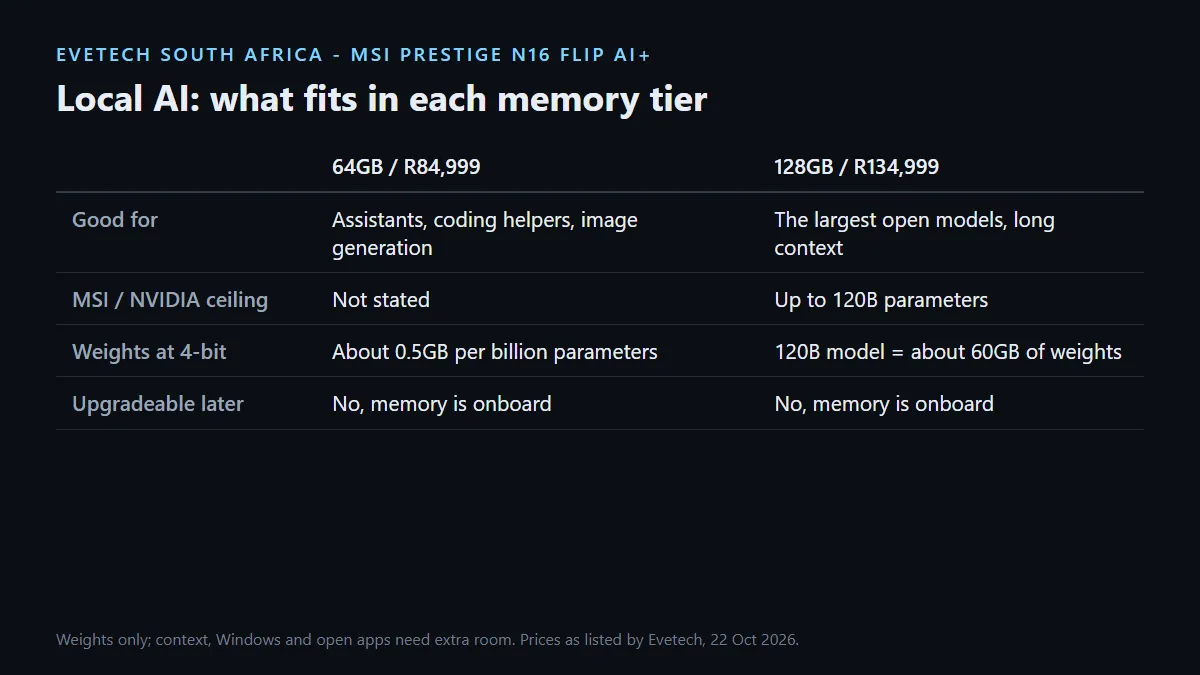
Choose the R84,999 model with 64GB if your local AI work is chat assistants, coding helpers and image generation with mid-sized models. Choose the R134,999 model with 128GB if you want the largest open models MSI talks about, up to 120 billion parameters, or long context windows. Neither configuration can be upgraded later, so buy for the biggest model you expect to use.
🧠 Why unified memory changes the maths
On a typical gaming laptop, an AI model running on the GPU has to fit inside the graphics card's own VRAM, which is separate from system RAM and usually much smaller. RTX Spark works differently. The NVIDIA Grace CPU and Blackwell RTX GPU sit on one chip and share a single LPDDR5X pool, so a model can use the same memory the rest of the system does.
NVIDIA says the 128GB version can run models of up to 120 billion parameters with a 1 million token context, and that the whole model fits in memory. MSI makes the same 120-billion claim for its 128GB configuration, with a note that supported size depends on configuration. Treat that as the ceiling, not the everyday number.
A quick way to estimate fit
Model weights take roughly half a gigabyte per billion parameters at 4-bit precision, and about one gigabyte per billion at 8-bit. A 120-billion-parameter model at 4-bit therefore needs around 60GB for weights alone, before the conversation history, Windows and your other apps take their share. That is why 128GB is the comfortable home for the largest open models, while 64GB suits models in the tens of billions of parameters.
💻 What each configuration is good for
MSI describes 64GB as room for advanced creative work with larger assets, and 128GB as the tier for the largest models and complex agent workflows with deeper context and richer retrieval. In practice that splits like this:
- 64GB (R84,999): local chat and coding assistants, document summaries, image generation and mid-sized open models with sensible context lengths.
- 128GB (R134,999): the biggest open models MSI and NVIDIA quote, long-context work over large document sets, and running a model while heavy creative apps stay open.
Both configurations use the same 20-core Grace CPU and 6,144-core Blackwell GPU, with up to 1 petaflop of FP4 AI performance quoted by MSI. Speed does not change between them. Capacity does.
🛠️ Software and storage to plan for
NVIDIA CUDA runs natively on RTX Spark, which matters because so much local AI tooling is built on it. Check that the specific runtime or app you want offers a Windows on Arm build, since the laptop runs Windows 11 on Arm rather than x86 Windows.
Storage fills quickly once you collect models. The 64GB model ships with 1TB and the 128GB model with 2TB, and MSI lists one PCIe Gen4 M.2 slot. A fast external SSD over one of the two USB4 ports is an easy way to keep a model library without filling the system drive.
If you are still deciding whether you need this class of machine at all, the AI laptop finder compares options by workload, and the full MSI laptop range shows the Prestige alternatives.
Frequently Asked Questions
Can I upgrade the memory later?
No. MSI lists the LPDDR5X as onboard memory, so the 64GB or 128GB you buy is permanent.
How big a model can 64GB run?
Mid-sized open models in the tens of billions of parameters at 4-bit precision fit comfortably, with room left for Windows and a few apps.
Does 128GB make AI faster?
Not on its own. Both models share the same chip. Extra memory lets bigger models and longer contexts fit, which is different from raw speed.
What does the 120 billion parameter claim mean?
It is MSI's and NVIDIA's upper figure for the 128GB configuration. Real results depend on precision, context length and what else is running.
Do local models need an internet connection?
Once a model is downloaded, it runs on the laptop itself. You only need a connection to download models and updates.
Where should I store my models?
The 1TB or 2TB internal SSD works, and an external SSD over USB4 keeps a larger library without crowding the system drive.
Planning a local AI setup?
Write down the largest model and context length you expect to use this year, then pick the Prestige N16 Flip AI+ memory tier that holds it with room to spare.