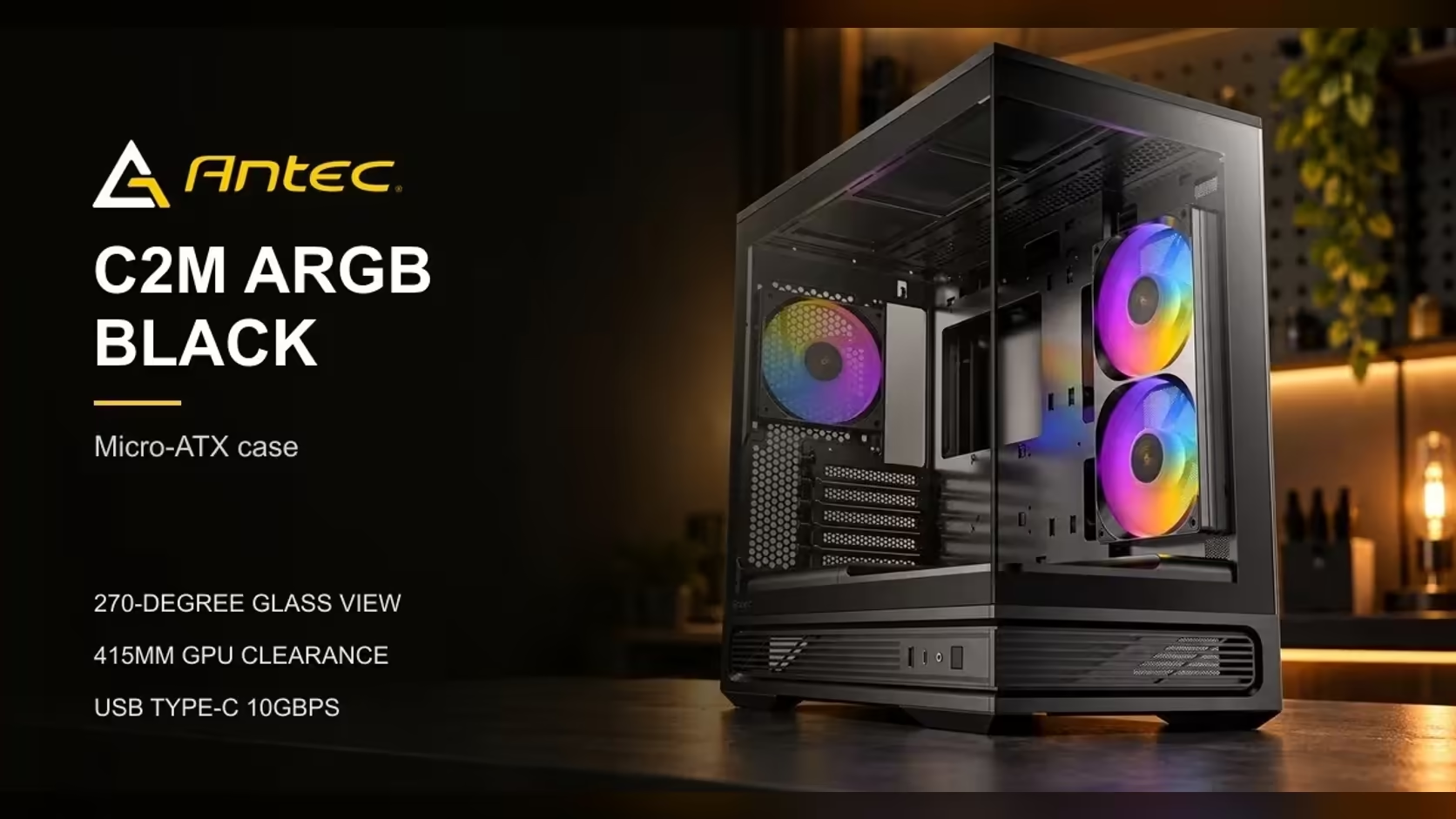
Most people buy a glass-sided case for the view, then discover the view is harder to keep than they expected. The Antec C2M ARGB's tempered glass wraps 270 degrees, so the components show from the side and the front rather than through one flat window. That is a wide view, and it changes how you light, route and clean the inside of the build.
Quick Answer
The C2M's tempered glass wraps 270 degrees, which leaves the remaining quarter of the turn without glass. The two included ARGB PWM fans carry the lighting through the glass, and the case is R899 at Evetech. Plan the cable routing and the cleaning routine before the first panel goes on.
🔍 What a 270-Degree Window Actually Shows
A full circle is 360 degrees, so 270 degrees is three quarters of the case seen from outside. The glass covers the side and the front, and the quarter that stays solid is the rear, where the I/O and the back of the board sit. In practice you see the graphics card, the cooler and most of the board from a standing position.
That view rewards tidy work. A cable bundle that you could hide behind a flat panel now sits in plain sight over about three quarters of the case. Route the main power and fan leads along the frame and tie them at intervals of roughly 100mm, so the loom reads as a neat line rather than a tangle.
In a build with a 240mm side fan, a 120mm rear fan and a 360mm radiator on top, the fan leads alone reach five headers. Gather them into one loom, tie it every 100mm and run it along the frame, and the glass shows a single clean line instead of five loose ends.
💡 Lighting the Build Through the Glass
The two included fans are ARGB PWM units, which means the lighting and the speed control run on separate leads. Most ARGB PWM fans use a 4-pin plug for speed and a 3-pin ARGB lead for colour, and the ARGB lead runs at 5V on a standard header. Connect both leads before the glass goes on, because a loose ARGB lead is the usual reason a fan lights only in part.
Lighting also shows dust. A glowing fan lights up every speck on the inside of the glass, so the effect looks best when the panel is clean. Choose colour modes that stay steady, since a pulsing pattern draws more attention to smudges than a single calm colour does. Three modes cover most needs: one steady colour for a clean desk, a slow breathing pattern for a relaxed lounge, and a static setting that shifts from cool to warm as the build heats up. Pick one and keep it, because changing the mode every week makes even a tidy build look unfinished. A mode that breathes slowly, at around one cycle every few seconds, reads as calm from across a room, while a fast strobe pulls the eye to every speck of dust on the glass. If you add a second lit fan later, match its colour to the first so the pair reads as one system.
For the wider range of compact cases, the computer cases category lists the glass and mesh options side by side, while the case range by board size sorts the sizes by board. Cable ties, mounts and clips on the case accessories page help keep the leads out of the view.
🧽 Keeping the Glass Clean in a Dusty Room
Glass collects fingerprints from the first build session and a film of dust from the air in the room after that. In a Pretoria study with the window open during a dry winter, the dust can build on the inside of the glass within a few weeks of normal use, so plan a wipe every fortnight in the dry season.
Use a microfibre cloth and a mild cleaner, and wipe the inside of the glass before the outside. Spray the cloth rather than the glass so no liquid runs into the seams. The mesh panels on the top, bottom and side need a different approach: a soft brush or a vacuum with a brush head clears them without pressing the dust into the weave. Allow 15 minutes for a full wipe of the glass and mesh every fortnight. The computer case accessories category lists the brushes, cloths and mounts for that job. Fold a cloth into quarters to give yourself eight clean faces, so one cloth can take a full side panel without spreading dust.
🛍️ Choosing Glass for the Look
A wide glass panel shows the build, but it also changes what the case does for airflow. Mesh moves air more easily, while a solid glass panel holds heat in the box. The C2M takes the middle route: glass on the side and front, mesh on the top, bottom and side, so the view and the airflow are both usable.
If you do not plan to light the build, a plain panel can look as good as a lit one. A simple black interior with clean cabling shows more of the parts than a crowded lit build with loose leads. Decide what you want the viewer to see first, then choose the lighting and the cable plan to match. At 270 degrees of wrap, the glass covers three quarters of the box and the rear 90 degrees stays solid, so the lighting you choose reaches most of the view. The best-selling cases list shows which glass-panel models shoppers pick most often on Evetech.
Frequently Asked Questions
How wide is the glass view on the C2M ARGB?
The tempered glass wraps 270 degrees, which covers the side and front of the case. The rear quarter stays solid.
Does the lighting use the case fans?
The two included fans are ARGB PWM units, so they carry the lighting. Connect the 4-pin speed lead and the 3-pin ARGB lead for each fan.
How often should I clean the glass?
In a dusty room, a fortnightly wipe in the dry season keeps the view clear. Clean the inside before the outside and use a microfibre cloth.
Is a glass panel bad for airflow?
Solid glass holds more heat than mesh. The C2M uses mesh on the top, bottom and side, so the airflow stays usable with the glass in place.
Want a clear view of your build?
Browse Evetech's compact cases with glass panels, then pick the lighting and cable tidy that show your parts to best effect.