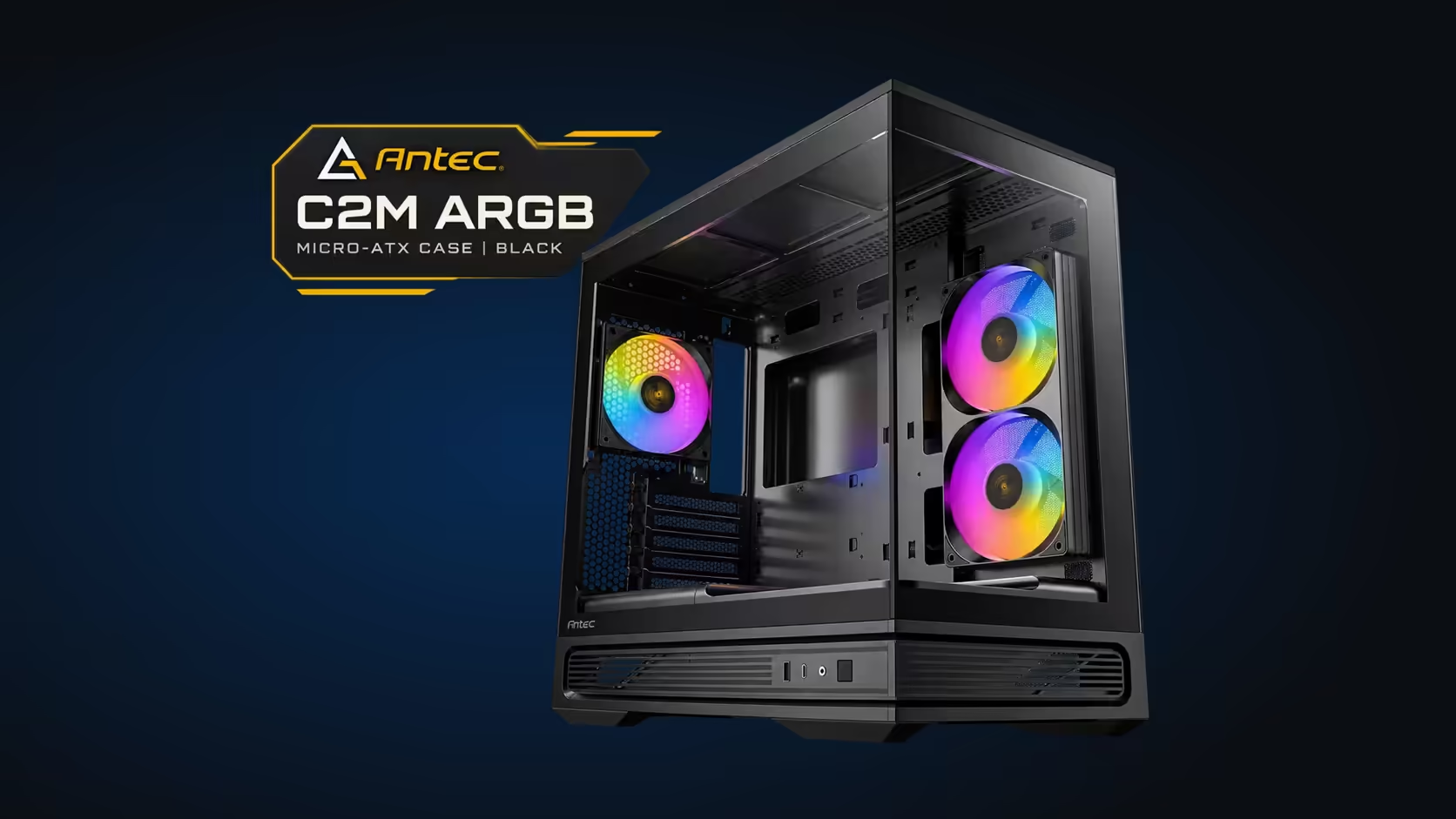
A spec sheet gives you a list of numbers, and most of them mean nothing until you hold them against the parts you already own. The Antec C2M ARGB lists 415mm of GPU clearance, a 165mm CPU cooler limit, a 360mm top radiator mount, two ARGB PWM fans in the box and room for six in total. Each figure answers one question about your build, so this guide takes them one at a time and says which part of your parts list each one tests.
Quick Answer
The C2M gives you 415mm of GPU clearance, 165mm of CPU cooler room and a 360mm radiator mount on top. It ships with two ARGB PWM fans and takes up to six fans in total. Read those figures against your parts list before you spend, and remember the case is R899 at Evetech.
📏 The Three Clearance Numbers
Clearance figures decide whether a part fits at all, so they come first. The 415mm figure is the room for the graphics card, measured as the case's own limit. A card that measures 340mm leaves 75mm, which is comfortable, while a card at 395mm leaves 20mm, which is tight once a power lead bends at the connector.
The 165mm figure is the tallest CPU cooler the case takes. Air coolers with large towers can approach that limit, so check the cooler height on its box, not the marketing name. The 360mm radiator mount on top is the third clearance figure, and it is only as good as the gap under the top panel. A 360mm radiator with one outer fan needs about 55mm of room in total, so measure before you buy.
🌬️ Fans in the Box and the Airflow They Create
The two included fans are a 240mm ARGB PWM reverse fan on the right side and a 120mm ARGB PWM fan at the rear. The side fan brings in air at up to 114.53CFM, which is the figure to compare when you judge how much air the intake can move. The rear fan removes air from the case, so the pair gives you a side-to-back path.
Six fans in total means four more positions, and a 360mm top radiator uses three 120mm fans of its own. In practice, a top radiator with three fans takes up the top of the case, leaving the side and rear fans as they ship, so you know exactly what a full build looks like before you buy.
🧠 Matching the Spec Line to Your Parts
Start with your graphics card and cooler, because those two parts set the limits. Check the card length against 415mm and the cooler height against 165mm. Then pick a radiator size that matches the room under the top panel, and check the RAM height too, since tall memory sticks sit under the radiator.
The spec line also lists USB Type-C 10Gbps. That speed only reaches the device when the board header, the lead and the drive all run at 10Gbps, so treat the port as one link in a chain rather than a guarantee. A board with a USB 3.2 Gen 2 header is the one to look for.
For the wider choice of compact boxes, the computer cases range puts the C2M next to its alternatives, and the Micro-ATX and Mini-ITX cases page shows the size options. The case accessories page lists the mounts and ties that help once the parts are in.
Here is a worked example. Say the card measures 340mm, the cooler stands 150mm tall and the radiator stack is 55mm. The card leaves 75mm of spare room in the bay, the cooler sits 15mm under the 165mm limit, and the radiator needs 55mm of the gap under the top panel. Each figure passes on its own, so the build goes together. Swap in a 395mm card and the spare room drops to 20mm, which is the point where the bend in the power lead starts to matter.
🏠 What the Numbers Mean on a Small South African Desk
Most South African builds in compact cases live on a desk in a flat, not in a dedicated room. A 415mm card needs a desk that clears the case depth as well as the card length, so measure the space behind the case before you commit. In a Durban flat with a shared study, leave clear space behind the case so the power and fan leads can run to the wall socket without a sharp bend.
Summer matters too. A glass-sided box in a room that reaches 30C on a February afternoon has less margin than the same box on a cool winter morning, so the fan plan and the radiator choice are worth settling early. A 240mm intake fan moves air quickly, but it can only cool what the rest of the room lets through.
Run the test on a warm afternoon before you settle on the fan plan. Note the card's temperature after 30 minutes of load, then compare it with the same test on a cooler morning. A gap of several degrees between the two readings tells you how much the room is working against the case, and whether a fourth intake fan or a cleaner mesh is the better spend. A shelf or a cable tray behind the desk keeps the leads off the floor, where a vacuum cleaner or a stray foot can catch them and pull a connector loose. Note each result in a simple table, so the next upgrade is judged against the same numbers.
Frequently Asked Questions
How much GPU room does the C2M have?
The listed 415mm of GPU clearance only helps once you have run a tape from the bracket to the far end of your own card.
What is the tallest CPU cooler the case takes?
The case supports coolers up to 165mm tall. Check the cooler's listed height and compare it with the figure.
How many fans come with the case?
Two ARGB PWM fans: a 240mm reverse fan on the right side and a 120mm fan at the rear. The case takes six fans in total.
Does the case take a 360mm radiator on top?
Yes. Measure the gap under the top panel and allow for the radiator thickness and its fans before you buy.
Checking the numbers against your parts?
Use Evetech's compact case range to compare the C2M with other boxes, then match the clearance figures to the parts in your basket.