ASUS sells the ProArt P16 on RTX Spark to creators first, and its launch claims are bold: 90GB-plus 3D scenes, 12K 4:2:2 video and 120-billion-parameter language models. Those numbers are real for the top configuration, but the ASUS ProArt P16 for creators sold in South Africa is the 32GB model. This guide matches each ASUS claim to what that local configuration can realistically do.
Quick Answer
The ASUS ProArt P16 H7607BA sold locally at R84,999 has 32GB of unified memory and a 4K OLED, which suits photo editing, 4K video, design and mid-sized AI image work. The headline claims of 90GB+ 3D scenes and 120B-parameter models are ones NVIDIA ties to 128GB of unified memory, which is sold overseas, not in the 32GB model listed in South Africa.
🎨 What ASUS claims for creators
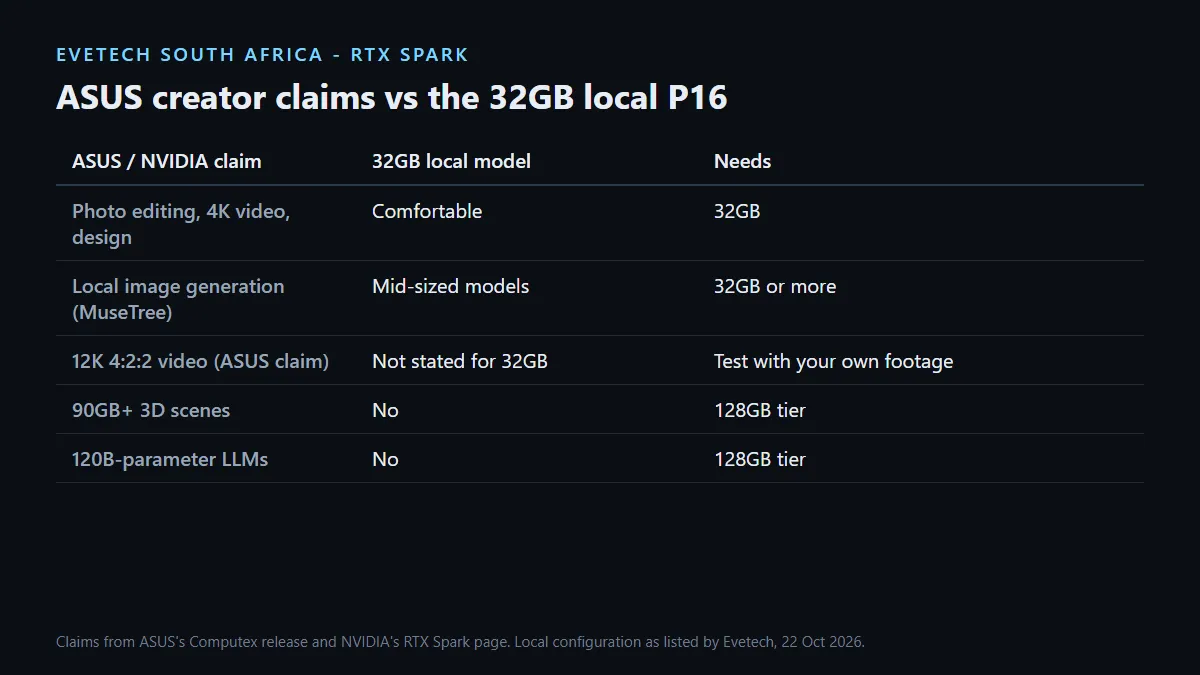
At Computex, ASUS said the RTX Spark ProArt laptops can render ultra-large 90GB-plus 3D scenes, edit 12K 4:2:2 video, generate 4K AI videos and run 120B-parameter language models with up to 1 million tokens of context. ASUS also said Adobe is re-architecting Photoshop and Premiere for RTX Spark, targeting 2x faster AI and graphics performance.
ASUS bundles its own creative software as well. MuseTree runs the FLUX and WAN image models locally for token-free generation, and StoryCube adds AI scene recognition and media organisation for Windows.
🧮 What fits in 32GB
Unified memory is shared by the CPU, the GPU and every open app, and on the P16 it is on board, so it cannot be upgraded. That makes memory the line between ASUS's headline claims and the local model:
- Comfortable on 32GB: photo editing in large catalogues, 4K video editing, graphic design, illustration with the touchscreen, and local image generation with mid-sized models.
- Needs the bigger configurations: 90GB-plus 3D scenes and 120B-parameter language models. NVIDIA says it takes up to 128GB of unified memory to hold scenes and models of that size.
If your daily work sits in the second group, the locally listed 128GB MSI Prestige N16 Flip AI+ at R134,999 is the RTX Spark option with that much memory. Our ASUS ProArt RTX Spark explainer covers the full ASUS range.
🖥️ The parts creators will use most
ASUS specifies a 16-inch 4K (3840 x 2400) Lumina Pro OLED touchscreen with full DCI-P3 coverage and up to 1,600 nits of HDR peak brightness, which is where colour work and photo editing benefit most. The SD Express 7.0 card reader speeds up getting footage off camera cards, and three USB4 ports leave room for fast external drives. A fast external SSD is worth budgeting for, because the local configuration ships with 1TB.
Before moving a paid project across, check that your plug-ins and add-ons support Windows on Arm. Browse the ASUS laptop range if you also want to compare conventional ProArt models.
Frequently Asked Questions
Is the 32GB ASUS ProArt P16 enough for video editing?
For 4K editing, photo work and design, 32GB is a workable amount. The 90GB scene claim is one NVIDIA ties to 128GB of unified memory.
Can the local ASUS ProArt P16 run 120B-parameter models?
NVIDIA says up to 128GB of unified memory is what holds a model that size. The 32GB model sold locally is not built for it.
What creative software does ASUS include?
ASUS names MuseTree for local FLUX and WAN image generation, and StoryCube for AI-assisted media organisation.
Is Adobe optimising for RTX Spark?
ASUS said at Computex that Adobe is re-architecting Photoshop and Premiere for RTX Spark.
Does the ASUS ProArt P16 have a colour-accurate screen?
ASUS specifies a 4K Lumina Pro OLED with 100% DCI-P3 coverage and up to 1,600 nits HDR peak brightness.
Can I add more memory later?
No. ASUS lists the memory as on board, so plan for your largest project before buying.
Buying the ASUS ProArt P16 for creative work?
Match your heaviest project to the 32GB local configuration first; if it needs far more, look at the 128GB RTX Spark option instead.